
Participating Frequently
February 28, 2018
Question

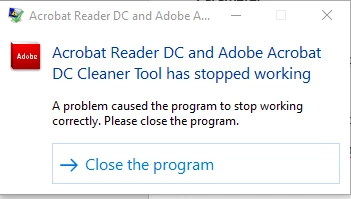
Acrobat Reader DC and Adobe Acrobat DC Cleaner Tool has stopped working...

  • February 28, 2018
  • 1 reply
  • 19864 views

I am in the process configuring an uninstaller for Adobe Reader in case we have failed installation within our company.  I found your cleaner tool, which is exactly what I needed!

However, after the tool completes the uninstall process (logs have finished being written), it crashes.  I have tested this on multiple computers.  Even if I run the tool without any adobe software installed, whenever it completes and you hit "Finish", it crashes.  If I run it silently, it crashes.

My machine is a Precision 3520 with Windows 10 1709.  However, this happened with a VM running 1709 as well.

Has anyone else experienced this?
This topic has been closed for replies.

1 reply

EnterpriseHelp
Inspiring
February 28, 2018

What are the product versions you are trying to remove?

Participating Frequently
February 28, 2018

I have been testing the tool by removing 18.011.20035.

The removal appears to be successful and the logging ends.

Like I mentioned before, even if I run the tool when NO adobe product is installed, it still crashes at the end once you click "Finish."

.

Participating Frequently
March 2, 2018

I see that you're installing the lasted version downloaded online.  I'm still not clear on whether you're reporting a bug or are having a problem. I'll take a stab at some scenarios: 

  • If you are installing Reader for the first time on machines then you don't need the cleaner. If it's crashing in that scenario, you don't have a problem but there could  be a minor tool bug when running it when no product is installed.
  • If you are removing older versions of Reader (or any older versions exist on the machine), then you are not using the right version of the cleaner. There are versions for each product version (e.g.: use the 11.x cleaner to remove 11.x products).
  • If you haven't deployed yet, there's no reason to uninstall. Moreover, the cleanup tool is not a replacement for the product uninstaller. Use the uninstaller to uninstall the product and only use the cleaner if a future install somehow fails because the previous uninstall was not complete. The cleaner is a backup tool for use in unusual cases.

Do either of those apply to you? In two places above you state the cleanup is successful and logging completes. If you are having an issue that prevents you from installing the product or I'm missing some detail, please post back.


Hi!  Thank you for your response.  I apologize for any confusion.  Let me try my best to clarify...

I support a global company with 1000's of machines.  While we try to keep the same version of Adobe software on all machines, anyone who has ever been in charge of global deployments knows that can be a difficult task.  Mobile devices that do not regularly check in on the network might be behind a few versions.  We also support Reader in multiple languages, which carry different GUID's themselves.

I am only trying to find a removal option for DC versions of Adobe Reader, not 11.x or 10.x, etc...

I am not currently using this tool as a clean up for failed installations.  My installations are fine as of now.  I was only preparing for that scenario, as well as others.  One of my other intended uses for this tool is if a policy comes out where my company decides to use another .pdf reader in the future or Adober Reader DC has a future critical vulnerability, I can quickly uninstall 1000's of copies of Adobe Reader DC silently.  We have to prepare for those types of scenarios.  Companies, at times, also decide to stop supporting software and it needs to be removed quickly (flash comes to mind here).  This tool appeared to be that answer.  It provided a "scrubber" like uninstall, had built in logic to uninstall any version of the DC software and supported a silent uninstall (typically provided for enterprise environments).

I only tried the tool without reader installed as a troubleshooting step, I know it is not meant to be used in that scenario.  My entire point was that the tool crashed regardless of the machine it was being used on or if it was even installed or not installed.  Part of my troubleshooting process was to provide multiple scenarios to see if I had different results.  I was trying to be helpful and point out that the tool only crashed as it was exiting, regardless of what the results of the uninstall were.

I also attempted to uninstall Reader DC - French language, 15.016.20039.  It crashed after it was finished with that version as well.

I also narrowed down today that we don't even have to perform the uninstall.  We can simply open up the software, then hit cancel, and it crashes.

I created a crash .dmp file and I came up with a "heap_corruption" as the culrpit.  That doesn't really tell me a lot, but it was worth a shot.

I originally posted to see if anyone else had experienced the issue or if I could help track down a bug.

I just finished testing the tool on a completely clean install of Windows 10 1709 (not domain joined, no group policy, no software) and it worked correctly.  It appears that something with our configuration does not play nice with this app.