
Participant
December 27, 2023
解決済み

Adobe Acrobat Version identifiy

  • December 27, 2023
  • 返信数 2.
  • 885 ビュー

We have a lot installations of Adobe Acrobat - Reader / Standard and Pro.

With the renaming in the appziw.cpl we can't directly identifiy which Version / Typ is now installed / in use


We install Adobe Acrobat Reader over Chocolatey.org

Chocolatey Software | Adobe Acrobat Reader DC 2023.6.20380
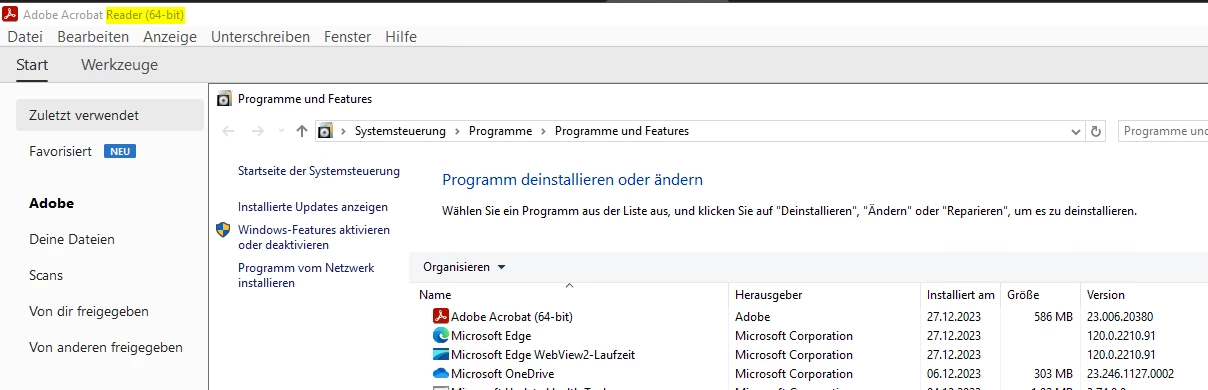
 

the other Adobe Acrobat Standard and Pro over the Adminconsole.adobe.com --> Package

 

So now, how can i find out which Version / Typ is in use?


Appendix A: Identifying Installs — Deployment Planning and Configuration (adobe.com)

このトピックへの返信は締め切られました。

返信数 2

Participant
January 23, 2024

... but this is not my question. where can i see if it adobe acrobat (reader) odr the adobe acrobat DC Standard

Kevin Stohlmeyer
Community Expert
Community Expert
December 28, 2023

@defaultwawqbmtetakr This is not a supported method to install Adobe software. If you are an enterprise customer, you can create install packages and track versioning via the Admin Console.

Participant
January 3, 2024

what is not a supported method? Chocolatey? but this is nothing more then a normal Setup from the adobe Setup.exe ;

https://ardownload2.adobe.com/pub/adobe/acrobat/win/AcrobatDC/2300120093/AcroRdrDCx642300120093_MUI.exe


We have over 50 Customer Admin Console... i wish to know how can i see the difference on the device himself. i will tracker the Software / Version over our Computermanagement Solution


Kevin Stohlmeyer
Community Expert
Community Expert
January 3, 2024