


- Home
- Enterprise & Teams
- Discussions
- Adobe Asset Link v3.0 is now GA!!
- Adobe Asset Link v3.0 is now GA!!


Copy link to clipboard
Copied
Adobe just released version 3.0 of Adobe Asset Link, packed with exciting new features and functionality!!

Adobe Asset Link v3.0 now allows creative pros and marketing pros to store, discover, and distribute digital assets faster. Users are automatically connected to any cloud-based Experience Manager Assets environment for which they have entitlement. Now, they no longer have to depend on IT admins to configure Experience Manager Assets instances for them.
The benefit-- They can now focus on the "real deal" (work with their creative assets) and get started right away. They can still switch between entitled environments or change their properties. Adobe Asset Link v3.0 supports InDesign, Photoshop, and Illustrator 2021 app updates.
Here are the highlights of Asset Link v3.0
- Support for Adobe Experience Manager Assets Essentials.
- Automatic detection and connection with Experience Manager Assets as a CS and Experience Manager Assets Essentials environments
- Support for accelerated asset uploads (three times faster on an average)
- Improved stability of the Adobe Asset Link for XD plugin
- Enhanced user experience in XD plugin
- Support for German and Japanese languages in XD plugin
- Support for ARM devices
- Supports Enterprise Storage Model (ESM)
For more information, see Adobe Asset Link and Adobe Asset Link for XD.


 1 Correct answer
Hi Wendy,
Here's the answer to your query from Elissa Hernandez, Product Manager, Adobe Enterprise Offerings:
"At the moment, Adobe Asset Link doesn't support checking out multiple assets in bulk. Each asset must be checked out individually. When a file is checked out, the asset is locked for editing by the individual who checked the asset out. This means that any changes made will automatically be updated in AEM once the asset is checked back in, and anyone with access to AEM Assets or Adobe As
...
 9
Replies
9
9
Replies
9


Copy link to clipboard
Copied
My team is moving our assets to AEM. I'm looking for documentation of effective workflows for using Adobe Asset Link with INDD files that have multiple linked assets that are also stored in AEM. I need to understand the order of operations so I can make edits to the INDD file without getting an error about not knowing where the linked items are stored. Thanks!
Copy link to clipboard
Copied
Hi Wendy,
Thanks for showing interest inAdobe Asset Link. Can you please elaborate upon your usecase a little more? Also, which version of InDesign are you using? If you just want to edit Experience Manager assets in InDesign, you can just check the asset out, edit it in your Creative Cloud app (InDesign in your case), and then check the asset back into Experience Manager. To use Experience Manager assets in InDesign, see Place assets by reference (InDesign 2020 or later), Place FPO assets by reference (InDesign 2020 or later) in this document.
best regards,
Copy link to clipboard
Copied
Thanks for your speedy reply! I am using InDesign 16.1. We have six designers on our team and we are transitioning to using AEM to store our completed work and also house all our current projects. We all multi-task and work on ~12-18 projects at a time.
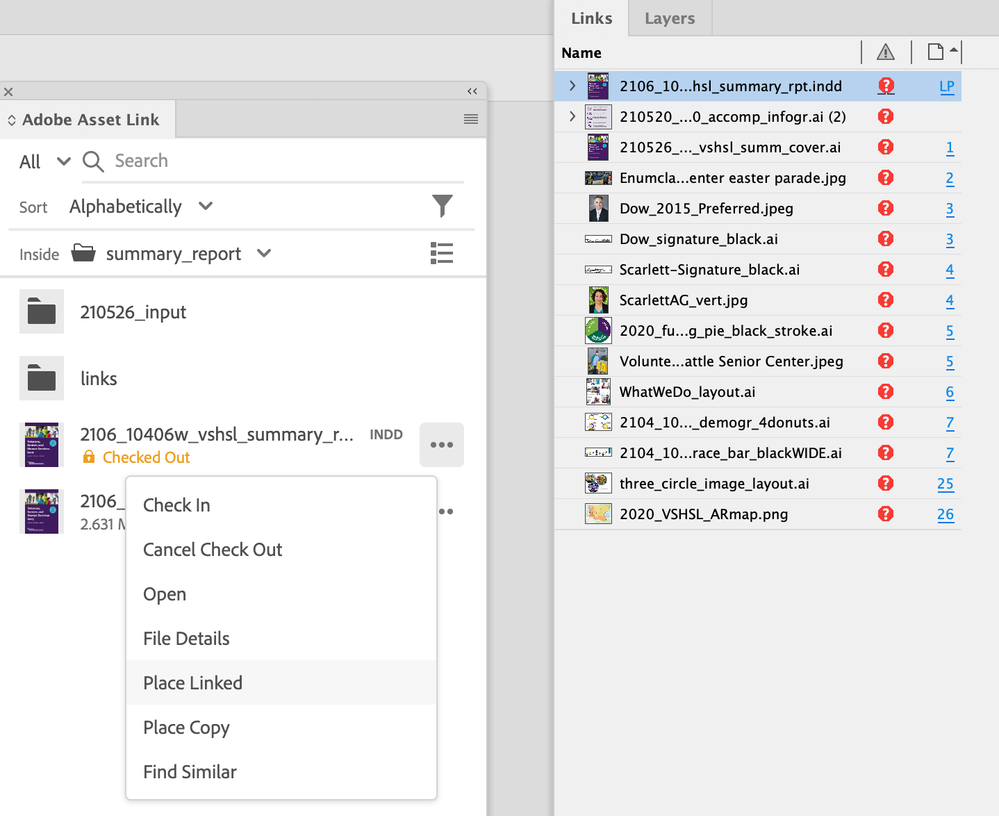
Here's a usecase: A multiple page InDesign file has a dozen or more linked images and AI files – all files are on AEM. What is the workflow so the INDD file can be checked out and have the links show as successfully linked items within INDD? If every linked item needs to checked out individually, is there a solution where Asset Link can remember the linked items for the next time that INDD file is opened, and all linked items can be checked out also? Or is there going to be a setting in the future that will allow to a folder of items to be checked out all at once? If I am currently working on several reports, each with multiple links, it will be very time-consuming to manually checkout each link everytime I want to work on a project.
Copy link to clipboard
Copied
I think I found some information here: https://experienceleague.adobe.com/docs/experience-manager-desktop-app/using/using.html?lang=en
It looks like I can "reveal" the linked items using the AEM Desktop app and upload them later if there are edits made to any of the linked items.
Copy link to clipboard
Copied
Hi Wendy,
Thanks for your patience. We are looking into your use case and will respond with an appropriate resolution soon.
Copy link to clipboard
Copied
Hi Wendy,
Here's the answer to your query from Elissa Hernandez, Product Manager, Adobe Enterprise Offerings:
"At the moment, Adobe Asset Link doesn't support checking out multiple assets in bulk. Each asset must be checked out individually. When a file is checked out, the asset is locked for editing by the individual who checked the asset out. This means that any changes made will automatically be updated in AEM once the asset is checked back in, and anyone with access to AEM Assets or Adobe Asset Link would see the updated version.
In your scenario of linked InDesign assets, once the assets are checked in with saved changes, the updates would flow through to the linked assets within the InDesign file. In the Links panel, a triangle over the asset link icon (also visible around the asset frame within the canvas) indicates there are updates to sync. Double clicking on the icon updates the linked asset. When closing and reopening a file, the links would still be active."
Hope this helps.
Copy link to clipboard
Copied
Thanks for your response. Do you have a link to any resources or best practices that explain a clear workflow for checking out and editing InDesign and Illustrator files with many links from AEM? Our team is transitioning to using AEM and I am unclear of a workable process for checking out links when opening InDesign and Illustrator files with links. Thank you.
Copy link to clipboard
Copied
Hi Wendy,
The following topics in this document should provide all the information you need. I had shared the link earlier:
- Check out assets
- Place assets by reference (InDesign 2020 or later)
- Place FPO assets by reference (InDesign 2020 or later)
I can't find a document that specifically explains best practices for editing InDesign/Illustrator files with many linked AEM assets.
Copy link to clipboard
Copied
Hello Chiradeep,
I have reviewed the url you sent and it's still not clear to me how we can efficiently checkout an INDD file and all of its placed linked files if they are all stored on AEM. It appears that I need to checkout the INDD file and each placed file individually before I can open the INDD file and have the linked files be connected. Is this true? Is there a faster way? We have some INDD files with dozens – even hundreds – of placed files. This workflow would be too time-consuming for us.
Is there someone at Adobe who can assist me with this? Thank you.


 AdChoices