
Participant
March 12, 2025
Question

Adobe CC settings like BrowserBasedAuthentication via mobileconfig / PLIST (macOS)

  • March 12, 2025
  • 1 reply
  • 490 views

Our goal is to distribute the Adobe CC Installer in a current version via Intune. For automating this, we need to use the public available DMG (like Homebrew is doing: adobe-creative-cloud — Homebrew Formulae). Using Adobe Console would allow creating a custom PKG with settings like BrowserBasedAuthentication, but always requires active re-creation by an admin and manual monitoring of the version.


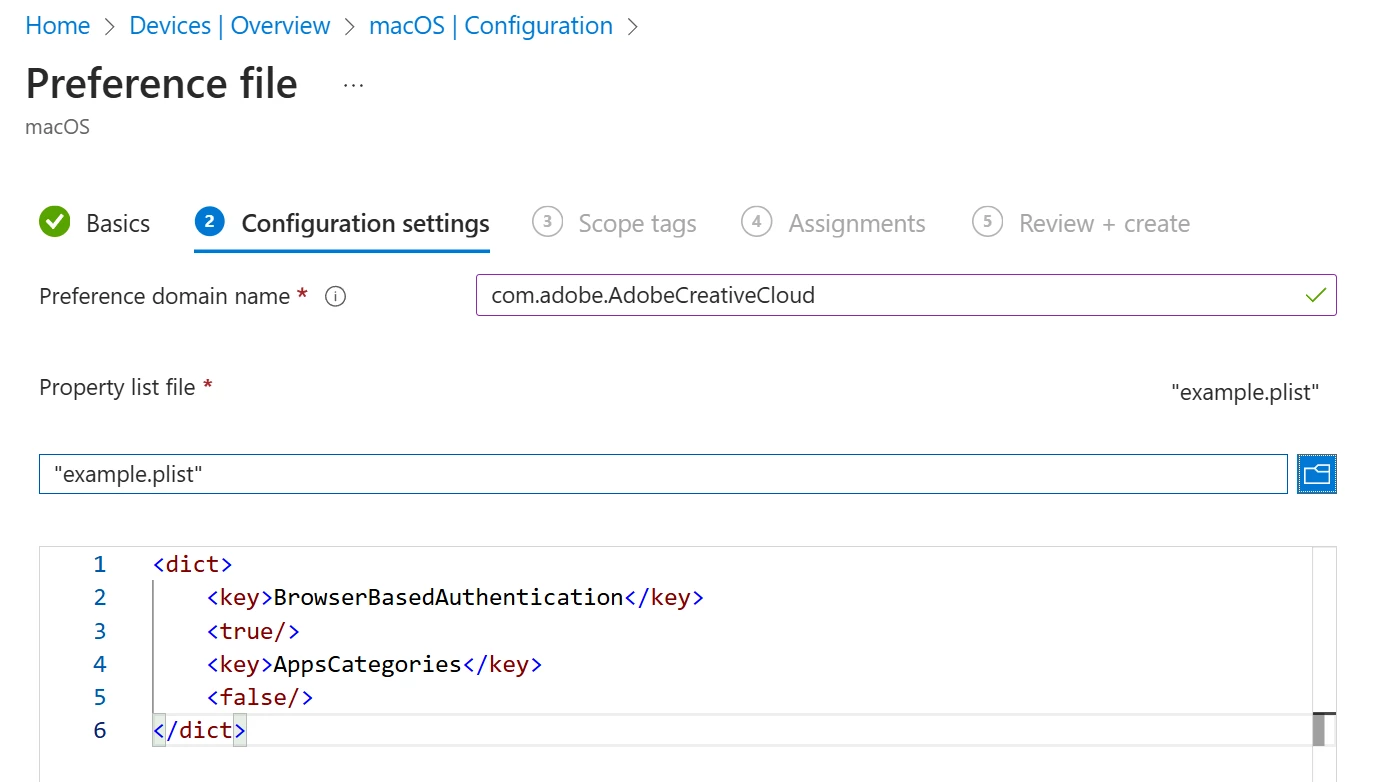
When using the standard DMG, is there a way to use issue settings via mobileconfig / PLIST files like?


  • AppsPanel
  • SelfServeInstalls
  • AppsAutoUpdate
  • SelfServePluginsInstall
  • FilesPanel
  • BrowserBasedAuthentication
  • AppsCategories


Goal is a simple configuration profile like this... This would be independent of the installer and does not require manual scripting.
 

1 reply

Community Manager
March 12, 2025

Hi @Schwerdti,


Thank you for reaching out. It looks like you are looking to deploy Adobe Creative Cloud on macOS via Intune. I would recommend reviewing the following documentation on deploying Adobe packages on macOS using Microsoft Intune: https://adobe.ly/3DKRHoA.


If you are looking for more control over updates, you can create policies that manage the applications your users can install and update. For more information, please refer to the following guide: https://adobe.ly/3XNRJTs.


Hope this helps. Let me know if you need further assistance.

Regards,
^AN

SchwerdtiAuthor
Participant
March 12, 2025

Thanks @Anshul_Nautiyal. Yes, generating the PKG via Adobe Admin Console is known. There are several points why this is not suitable for automation:

  • active re-creation of package required by an admin for new versions
  • no automatic monitoring of the version possible (no public download URL available)
  • huge file size (1.3GB compare to DMG with only 0.3GB)
  • no uninstall possible (Intune only supports this for DMG)


That's why homebrew is also using the DMG: adobe-creative-cloud — Homebrew Formulae
For an automatic packaging pipeline the generic DMG suits better.


The missing piece is allowing configuration of settings like BrowserBasedAuthentication via mobileconfig / PLIST. That's the common way other apps are using like Microsoft Edge, Google Chrome, Zoom, ... They all offer a generic installer and customization is done via mobileconfig / PLIST.

SchwerdtiAuthor
Participant
April 15, 2025

Hi @Schwerdti ,

Thank you for reaching out, and apologies for the delayed response.

Point 1: Active re-creation of package required by an admin for new versions
In this scenario, you may consider creating a self-service package. This allows end users (such as creative professionals) to install applications and receive updates via the Creative Cloud desktop app. It significantly reduces IT overhead while ensuring users have access to the latest tools as updates become available.

Alternatively, if you prefer to maintain control over application updates, you can create a managed package and use tools such as Adobe Update Server Setup Tool (AUSST) and Remote Update Manager (RUM) to manage updates across your organization.

For more details, please refer to the following documentation:
https://helpx.adobe.com/enterprise/using/package-apps-admin-console.html
https://helpx.adobe.com/enterprise/using/update-overview.html

Point 2: No automatic monitoring of the version possible (no public download URL available)
As mentioned above, managed packages offer complete control over updates. Using RUM and AUSST, you can monitor and deploy updates internally without the need for end-user intervention. RUM provides a command-line interface that enables administrators to remotely install updates, eliminating the need to manually access each client machine.

Point 3: Large file size (1.3 GB compared to DMG with only 0.3 GB)
To address this concern, we recommend creating single-app packages instead of bundled packages. While this may not reduce the package size to 0.3 GB, it will help minimize the overall size compared to multi-app bundles.

More information is available here:
https://helpx.adobe.com/enterprise/using/pre-generated-packages.html

Point 4: No uninstall possible (Intune only supports this for DMG)
For this use case, you can utilize the Adobe uninstall tool or explore alternate methods for removing Creative Cloud applications. Please refer to the following documentation for more guidance:
https://helpx.adobe.com/enterprise/using/uninstall-creative-cloud-products.html

Should you need further assistance with any of the above points, feel free to reach out.

Regards,

AN


Thanks! See my comments on this:


Point 1: Active re-creation of package required by an admin for new versions

We already use the self-service package (only contains "Creative Cloud desktop app"). But, also this package gets new versions and should be updated on regular basis. Example: Initial client deployments should directly get a current version of the CC app.


Point 2: No automatic monitoring of the version possible (no public download URL available)

Yes, for updates after initial installation of CC app that's valid.


Point 3: Large file size (1.3 GB compared to DMG with only 0.3 GB)

Good idea! Only CC app has 0.65GB there. Unfortunately, it is missing the important setting for enterprises using SSO via Entra ID: "BrowserBasedAuthentication". If we could set this via MDM (mobileconfig / PLIST, as proposed), we would be happy with this pre-packaged app!


Point 4: No uninstall possible (Intune only supports this for DMG)

Thanks. Will look into this.