
edgar.Delamora
Participant
November 15, 2017
Resuelto

Adobe Indesign shows license but when installing, it won't open

  • November 15, 2017
  • 1 respuesta
  • 234 visualizaciones

I work for a school district where we have some 14 licenses purchased for our users.  The executable was created using the current active license in Adobe Indesign to deploy.  The install completes but when opening up indesign, I get the below message.  Checking the Adobe Adminconsole, it shows the license was given to the user but the program doesn't open at all.  Please help
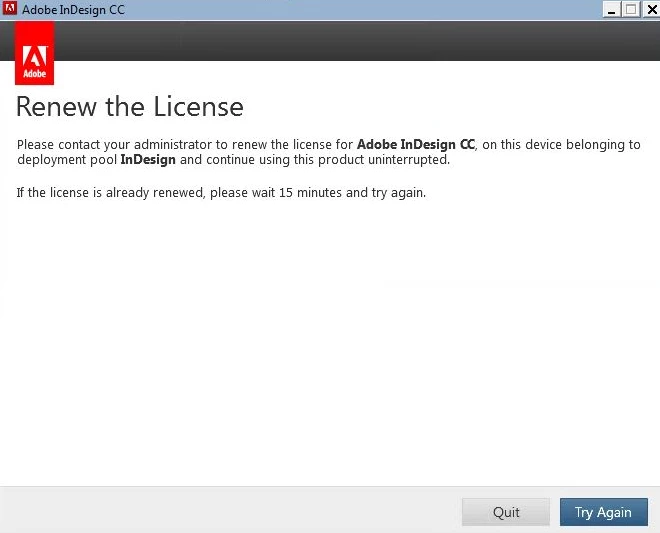
    Este tema ha sido cerrado para respuestas.
    Mejor respuesta de John T Smith

    This is an open forum, not Adobe support... click below to contact Adobe staff to help

    While the forums are open 24/7 you may not contact Adobe support at all times

    Chat help: Mon - Fri  5am - 7pm  (US Pacific Time) <=== NOTE DAYS AND TIME

    Be sure to remain signed in with your Adobe ID before accessing the link below

    Creative Cloud support (all Creative Cloud customer service issues)

    https://helpx.adobe.com/contact/support.html

    1 respuesta

    John T Smith
    Community Expert
    John T SmithCommunity ExpertRespuesta
    Community Expert
    November 15, 2017

    This is an open forum, not Adobe support... click below to contact Adobe staff to help

    While the forums are open 24/7 you may not contact Adobe support at all times

    Chat help: Mon - Fri  5am - 7pm  (US Pacific Time) <=== NOTE DAYS AND TIME

    Be sure to remain signed in with your Adobe ID before accessing the link below

    Creative Cloud support (all Creative Cloud customer service issues)

    https://helpx.adobe.com/contact/support.html

    edgar.Delamora
    Participant
    November 15, 2017

    Thanks John,

    I’m confused though because I got to this location from the adobe support within the adobe admin console.  I’ll just copy and paste my question with the instructions you provided

    [Deleted duplicate message... posting a 2nd time in this forum won't help... you need to follow the support link to initiate a chat session]