Participant
December 9, 2020
Answered

Can’t install any Adobe programs on MacBook Pro M1

  • December 9, 2020
  • 6 replies
  • 22074 views

I created a Adobe package from website and then downloaded in .pkg but after I began installing. It said that it can't be installed on this computer. How to fix this.

This topic has been closed for replies.
Correct answer Vikrant R

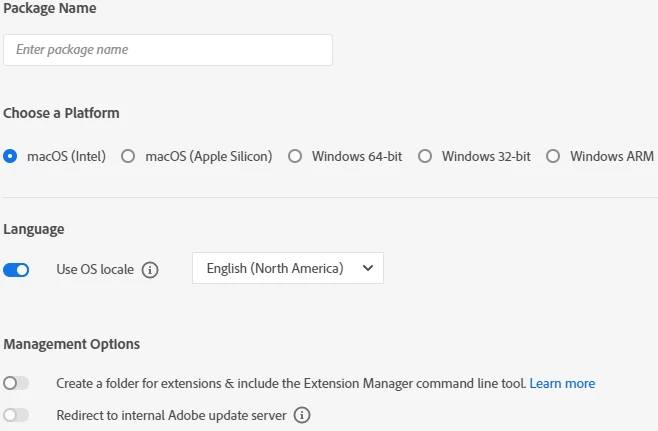
The Admin Console now supports creating packages for Apple Silicon. You can specify the platform while creating packages. For more information, see Creating Packages.
 

6 replies

Vikrant R
Vikrant RCorrect answer
Inspiring
May 12, 2021

The Admin Console now supports creating packages for Apple Silicon. You can specify the platform while creating packages. For more information, see Creating Packages.


psmudger
Inspiring
July 11, 2021

I choose Apple Silicon but I don't get the native (16.3.x) version of InDesign as an option. It's only displaying InDesign 16.2.1.

Doing this on an M1 Mac Mini. I can get InDesign 16.3.x if I do a standalone install of the CC Control panel but I need to make a package for multiple M1 Macs. Is there any reason I can't see InDesign 16.3.x through the CC Packager?


Vikrant R
Inspiring
January 14, 2021

Update: The Admin Console now supports additional platform options while creating packages. The solution/article provided in this post is no longer valid and has been unpublished.

--

The packages as downloaded from Admin Console are not compatible on Apple M1 machines. There is a small workaround that you need to perform to make the packages compatible: https://helpx.adobe.com/enterprise/kb/deploy-packages-to-arm-devices.html


We'll be making an update and will make M1 packages compatible. Till that time, please follow the steps in the article to install the packages.

lehrlingd47248792
Participant
May 12, 2021

Hi

The link to te solution isn't working yet.

Can someone give me a tip that i can get it working, please.


Pat

Abambo
Community Expert
Community Expert
December 24, 2020

You need to wait until those machines are supported. Some Adobe products do work, but don't ask when the other will work. Adobe, I'm sure, tries it's best, but some things can't be rushed. It was probably easier when Windows and MacOS where on the same CPU.

ABAMBO | Hard- and Software Engineer | Photographer
Participant
December 25, 2020

I don't understand. Isn't Adobe support installation with .pkg files on Macbook M1 (Silicon) products? I just want to learn whether I can install Adobe CC with .pkg format on my Macbook M1? 


I don't care if these programs will run with Rosetta 2 emulation. But I don't install with .pkg format

Participant
January 14, 2021

Agreed! I also want to install Adobe Cloud with.pkg format on Macbook silicon. 

Participant
December 24, 2020

Can you fix it? I cannot too. If I want to install with .pkg files, I would get an error which is "This software can't be installed"

Just Shoot Me
Legend
December 9, 2020

You need to be posting this in the Enterprise & Teams forum.

I am moving this conversation to that forum space.


Best of luck to you.

John T Smith
Community Expert
Community Expert
December 9, 2020

Wait until Adobe re-writes all programs to be compatible with the brand new m1 cpu