

johnpooley3
Inspiring
June 18, 2020
Answered

Creative Cloud 5.1.0.407 No Apps Screen

  • June 18, 2020
  • 2 replies
  • 1411 views

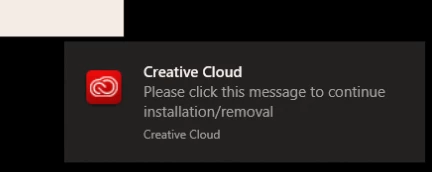
With the latest version of Creative Cloud for Windows 5.1.0.407, we're running into issues on multiple computers with the installation not completing, and the user being prompted to click a notification that quikly disappears to complete it. 


Is this expected behaviour? We are running the installer elevated as an administrator. 


The issue prevents the Apps page from loading. 


It's extremely annoying to troubleshoot this in an enterprise environment with dozens of users. 


This topic has been closed for replies.
Correct answer SuJoshi

Hey Techburner, 


With that installer I'm still getting version 5.1.0.407, and a 1603 error when trying to do a silent install. 


Could you please confirm whether User Account Control going to be required as enabled for 5.2? 


Thanks,

John Pooley


Hello John,

As I mentioned earlier, the 5.2 version is not released yet and I think it will be available by the end of this month. The package which I shared with you is to fix the prompt issue. Kindly run it manually on a machine and check if the prompt is still coming.


If you have given permission to the users to update or install the CC apps then I would suggest enabling UAC as well.


2 replies

Community Manager
June 23, 2020

Hello,

Kindly share the screenshot of the creative cloud version you are using. You can go to the "Help" menu after opening the creative cloud desktop app and select "About Creative Cloud".

johnpooley3
Inspiring
June 24, 2020

Hi Techburner, 


Here is the version information: 

SuJoshiCommunity ManagerCorrect answer
Community Manager
June 26, 2020

Hey Techburner, 


With that installer I'm still getting version 5.1.0.407, and a 1603 error when trying to do a silent install. 


Could you please confirm whether User Account Control going to be required as enabled for 5.2? 


Thanks,

John Pooley


Hello John,

As I mentioned earlier, the 5.2 version is not released yet and I think it will be available by the end of this month. The package which I shared with you is to fix the prompt issue. Kindly run it manually on a machine and check if the prompt is still coming.


If you have given permission to the users to update or install the CC apps then I would suggest enabling UAC as well.


johnpooley3
Inspiring
June 18, 2020

It seems to be related to UAC based on this troubleshooter: https://helpx.adobe.com/download-install/kb/creative-cloud-install-stuck.html


This is a sudden an undesriable change