
Participant
September 13, 2019
Answered

Creative Cloud Free Membership is overriding Adobe for Teams license

  • September 13, 2019
  • 1 reply
  • 1401 views

I have a user who has been assigned a full Creative Cloud license for all applications. This appears in her account as 'Adobe for Teams' as expected, but next to it is also 'Creative Cloud Free Membership', which is taking precedence over the full license.
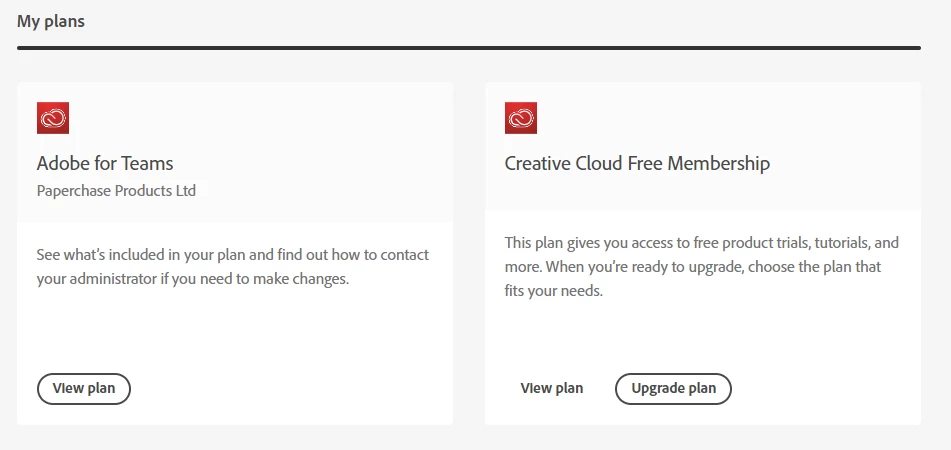
 

When trying to install certain applications from Creative Cloud, and when trying to access certain features such as fonts, it is ignoring the full license and instead only recognising her free membership. The issue is not specific to one device, CC version or web browser, and even after removing her license and re-assigning it the issue has persisted. I've even removed her Adobe account completely, re-created it, and then re-assigned a full Creative Cloud license to her again. None of this has worked, and her license is still ignored in favour of the free membership plan.


Can someone please advise on how I might go about resolving this?

This topic has been closed for replies.
Correct answer SuJoshi

Licensing problems when siging in from a physical machine is how all this started. My attempt to sign in from a virtual  machine was only to see the behavior when signing in from a brand new, clean OS.


Then I would recommend contacting the support team so that they can check the logs to find the root cause of the issue. The apps might not be able to connect with the activation server to update. 

Click on the chat icon on the bottom right corner of this page: https://helpx.adobe.com/support.html.

1 reply

Vikrant R
Inspiring
September 16, 2019

After reassigning the user, could you ask her sign out and then sign back in to Creative Cloud? In any app, such as Photoshop, choose Help > Sign Out/Sign in. This will force the system to do an entitlement check. See this article for more information: https://helpx.adobe.com/download-install/using/activate-deactivate-creative-cloud-apps.html


Let us know if this helps.

Participant
February 18, 2021

I have the exact problem as George K above. Signing out and back in made no difference to me. In addition to what George has experienced, I signed on to a brand new virtual machine that had never had any Adobe products installed on it with the same result.


What's the next step to resolve this problem?

Community Manager
February 18, 2021

Please confirm if you are facing licensing issue with any specific app like Acrobat or with all the applications.