

Ivan FIlipov
Known Participant
March 2, 2020
Answered

Creative Cloud Libraries : Unable to connect to server

  • March 2, 2020
  • 2 replies
  • 5269 views

Hello

I tried everything described here:
https://helpx.adobe.com/creative-cloud/kb/libraries-panel-not-working.html
and here:

https://community.adobe.com/t5/get-started/cc-libraries-sync-error/m-p/10901142?page=1#M452989

but no luck. The Libraries are working locally but not syncing to cloud - not good when 12 people are using the same libraries and store files there.
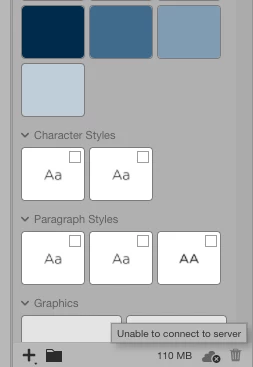
 

Any help with this will be appreciated!!!

This topic has been closed for replies.
Correct answer supkat

This is really annoying. Libraries are practically useless if they cannot be synced. Where do I file an support ticket or Adobe has no official support? It's not like we are PIRATING your software, so I think we're entitled on some decent support?!?!?


Hi Evan,


I’m sorry to hear that you’re still unable to sync your Libraries. I sent you a private message.


Can you please confirm do you use any proxy settings for your organization?


Thanks,

Supriya

2 replies

Known Participant
March 3, 2020

Even more maddening, when I try to access the cloud library it tells me to sign in even tho' I am signed in. I can see my Creative Cloud library in https://assets.adobe.com/libraries, yet I'm not signed in to the desktop app. What gives?

Adobe Employee
March 5, 2020

Hi,


I would recommend you reinstall your Libraries. Could you please try next:
1. Delete all folders that start with “CC_LIBRARIES_PANEL_EXTENSION_xx_xx_xx” in this location:
WIN: C:\Program Files (x86)\Common Files\Adobe\CEP\extensions
MAC: Macintosh HD⁩ ▸ ⁨Library⁩ ▸ ⁨Application Support⁩ ▸ ⁨Adobe⁩ ▸ ⁨CEP⁩ -> extensions
2. Follow the steps of Solution 2 in this article:
https://helpx.adobe.com/creative-cloud/kb/libraries-panel-not-working.html
Before trying the steps in the article - please, make sure you killed the CCLibraries process in Task Manager / Activity Monitor, as well as you have quit all Adobe related products. This is mentioned in steps 1 and 2 of the article linked in step 2 but wanted to point out because it is important.

If it does not help you. Could you please collect logs as I described in Ivan_FIlipov reply.


Thank you,
Supriya Katiyar
CCLibraries Team

Ivan FIlipov
Known Participant
March 5, 2020

Unfortunately, reinstalling and everything else has been a temporary cure. As of today morning the situation is back to square one.


Adobe Employee
March 3, 2020

Hi,

We would like to investigate this problem and if you could share logs from your machine, this would be very helpful. Here is a link to Adobe Log Collector Tool:
https://helpx.adobe.com/creative-cloud/kb/cc-log-collector.html
You'll get a zip file generated, could you please send the name of it?
It will be something like "AdobeLogs_20191011_081024_xxx-win.zip"
This might help us to understand the root cause of the problem.

Thank you,

Supriya Katiyar
CCLibraries Team

Ivan FIlipov
Known Participant
March 4, 2020

Thanks. I will attach it to this reply. Meanwhile, this morning everything started syncing... at least on my Mac, the rest of the team is still "Unable to connect to server". I guess I must gather their logs too....


AdobeLogs_20200304_092757_755-mac.zxp


Let me know please