
UTSIT
Participant
March 1, 2017
Answered

Creative Cloud Packager 2017 Installation failed

  • March 1, 2017
  • 3 replies
  • 2849 views

Hi ,

I have created a Adobe package using creative cloud packager on 2017.

By default i have selected all software.

I then proceeded to create a fresh OSX Siera image and begin to manually install the software.

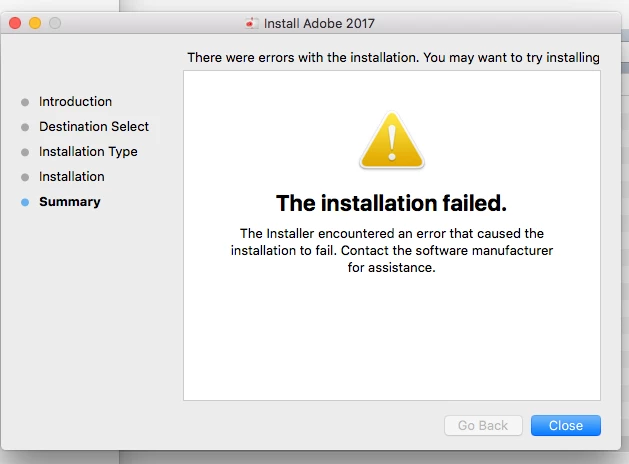
Unfortunatley it pops up with an error message as per attached

Last week i have previously pushed the same software out through deploy studio admin.

Has anyone recently ran into these issues previously?
    This topic has been closed for replies.
    Correct answer Bill_Scheffler

    We were running in the same issue the last few days. I got my installer package to work again by setting the clock back to 10-1-2016 temporarily (probably don't need to set it back that far but that's what I used) while running the installer and it worked.

    Then, set the clock back to the proper time, sign into CC, run updates, and everything seems to work fine. This is going to be our workaround until Adobe finds a fix.

    Hope that helps!

    - Bill

    3 replies

    sathyanarayananp99643592
    Participant
    November 26, 2018

    Hello people,

    I still have this problem. Am currently using MAC OS Mojave and my college provided me with adobe cc 2017 package to use, but i cant install. Please let me know how i should proceed.

    Thanks

    Partha

    Bill_SchefflerCorrect answer
    Participant
    March 1, 2017

    We were running in the same issue the last few days. I got my installer package to work again by setting the clock back to 10-1-2016 temporarily (probably don't need to set it back that far but that's what I used) while running the installer and it worked.

    Then, set the clock back to the proper time, sign into CC, run updates, and everything seems to work fine. This is going to be our workaround until Adobe finds a fix.

    Hope that helps!

    - Bill

    alisterblack
    Inspiring
    March 1, 2017

    Hi,

    Please refer to this document.

    We are aware of this issue and are working on an urgent fix.