
Participant
April 14, 2023
Answered

Creative Cloud Setup Crash

  • April 14, 2023
  • 1 reply
  • 278 views
 

After a crash of we tried to re-install Creative cloud setup, but the setup also crashed right after launching.

even with a complete removal using the cleanup cleaner tool -> clean all
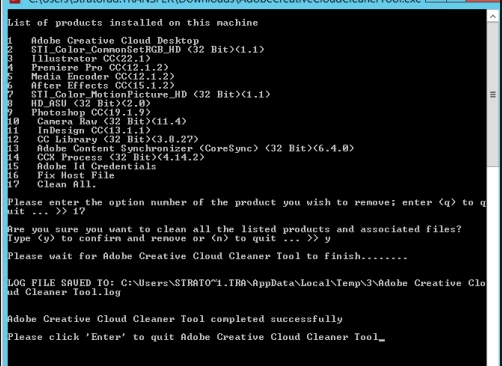
 

After the cleanp and a reboot of the win2012r2 server, it still does not re-install using the setup tool and gives the following error right after launch:
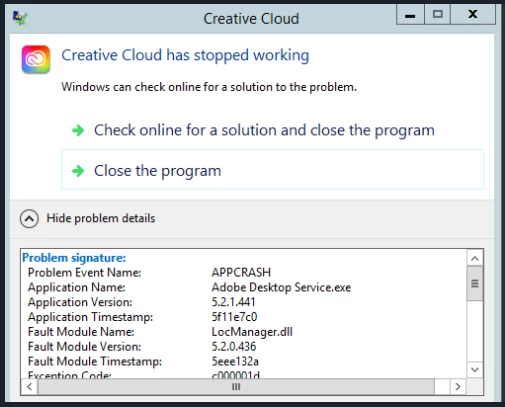
 

Antivirus was stopped, elevated access tested, no difference, any idea what to try next ?


This topic has been closed for replies.
Correct answer Gurdeep.Singh

Hi @First IT Helpdesk we would need more information to investigate this issue. Please be aware CC apps are not completely supported on Server based environments.


We need to isolate the issue by checking if this is happening on just one machine or you have multiple machines with the same issue


Please follow the steps mentioned in the KB below 


https://helpx.adobe.com/in/creative-cloud/kb/creative-cloud-app-doesnt-open.html


In case this does not resolve the issue, please raise a support case with us by following this link : https://helpx.adobe.com/contact.html

1 reply

Gurdeep.Singh
Adobe Employee
Gurdeep.SinghCorrect answer
Adobe Employee
April 17, 2023

Hi @First IT Helpdesk we would need more information to investigate this issue. Please be aware CC apps are not completely supported on Server based environments.


We need to isolate the issue by checking if this is happening on just one machine or you have multiple machines with the same issue


Please follow the steps mentioned in the KB below 


https://helpx.adobe.com/in/creative-cloud/kb/creative-cloud-app-doesnt-open.html


In case this does not resolve the issue, please raise a support case with us by following this link : https://helpx.adobe.com/contact.html