mduncan_tooledesign
Inspiring
November 10, 2017
Answered

Creative Cloud Updates Acrobat XI to DC

  • November 10, 2017
  • 3 replies
  • 3770 views

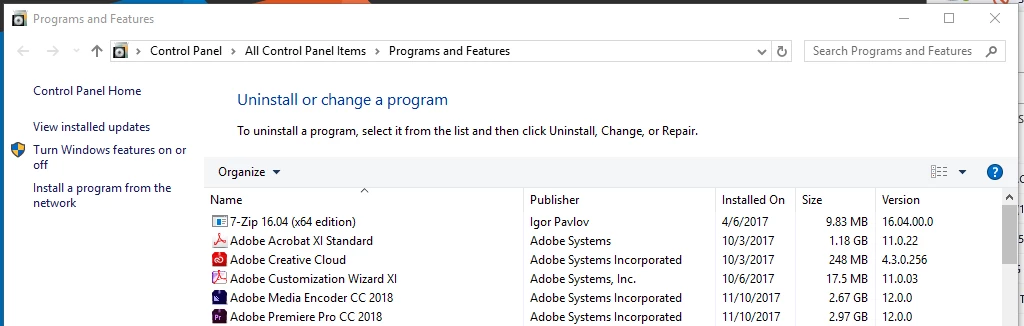
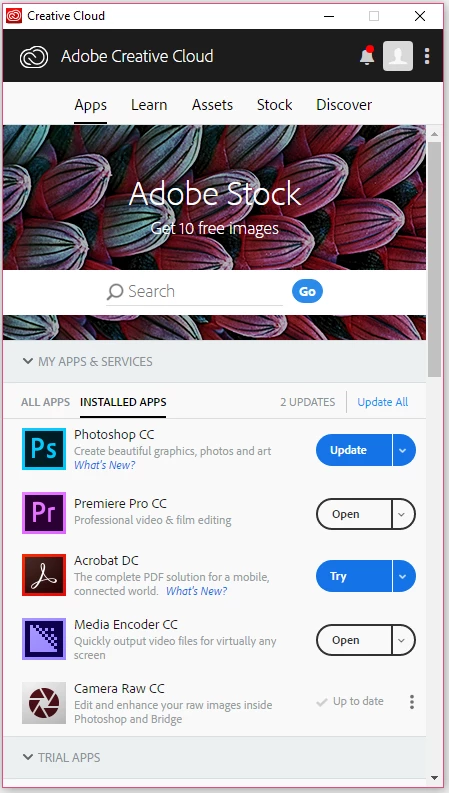
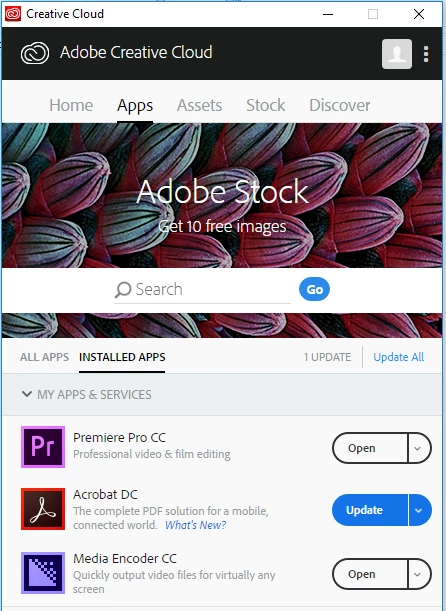
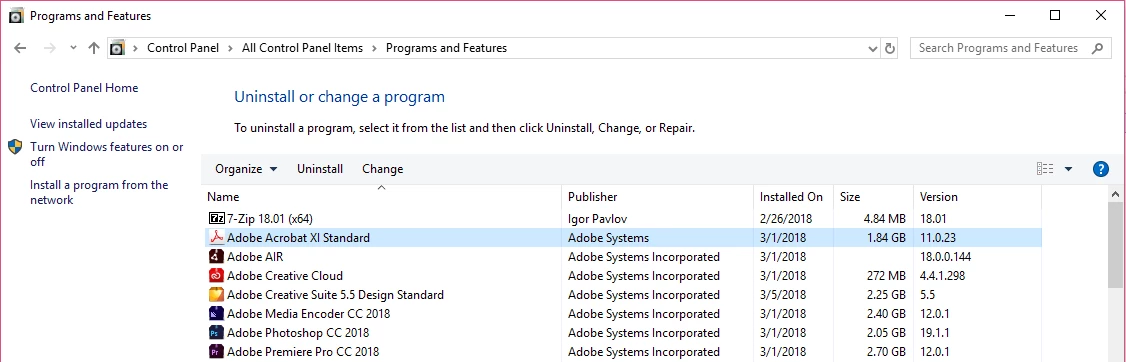
Hello we are having an issue in our organization with Creative Cloud and Acrobat XI.  This problem exists on ANY computer that has Acrobat XI installed alongside a CC application.  The problem is the Adobe CC application sees Acrobat XI as Acrobat DC.  This occurs regardless of which program is installed first.  In the images below the computer has Acrobat XI, and Premiere Pro installed.  You can see in the first image the CC app sees Acrobat DC installed and offers to update it.  The second image shows the Programs and Features window, Acrobat DC is not installed.
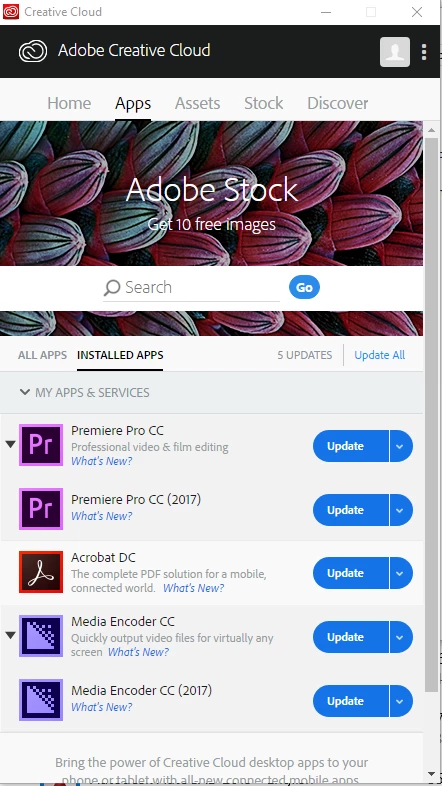
This is a problem because we configure our CC deployments to allow the user to update their application(s) without admin approval.  When the user updates all their apps, the CC application takes the liberty of updating Acrobat XI to Acrobat DC.  Since the user isn't licensed to use Acrobat DC it runs as a 7 day trial.  When the trial expires, the user is unable to open files or print to PDF with out re-installing Acrobat XI.  THIS IS REALLY FRUSTRATING.  As you can see in the image below after clicking update, Acrobat XI has been replaced by Acrobat DC:
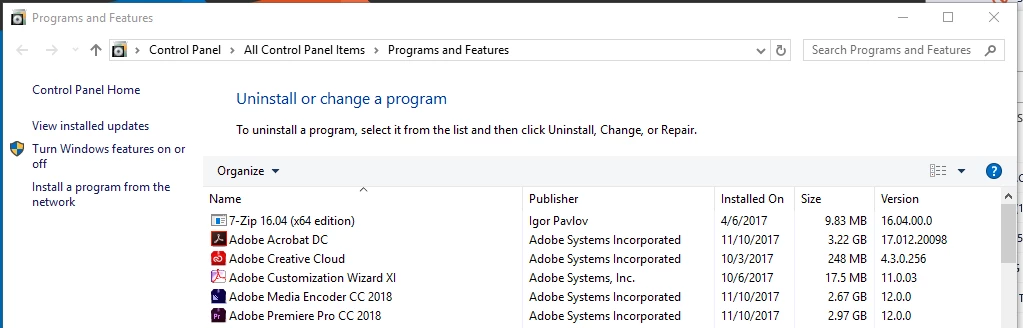
Even after uninstalling Acrobat DC, restarting the computer, re-installing Acrobat XI, and fully patching it.  The CC application still sees Acrobat XI as DC and offers to update it.  So the next time the user updates their CC apps, the Acrobat Xi will be uninstalled again restarting the process:
I have tested installing Acrobat XI before and after the Adobe CC applications but I still get the same result.  This even occurs on fresh installs of Windows and after I've run the Adobe CC Cleaner Tool on older laptops.  I'm beginning to think the software is designed to work this way: To force users off their perpetual license software into a trial that asks them to buy a license in 7 days.  Has anyone else experienced this issue and know how to fix it?

Thanks,
This topic has been closed for replies.
Correct answer EnterpriseHelp

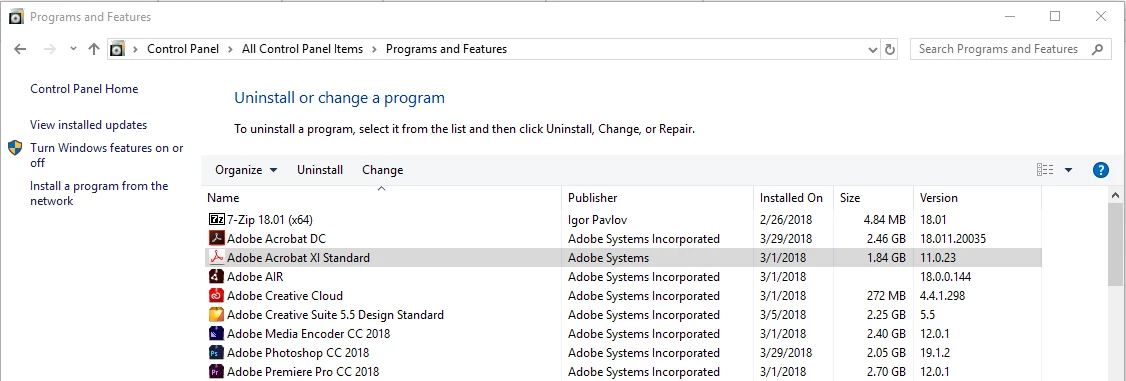
Thank you for your two previous replies.  I've provided some screenshots to help me answer your question.  On this machine, Acrobat XI Standard, Photoshop CC, Premiere Pro CC, Media Encoder CC, and the Creative Cloud app are installed.  I also have InDesign CS 5.5 installed which is why you see Adobe Creative Suite 5.5 Design Standard in the list.

When I open the Creative Cloud app, it says I have two updates pending:

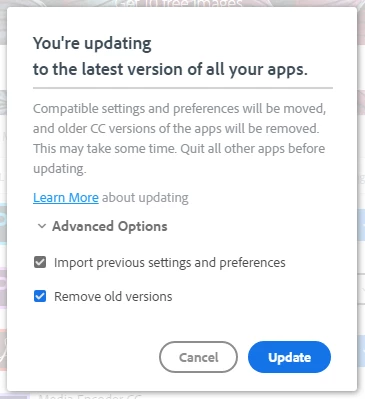
One for Photoshop and one for Acrobat DC (which is not installed).  The button beside Acrobat DC says "Try" now.  If you reference my screenshots from previous posts you can see it use to say "Update".  This must have been changed since my original post.  When I select "Update All" I get this window:

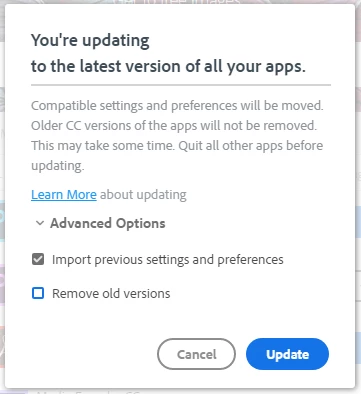
If I un-check "Remove old versions" the text changes to read, "Older CC versions of the app will not be removed."

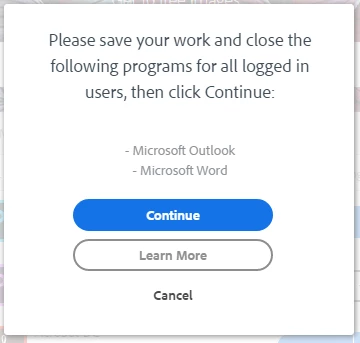
With the box unchecked, I select "Update" and I get one last window asking me to close Outlook and Word.  This is a indicator to me that Acrobat is about to be installed since Acrobat's PDFmaker plugin requires Office apps be closed before installing.

Surprisingly once the update finished, Acrobat XI was still installed alongside an install of Acrobat DC:

This was definitely not the case previously.  In the past, un-checking "Remove old versions" would still result in Acrobat XI being uninstalled.  I'm glad to see this new result after updating all the apps.  I'd like to double check the behaviour when the "Remove old versions" check box remains checked but I don't have time today.  I'll reply back tomorrow once I've tested that.


Here's more info. Again, CC app issues are likely better posted on a CC forum, but here's how the CC app should work WRT Acrobat:

  • There is no scenario where the app can silently remove a licensed product (unless there's a bug).
  • If a licensed product exists on the machine and the workflow is going to initiate an uninstall, the user is asked first for permission (the user must un-check a checkbox to allow removing the previous version)
  • If the user has a licensed 11.x product and no entitlement for Acrobat DC (serial or named user license), then Acrobat DC can be installed in trial mode and both products can coexist on a machine.
  • If the user has a subscription to an earlier version or has installed a trial, then it makes sense that the user can upgrade to DC and uninstall the existing product. Again, the user is asked for permission to allow that uninstall.

It comes down to admin control: Either prevent the user from updating altogether, allow them to update, or educate them about how to upgrade in the requisite context.

3 replies

Kevin Stohlmeyer
Community Expert
Community Expert
November 11, 2017

I do understand. Your cc desktop app shows any available updates to software. If you had any CC 2017 app installed the desktop app will show updates available and remove and upgrade to 2018.

The same  happens with acrobat. It’s not identifying your current load as DC, it’s telling your users an upgrade to DC is available. When they click it - it will upgrade to DC.

Teams is managed different from enterprise. Your only two options is to remove the user upgrade option or tell them to ignore it. Your IT dept should be able to easily manage and push out updates to users using the Teams packages you create.

mduncan_tooledesign
Inspiring
March 28, 2018

Came back to reference this post and was surprised to see this marked as answered.   The answers here are not satisfactory and the problem outlined in this post is not resolved.  Under the guise of "updating" the Adobe CC app is designed to uninstall a licensed copy of Acrobat XI and install Acrobat DC even if the user isn't licensed to use that software.  This eventually leads to the user being prompted to purchase Acrobat DC once the trial expires.

Maybe reply back with:


"Sorry we're greedy and we designed the program to force users off their old perpetual licenses." 


I'd happily mark that answer as correct.

EnterpriseHelp
Community Manager
Community Manager
March 28, 2018

I don't see where this post is marked as answered, but I don't see it answered satisfactorily either. I'll ping the deployment team and see if I can get a better answer here.

kglad
Community Expert
Community Expert
November 10, 2017
Kevin Stohlmeyer
Community Expert
Community Expert
November 10, 2017

We've found you cannot have both Acrobat XI and DC on Windows.

Are you using an Enterprise deployment package or Admin console to manage these apps?

If not, perhaps you should look at that - it would allow you to mass update or control the apps instead of individual users doing it.

Much more efficient.

CC is the update for XI. So the simplest option is to just tell your employees not to update Acrobat.

mduncan_tooledesign
Inspiring
November 10, 2017

Ok, just to reiterate: Acrobat XI and Acrobat DC are not installed at the same time on these computers.  That is not what I'm trying to do.

In my scenario, Acrobat XI is installed alongside an Adobe CC program such as Photoshop CC, InDesign CC, or Premiere Pro CC, which install the Adobe CC app.  It is the Adobe CC app that mistakenly identifies the Acrobat XI install as Acrobat DC and prompts the user to update the software.  When they do, Acrobat XI is uninstalled and Acrobat DC is installed.  Since the user isn't licensed to use Acrobat DC they are forced to use it as a 7 trial which eventually expires.

To answer your question about managing the apps, we created our deployment using the Creative Cloud packager.  I'm not sure what admin console you are referring to.  The only one I'm familiar with is: Admin Console for teams and that console does not allow me to send out updates.  I can only assign and revoke licenses from there.

We configured our CC deployments so user's could install updates on their own without needing admin credentials.  This is both convenient for our end users and our IT staff.  I don't like the idea of telling users to ignore update notifications from Creative Cloud.  It seems to me the Creative Cloud application should be identifying Acrobat Xi correctly and not uninstalling a piece of licensed software and replacing it with a trial.