
Participant
January 18, 2016
Answered

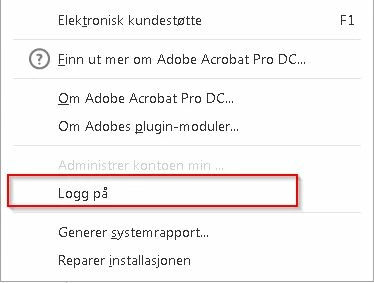
Deactivate sign in from the Help menu in Adobe Acrobat Pro DC

  • January 18, 2016
  • 1 reply
  • 1042 views

Hi

I am using Acrobat Customization Wizard to build my Acrobat Pro DC package for dist trough SCCM.

I have deactivated All Document Cloud services wich removes the ability to sign on trough the welcome screen, but the ability to do so using the help tab is still there. But since the Document Cloud services is disabled it just gives a awkward error.

Is there someway to remove this choice on the help menu?
This topic has been closed for replies.
Correct answer hanss4188986

Use following registry keys to disable Help > Sign In/Sign Out

For Continuous Build:

[HKEY_LOCAL_MACHINE\SOFTWARE\Policies\Adobe\Adobe Acrobat\DC\FeatureLockDown]

"bSuppressSignOut"=dword:00000001

For Classic Build:

[HKEY_LOCAL_MACHINE\SOFTWARE\Policies\Adobe\Adobe Acrobat\2015\FeatureLockDown]

"bSuppressSignOut"=dword:00000001


by Karan Malik on Nov 18, 2015 10:32 AM

1 reply

hanss4188986AuthorCorrect answer
Participant
January 19, 2016

Use following registry keys to disable Help > Sign In/Sign Out

For Continuous Build:

[HKEY_LOCAL_MACHINE\SOFTWARE\Policies\Adobe\Adobe Acrobat\DC\FeatureLockDown]

"bSuppressSignOut"=dword:00000001

For Classic Build:

[HKEY_LOCAL_MACHINE\SOFTWARE\Policies\Adobe\Adobe Acrobat\2015\FeatureLockDown]

"bSuppressSignOut"=dword:00000001


by Karan Malik on Nov 18, 2015 10:32 AM