Participant
January 5, 2015
解決済み

Disable Creative Cloud Desktop Application

  • January 5, 2015
  • 返信数 2.
  • 8638 ビュー

I'm trying to create a package with Creative Could Packager version 1.7.0.31 on a pc.

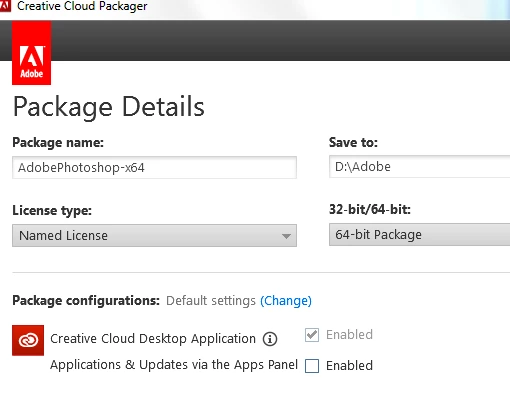
But i cant disable the 'Creative Cloud Desktop Application' because the checkbox is enabled and  grayed out.
    このトピックへの返信は締め切られました。
    解決に役立った回答 Ashubijalwan1

    In case you would need a package including creative cloud desktop app, you can sign in with enterprise account and create a package under named license and you will have ability to enable or disable creative cloud desktop.

    Thanks,

    Ashish

    返信数 2

    alisterblack
    Community Manager
    Community Manager
    February 19, 2016

    I agree and I imagine this is already on the roadmap for the packaging engineering team at Adobe.

    However I'll log some feature requests for

    1. Command line with silent option for updating the CC Desktop App

    2. Command line with silent option to uninstall the CC Desktop App

    Ashubijalwan1
    Adobe Employee
    Adobe Employee
    January 5, 2015

    Hello there,

    It seems you are logged in as a creative cloud for team administrator. If so, you won't be able to disable creative cloud desktop app as this is mandatory for creative cloud team users.

    Thanks,

    Ashish

    CVICT作成者
    Participant
    January 7, 2015

    Yes, Im logged in as a creative could for team administrator. Why is the desktop app now mandatory? In the past (mid of 2014) this was not the case.

    There also some problem with updating the Desktop App Re: RUM for Creative Cloud Desktop App

    Ashubijalwan1
    Adobe Employee
    Ashubijalwan1解決!
    Adobe Employee
    January 8, 2015

    In case you would need a package including creative cloud desktop app, you can sign in with enterprise account and create a package under named license and you will have ability to enable or disable creative cloud desktop.

    Thanks,

    Ashish
