Participant
January 5, 2015
Answered

Disable Creative Cloud Desktop Application

  • January 5, 2015
  • 2 replies
  • 8642 views

I'm trying to create a package with Creative Could Packager version 1.7.0.31 on a pc.

But i cant disable the 'Creative Cloud Desktop Application' because the checkbox is enabled and  grayed out.
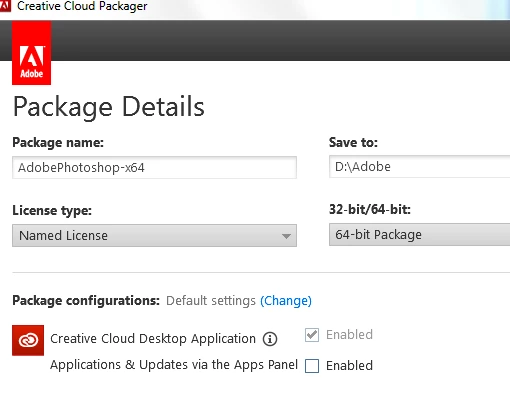
    This topic has been closed for replies.
    Correct answer Ashubijalwan1

    In case you would need a package including creative cloud desktop app, you can sign in with enterprise account and create a package under named license and you will have ability to enable or disable creative cloud desktop.

    Thanks,

    Ashish

    2 replies

    alisterblack
    Community Manager
    Community Manager
    February 19, 2016

    I agree and I imagine this is already on the roadmap for the packaging engineering team at Adobe.

    However I'll log some feature requests for

    1. Command line with silent option for updating the CC Desktop App

    2. Command line with silent option to uninstall the CC Desktop App

    Ashubijalwan1
    Adobe Employee
    Adobe Employee
    January 5, 2015

    Hello there,

    It seems you are logged in as a creative cloud for team administrator. If so, you won't be able to disable creative cloud desktop app as this is mandatory for creative cloud team users.

    Thanks,

    Ashish

    Zoe VUW
    Participant
    November 9, 2015

    I also need to be able to create packages that have the CC desktop application disabled. Our staff do not have administrator rights to the computers and all updates are completed by our ITS team. We used to be able to create packages without the desktop app.

    DvdW__
    Inspiring
    February 18, 2016

    You would need to uninstall the existing desktop app.

    Otherwise..yes.

    The desktop app is integral to the functionality of Named User deployment so I don't anticipate having the option not to deploy it anytime soon.


    Thanks Alisterblack, I found there is no way to uninstall the old CCD remotely before installing the new packaged CCD application. Ashubijalwan1 wrote:

    Adobe creative cloud desktop app can't be uninstalled silently if it was installed individually from web. You can create a package for creative cloud desktop app only through creative cloud packager and install using package installer. You can uninstall the desktop app silently this way and can use the command  msiexec /x "name of package.msi" /qn

    Is there any chance this will be improved in upcoming versions? Would it be possible to "upgrade" the CCD when redeploying the package (saves the uninstall step). Would make the IT admin live more easy. Thanks in advance!
