
Participant
November 15, 2023
Answered

Error Intune with "Adobe Creative Cloud"

  • November 15, 2023
  • 1 reply
  • 3909 views

Hello,


if you try to add the "Adobe Creative Cloud" App from Intune over the option "Microsoft Store-App (new)" then you receive an error "The selected app does not have a valid current package version."
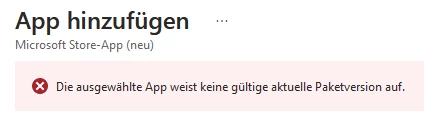
 

Have somebody information about the package on the Microsoft Store or about the usage / support of the option "Microsoft Store-App (new)" with the Adobe apps in Intune?


(I am ware of the posibility to install Adobe products over "Win 32 prep Tool".)


Thank you for the information.

This topic has been closed for replies.
Correct answer Gurdeep.Singh

Hi @RGB-User 


We have a public facing helpX available for Intune deployment, Please refer below and see if this helps


https://helpx.adobe.com/in/enterprise/kb/deploy-packages-using-ms-intune.html


Regards,

Adobe

1 reply

kglad
Community Expert
Community Expert
November 15, 2023

in the future, to find the best place to post your message, use the list here, https://community.adobe.com/

p.s. i don't think the adobe website, and forums in particular, are easy to navigate, so don't spend a lot of time searching that forum list. do your best and we'll move the post (like this one has already been moved) if it helps you get responses.


<"moved from cc desktop">
Gurdeep.Singh
Adobe Employee
Gurdeep.SinghCorrect answer
Adobe Employee
November 15, 2023

Hi @RGB-User 


We have a public facing helpX available for Intune deployment, Please refer below and see if this helps


https://helpx.adobe.com/in/enterprise/kb/deploy-packages-using-ms-intune.html


Regards,

Adobe