
Participating Frequently
November 17, 2023
Answered

How do I change accounts without re-installing?

  • November 17, 2023
  • 3 replies
  • 13146 views

This question was asked and answered before: the instruction was to launch the CC app, click the gear icon, and change accounts. However, the UI seems to have since changed, as no gear icon is presented when launching. Here's what I see when I launch (yellow rectangles protect our corporate identity). When I launch the app, it immediately shunts me to the corporate login screen. There is no gear icon, and no way to change account. Since I cannot login with this corporate credential, I am stuck, there seems to be no way to specify a different account. 


Please, help?
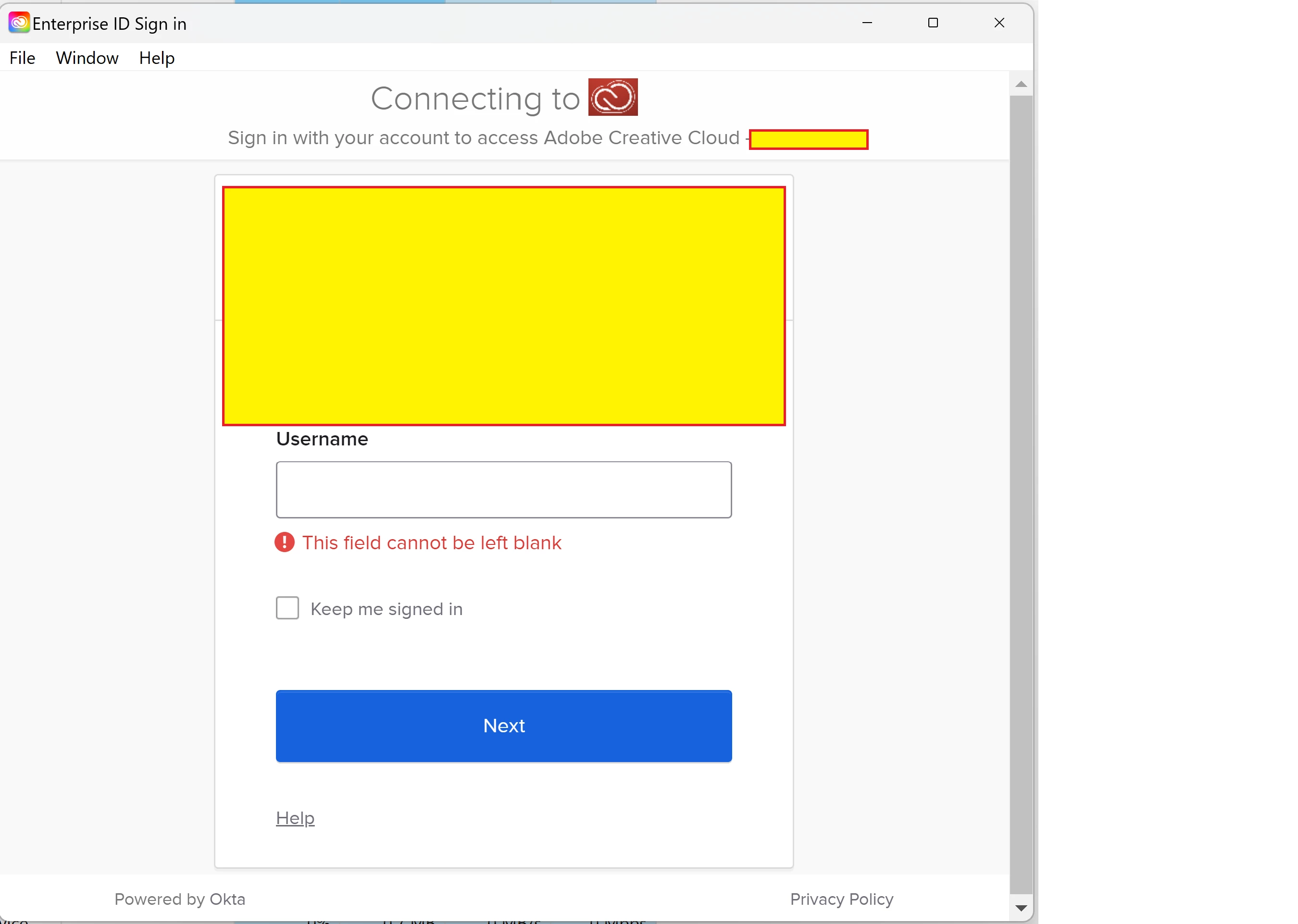
 

This topic has been closed for replies.
Correct answer Nikhil R Gupta

@danjonwig As per the screenshots, you are using a Federated corporate login. When you enter your email, it will take you to the organization's SSO page, and you have to finish logging in there.


Regarding the error on CCDA. A couple of things I can suggest.

Solution 1:

1. Close CCDA.

2. Close Adobe processes from the Task Manager on Windows or Activity Monitor on MAC.

3. Remove opm.db

win: C:\Users\YOURNAME\AppData\Local\Adobe\OOBE\

MAC: /Users Library/Application Support/Adobe/OOBE

4. Relaunch CCDA and check.

Hidden library MAC 

Hidden Appdata Windows 


Solution 2:

Uninstall and reinstall CCDA and check.

Uninstall tool 

Creative Cloud for the desktop download page

3 replies

Nikhil R Gupta
Nikhil R GuptaCorrect answer
Legend
November 24, 2023

@danjonwig As per the screenshots, you are using a Federated corporate login. When you enter your email, it will take you to the organization's SSO page, and you have to finish logging in there.


Regarding the error on CCDA. A couple of things I can suggest.

Solution 1:

1. Close CCDA.

2. Close Adobe processes from the Task Manager on Windows or Activity Monitor on MAC.

3. Remove opm.db

win: C:\Users\YOURNAME\AppData\Local\Adobe\OOBE\

MAC: /Users Library/Application Support/Adobe/OOBE

4. Relaunch CCDA and check.

Hidden library MAC 

Hidden Appdata Windows 


Solution 2:

Uninstall and reinstall CCDA and check.

Uninstall tool 

Creative Cloud for the desktop download page

Participating Frequently
November 25, 2023

Thank you. 

yes indeed, that is precisely the situation (corp login). As mentioned elsewhere, I no longer have access to that account, so I *cannot* complete it, as you suggest. So, my question is, how do I take a step back and use a different (not corporate) login?


re error: that error happens only after I fail to login. I have no doubt that fixing the login problem will obviate the error.

Kevin Stohlmeyer
Community Expert
Community Expert
November 27, 2023

@DanJonWig99 why do you no longer have access to the Corporate account? Contact your Admin to address the account issue.

Kevin Stohlmeyer
Community Expert
Community Expert
November 20, 2023

Hi @danjonwig you're already past the gear icon. You would use that to sign out of the current account. From here you can easily switch accounts simply by entering the email address of the account you want to go to. When you enter the email it should prompt you to choose personal or business account:


Participating Frequently
November 20, 2023

Very kind. The screenshot I sent is the very first screen I see when I launch. If I'm past it, how do I go back?

kglad
Community Expert
Community Expert
November 23, 2023

Thank you kindly. I am able to login to the website in my browser, but this does not seem to impact the creative cloud desktop application. Maybe I'm missing step here?


Just to make sure I have described it correctly: I have two different accounts with adobe creative cloud. Call them Corp1 and Corp2. This computer was previously logged-in to Corp1, but I no longer have access, so I want to login with my credentials for Corp2. However, Creative Cloud always routs me to the login screens for Corp1, with no option to go back a step to let me specify Corp2. 


As requested, below are the screenshots in order (S1 and S2). I believe that the login screen shown in S1 is affiliated with Corp1. I have tried entering the email address for Corp2 on that screen, but no matter what, it routes me next to the branded corporate login page for Corp1. Forgive me for blanking out parts of it, but trying to be careful not to run afoul of any corporate security concerns. 


again, that error has primacy.

kglad
Community Expert
Community Expert
November 17, 2023

click help > sign out


====================================

in the future, to find the best place to post your message, use the list here, https://community.adobe.com/

p.s. i don't think the adobe website, and forums in particular, are easy to navigate, so don't spend a lot of time searching that forum list. do your best and we'll move the post (like this one has already been moved) if it helps you get responses.


<"moved from account, payment & plan">
danjonwigAuthor
Participating Frequently
November 21, 2023

Thank you kindly; here is the content of the Help menu. 


I have tried "sign  in using your browser". Bizarely, it doesn't actually launch a browser, it just reloads within the Cloud window, and I get the same thing again; no option to change account


Kevin Stohlmeyer
Community Expert
Community Expert
November 21, 2023

@danjonwig what does that error show you are covering up?