
Participant
April 10, 2022
Answered

How to switch between personal and business accounts

  • April 10, 2022
  • 2 replies
  • 60521 views

Maybe Im missing something, but now when i login I can't seem to choose between persoanl and business accounts.  It used to give me that option but Im not seeing that anymore.  What am I missing?
Correct answer iCharles

Hi there,


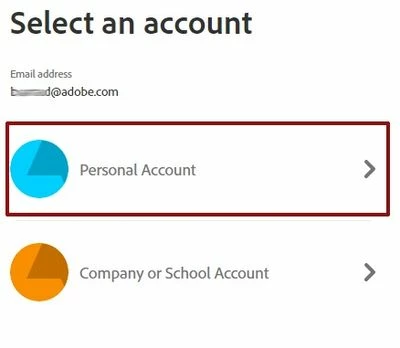
We understand that you need assistance with switching between Creative Cloud Individual and Teams accounts.


To switch between these account profiles: Sign out and sign back in. After entering your credentials, the Profile chooser will display. Select the profile of your choice.


Hope this helps.

Charles

2 replies

Participant
April 18, 2023

Interesting discussion. I found useful information here

Ashish_Harrison
Adobe Employee
Adobe Employee
April 18, 2023

Hi @Lucille29469570y45z or you can find the details on this help article - https://helpx.adobe.com/in/enterprise/kb/enterprise-id-faq.html


Thanks!

Regards,Ashish Harrison
iCharlesCorrect answer
Legend
April 11, 2022

Hi there,


We understand that you need assistance with switching between Creative Cloud Individual and Teams accounts.


To switch between these account profiles: Sign out and sign back in. After entering your credentials, the Profile chooser will display. Select the profile of your choice.


Hope this helps.

Charles

Participant
April 18, 2022

Ive been super bus and have not replied.  After I complete the ID/pw boxes, it just takes me to my business account and never asks me which acocunt i want to choose.

Vikrant R
Community Manager
Community Manager
April 19, 2022

By default, the system tries to select the most appropriate profile (Business or Personal) based on the product or service you're trying to access. However, if you want to be prompted to select a profile, you can enable that option. See https://helpx.adobe.com/enterprise/using/manage-adobe-profiles.html