
Inspiring
March 28, 2017
Answered

How to use adobe internal update server to update adobe CC software version?

  • March 28, 2017
  • 3 replies
  • 2824 views

I have bulid up a adobe internal update server by ausst and make a AdobeUpdater.Overrides, I use CCP to creata a adobe cc package and integrated AdobeUpdater.Overrides。
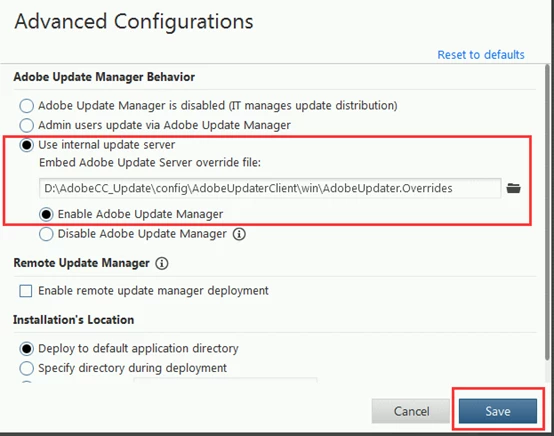
But in the test, when I click "Update" at software , it will auto start Adobe Creative Cloud program it told me that has new version , but when I kick install ,it will connect to Adobe official server , not internal server ( because  we do not allow unauthorized users to access the Internet), so that it stop at download interface and we can not do anything.
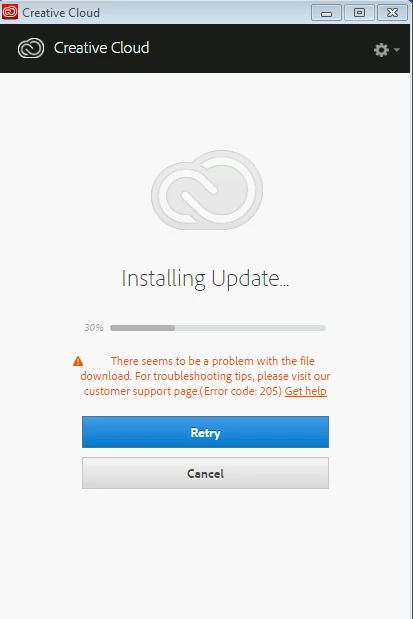
Pls help me what I can do can let adobe CC software update program connect to internal server?

Thanks

    This topic has been closed for replies.
    Correct answer alisterblack

    I think at this stage I would recommend opening a support ticket with our enterprise support team so that we can have a look at the logs.

    Logs are noted here: Using the Adobe Update Server Setup Tool (AUSST)

    To contact support please use one of the following options.

    Creative Cloud for Enterprise - from the Admin Console go to the support tab to open a case. Phone and chat options are also available here.

    Creative Cloud for Teams - from the CCT Admin Console go to the Help tab for chat and phone options.

    Alternatively please Contact Customer Care

    3 replies

    alisterblack
    Inspiring
    March 29, 2017

    Is the overrrides file at the correct location on the client machine?

    In Windows XP:

    \Documents and Settings\All Users\Application Data\Adobe\AAMUpdater\1.0\AdobeUpdater.Overrides

    In Windows 7/Vista:

    \ProgramData\Adobe\AAMUpdater\1.0\AdobeUpdater.Overrides

    \Program Files (x86)\Common Files\Adobe\UpdaterResources

    In Mac OS X:

    /Library/Application Support/Adobe/AAMUpdater/1.0/AdobeUpdater.Overrides

    Inspiring
    March 30, 2017

    Yes,the overrrides file at the correct location

    If I just install Indesign CS6 or Photoshop CS6, it can update smoothly; but if I install adobe CC (CC package create by CCP and integrated overrrides file),adobe CC software told me that I need to update Create Cloud version; Why adobe CC can not update Create Cloud version from internal server , and need to connect to adobe official server to update?

    alisterblack
    alisterblackCorrect answer
    Inspiring
    March 30, 2017

    I think at this stage I would recommend opening a support ticket with our enterprise support team so that we can have a look at the logs.

    Logs are noted here: Using the Adobe Update Server Setup Tool (AUSST)

    To contact support please use one of the following options.

    Creative Cloud for Enterprise - from the Admin Console go to the support tab to open a case. Phone and chat options are also available here.

    Creative Cloud for Teams - from the CCT Admin Console go to the Help tab for chat and phone options.

    Alternatively please Contact Customer Care

    alisterblack
    Inspiring
    March 28, 2017

    Hi,

    If you are happy that the AUSST server is set up correctly (updates should have synched to your AUSST server) then the issue may be whether the client machines can see the server.

    Check the Troubleshooting section at Using the Adobe Update Server Setup Tool (AUSST)

    Particularly

    "As a simple test to check that the web server is running correctly, check that the updaterfeed.xml files on the update server can be accessed from browsers on the client machines. Essentially, you need to ensure that the web server is working, independent of the Adobe Update Server Setup Tool."

    Inspiring
    March 29, 2017

    Hi alisterblack

    Thanks for your reply; web server is running correctly, because if I install indesign CS6 or PhotoShop CS6 or AI CS6 separately ,it can found and download update from internal server,and the client PC can access updaterfeed.xml, so I do not know why adobe CC need to connect adobe server to download new version adobe application

    kglad
    Community Expert
    Community Expert
    March 28, 2017