
Participant
January 12, 2018
Answered

Made a Web Premium CC package including Acrobat but Acrobat installation is skipped

  • January 12, 2018
  • 2 replies
  • 662 views

Made a Web Premium CC package including Acrobat but this installation is skipped.

What is can see in the PDApp.log is the following:

01/12/18 12:28:54:205 | [INFO] |  | ASU | DeploymentManager | DeploymentManager |  |  | 6936 | The Bootstrapper seems to be missing(\\kit.nl\config\Packages\XApp-Adobe-Web-Premium-CC\Adobe Web Premium CC 2017\Build\Setup\APRO18.0\Set-up.dat). Skipping the installation process.

It seems like the process that made the CC package botched up the Acrobat part of the package:

(I used the Creative Cloud Packager to make the CC package)
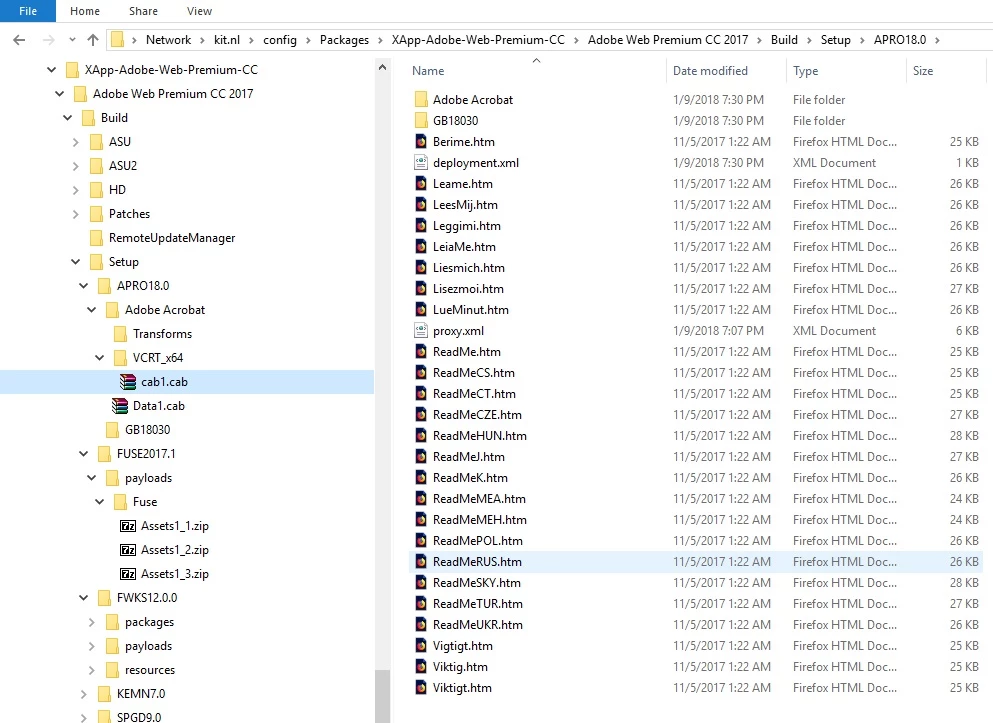
If i click open the "Adobe Acrobat" folder is see the following:
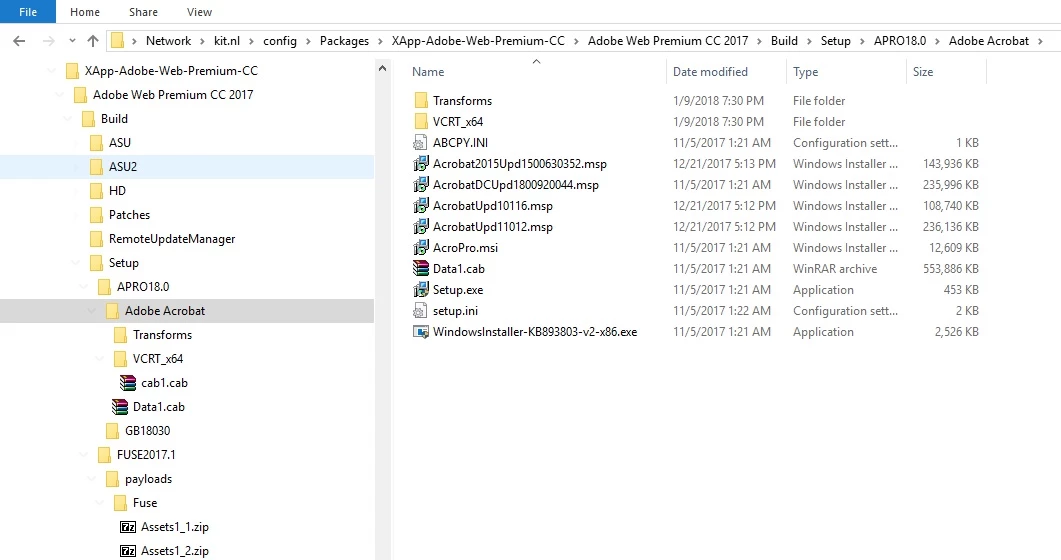
The AcroPRo.msi seems usable to deploy through GPO but i think this msi is missing the license key and custom settings.

Is there a way to get the whole CC package to work including Adobe Acrobat?

Kind regards,

M

This topic has been closed for replies.
Correct answer alisterblack

To run all installers at the same time please use the .exe

Otherwise the Acrobat .msi will need to be run seperately.

If you have included transformations made with the customization wizard you will see the .mst file in the same folder as the Acrobat .msi and a line will be written into the acrobat .ini file to include the transform.

For further information please refer to Deploy Adobe Acrobat XI or DC

2 replies

Participant
January 15, 2018

Thanks for the reply, alisterblack

We install all our applications through Windows Active Directory so msi has our preference. Also i don't think the msi that was created for Adobe by the CC wizard contains our key.

I did manage to package an Adobe Acrobat DC standalone package with our licence key and it successfully granted an offline exception. The problem i'm facing now is the Adobe Sign In requirement which pops up.

I'll try to make a new package with the Adobe msi that is created through the CC wizard creation and modify this one through the Acrobat Customization Wizard DC.

kglad
Community Expert
Community Expert
January 12, 2018
alisterblack
alisterblackCorrect answer
Inspiring
January 15, 2018

To run all installers at the same time please use the .exe

Otherwise the Acrobat .msi will need to be run seperately.

If you have included transformations made with the customization wizard you will see the .mst file in the same folder as the Acrobat .msi and a line will be written into the acrobat .ini file to include the transform.

For further information please refer to Deploy Adobe Acrobat XI or DC