

Tom_Alongi
Known Participant
August 20, 2023
Question

No "Three Dots" for Editing User Email Addresses

  • August 20, 2023
  • 2 replies
  • 449 views

Good afternoon, all.


I have seen variations of this question on the support threads, but never a conclusive answer and instead a fair amount of deflection to other threads which proved dead-ends. Bottom line, I am the administrator for a Team/Pro account with six users, including myself. We recently moved to new email domains, which I am trying to update in the Admin Console. But I can't.


The online guides claim you can edit profiles - including names, etc. - by navigating to Admin Console/Users and selecting the person in question. That is not true. When I try, I get this ...
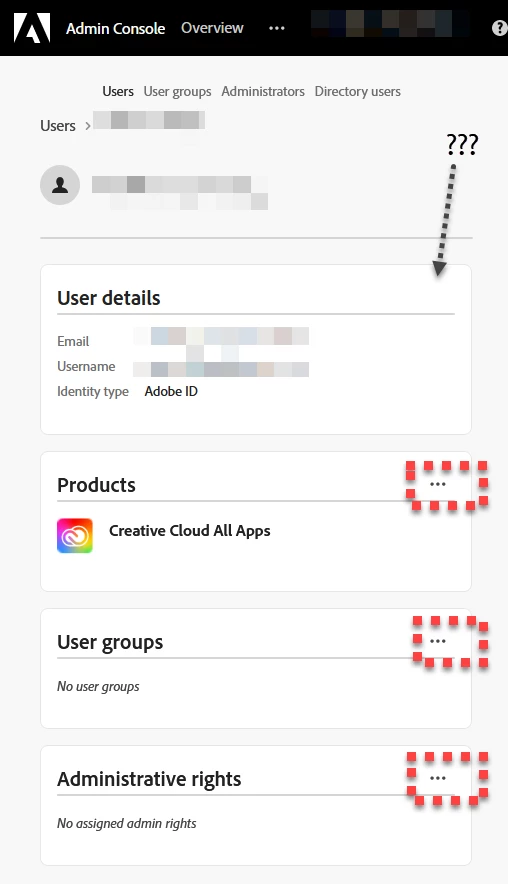
 

There are no three dots. Not there. Not where they're supposed to be. And when I do examine the available options, the closest solution I can find is to wander through the business of downloading/uploading in CSV format.
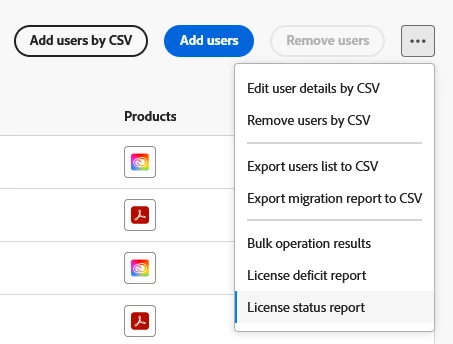


If I am forced to mess with CSV, then I guess I will. And I guess I'll cross my fingers and trust that that will work as advertised. But it won't explain why the editing interface doesn't appear as Adobe claims... and the back-and-forth with CSV manipulation is a lot of extra work, too. Can someone explain what is going on?


Tom

This topic has been closed for replies.

2 replies

Participant
November 15, 2024

I am having the same issue.  Can anyone assist?


Community Manager
November 15, 2024

Hi @patricia_4874,

Thank you for reaching out.

To assist you further, could you kindly clarify the specific issue you are encountering? If you are experiencing challenges with the CSV upload method to update user emails, and the changes are not reflecting in the Admin Console, we recommend reviewing the following:


Clear Cache or Use a Different Browser: Sometimes, UI glitches can be resolved by clearing your browser’s cache or using an alternative browser.

Double-Check CSV Formatting: Please ensure the CSV file is formatted correctly, including the use of appropriate delimiters.


For additional guidance, we invite you to refer to the following article on Manage multiple users | Bulk CSV upload.


If the issue persists after following these steps, please do not hesitate to provide more details, and we’ll be happy to assist you further.


Regards,
^AN

Tom_Alongi
Known Participant
August 20, 2023

UPDATE


Well, I tried the CSV method - just in case - and that flopped, too. The Excel form downloaded fine ... and I changed the data fine ... and I uploaded the new spreadsheet fine ... and then the console just stared back at me with the old addresses still intact. Refreshing the page didn't work either.


It was as though I hadn't even bothered.

Tom_Alongi
Known Participant
August 20, 2023

... and here is the error message I received in my inbox each time (x3) that I tried the CSV method.