


Persistent Adobe Creative Cloud Repair Popups
Hi,
I'm running into an issue at my organization where many of my users (Windows 10, mix of build 1703 and 1909) receive this popup regarding Adobe Creative Cloud Desktop (ACCD) upon boot stating "Adobe Creative Cloud is needed to resolve this problem. However, it is missing or damaged. Please download and install a new copy of the Creative Cloud from 'http://www.adobe.com/go/adobecreativecloudapp'."
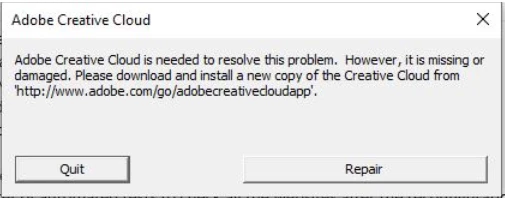
While it only shows up once upon boot, no matter what I do, this popup keeps coming back after a random number of restarts, affecting a random group of users. Here are the options I have tried based on previous community posts about this subject, and the popups just keep coming back.
Option #1: Run the repair option directly from the popup.
Option #2: Run the Creative Cloud Cleaner Tool, pull an ACCD package from the Creative Cloud Packager tool on my account, install that package.
Option #3: Manually uninstall ACCD from Programs & Features, use the ACCD package I pulled from the Creative Cloud Packager tool on my account, install that package.
Option #4: Use the ACCD package I pulled from the Creative Cloud Packager tool on my account, install that package without doing any uninstalling first.
Constraints:
1) Clicking "repair" is not an option since most of my users do not have admin rights to their machines.
2) I need to be able to deploy a fix silently to the enterprise.
3) We use named user licenses tied to AD login.
For now I have suppressed ACCD from starting on boot, but it is a workaround and I do not know what exactly is needing repair, or what I am missing/doing wrong. Any help or feedback would be very appreciated!
 AdChoices