


- Home
- Enterprise & Teams
- Discussions
- Reader update on terminal server
- Reader update on terminal server
Reader update on terminal server

Copy link to clipboard
Copied
I am upgrading reader on a terminal server. I don't want the 'Acrobat Security Settings' dialog box popping up asking to import settings the first time each user opens a signature enabled pdf. Is there a way to avoid this?


 21
Replies
21
21
Replies
21




Copy link to clipboard
Copied
I'm moving this to the Enterprise Deployment forum to see if someone can assist you with your question.


Copy link to clipboard
Copied
Get the Preference Reference which will help you accept the EULA for all users, disable behaviors you don't want in enterprise settings, etc. Refer to that application for all preferences and paths.
http://www.adobe.com/go/acrobatetk
You need these:
| bAskBeforeInstalling | Specifies whether trust anchors should be imported silently or Acrobat should ask permission from the user. |
| bLoadSettingsFromURL | Specifies whether or not trust anchors should be periodically downloaded from Adobe. |
| iCheckEvery | The value in seconds that the application should check for new certificates to download from Adobe. |
Copy link to clipboard
Copied
This is an old post.
- Go the ETK at www.adobe.com/go/acrobatetk.
- Learn how to set preference from the admin guide.
- Use the Preference Reference to see what's available (or use the answer above).
- Use the Customization Wizard for mass deployments.
HTH,
Ben

Copy link to clipboard
Copied
Hi Ben,
Thanks, isn't that (below) is the same as what is in the Customization Wizard? I noticed that I only get these pop up if I run both Acrobat 10 and Reader 11. If a computer doesn't have Adobe Acrobat but only Reader, I don't get this pop up. What if I upgrade my users to Acrobat 11? Will they still get this pop up?
You need these:
| bAskBeforeInstalling | Specifies whether trust anchors should be imported silently or Acrobat should ask permission from the user. |
| bLoadSettingsFromURL | Specifies whether or not trust anchors should be periodically downloaded from Adobe. |
| iCheckEvery | The value in seconds that the application should check for new certificates to download from Adobe. |
Copy link to clipboard
Copied
You should start with the documentation. . . in particular, the Pref Ref which tells you what products and what versions these prefs apply.
The CW is a tool that allows you to set anything. Prefs can be set with that tool, manually, or via any number of ways.
Copy link to clipboard
Copied
Brogers, Thank you. Sorry, I am a newbie and this documentation is quiet overwhelming.
What is CW? And is there like a group policy for this instead?
First of all, I read somewhere that it is not supported and recommended that Acrobat 10 and Reader 11 coexist together. So I supposed that this is a workaround for something that is not supported?
I am familiar with Group Policy, Orca and Adobe Customization Wizard is there anywhere in one of these tools I can use to suppress this box?
Thanks for your patience. I am so lost and confused on all of this.
Copy link to clipboard
Copied
If you're asking questions like "What is CW?", then you probably haven't opened the CW documentation. There's a good overview page.
All you need to do is set the registry preferences listed above. Use any of the methods you are "familiar" with.
HTH
Copy link to clipboard
Copied
Hi,
I added bAskBeforeInstalling in the registry on these exact locations but to no avail.
(Note: I placed _ as space because this forum keeps on reformatting my path)
HKEY_CURRENT_USER\Software\Adobe\Acrobat_Reader\11.0\Security\cDigSig\cAdobeDownload\bAskBeforeInstalling = value is 0
HKEY_CURRENT_USER\Software\Adobe\Acrobat_Reader\10.0\Security\cDigSig\cAdobeDownload\bAskBeforeInstalling = value is 0
and
HKEY_CURRENT_USER\Software\Adobe\Adobe_Acrobat\10.0\Security\cDigSig\cAdobeDownload\bAskBeforeInstalling = value is 0
I did it both manually on the registry, via GPO or Custom Wizard. Other people have tried but has the same exact issues:
http://forums.adobe.com/thread/1203540
http://forums.adobe.com/message/4961805 .
When I also looked here http://www.adobe.com/devnet-docs/acrobatetk/tools/PrefRef/Windows/index.html for bAskBeforeInstalling Pref Reference the version is TBD. Therefore, it appears that this may not work on XI *or* on a computer that runs two different versions.
I think what I am trying to accomplish is not supported and recommended to coexist because according here
http://helpx.adobe.com/acrobat/kb/acrobat-product-interoperability-install-remove.html
Did someone able to successfully make this import dialog go away on a computer that is Windows 7, Adobe Acrobat 10 and Adobe Reader XI without deleting or renaming the .acro files?
Thank you!
Copy link to clipboard
Copied
- If you set bAskBeforeInstalling to zero, you are telling the app to install without asking.
- Set bLoadSettingsFromURL to zero to do what you want.
- None of the AATL settings are marked TBD. The versions are all "9.0 and later".
Copy link to clipboard
Copied
Hi brogers_1
First, let me thank you for your time responding to my questions and your patience about this. I appreciate it so much.
Second, I applied your advice but did not work. Here are my exact settings. Windows 7, Adobe Acrobat 10.x and Adobe Reader 11.x
HKEY_CURRENT_USER\Software\Adobe\Acrobat_Reader\10.0\Security\cDigSig\cAdobeDownload\bAskBeforeInstalling = REG_DWORD is 0
HKEY_CURRENT_USER\Software\Adobe\Acrobat_Reader\10.0\Security\cDigSig\cAdobeDownload\bLoadSettingsFromURL = REG_DWORD is 0
*************
HKEY_CURRENT_USER\Software\Adobe\Adobe_Acrobat\10.0\Security\cDigSig\cAdobeDownload\bAskBeforeInstalling = REG_DWORD is 0
HKEY_CURRENT_USER\Software\Adobe\Adobe_Acrobat\10.0\Security\cDigSig\ cAdobeDownload\bLoadSettingsFromURL = REG_DWORD is 0
*****************
HKEY_CURRENT_USER\Software\Adobe\Adobe_Reader\10.0\Security\cDigSig\cAdobeDownload\bLoadSettingsFromURL = REG_DWORD is 0
HKEY_CURRENT_USER\Software\Adobe\Adobe_Reader\10.0\Security\cDigSig\cAdobeDownload\bAskBeforeInstalling = REG_DWORD is 0
*******************
HKEY_CURRENT_USER\Software\Adobe\Adobe Reader\11.0\Security\cDigSig\cAdobeDownload\bAskBeforeInstalling = REG_DWORD is 0
HKEY_CURRENT_USER\Software\Adobe\Adobe Reader\11.0\Security\cDigSig\cAdobeDownload\bLoadSettingsFromURL = REG_DWORD is 0
Copy link to clipboard
Copied
- Export your registry settings and post so I can see them.
- Post an image of the dialog that you are seeing.
Copy link to clipboard
Copied
[HKEY_CURRENT_USER\Software\Adobe\Adobe Acrobat\10.0\Security]
[HKEY_CURRENT_USER\Software\Adobe\Adobe Acrobat\10.0\Security\cDigSig]
[HKEY_CURRENT_USER\Software\Adobe\Adobe Acrobat\10.0\Security\cDigSig\cAdobeDownload]
"bAskBeforeInstalling"=dword:00000000
"bLoadSettingsFromURL"=dword:00000000
Here's the pic of the error message
AdobeIssue.jpg
Copy link to clipboard
Copied
Please post the image again. It disappeared when I removed the hundreds of non-essential registry lines from your post.

Copy link to clipboard
Copied
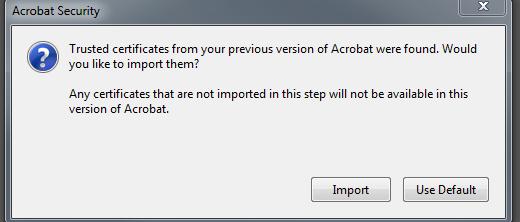
The same pop up is observered in our upgrade from Acrobat 10.0 to Acrobat 11.X on Windows 7, Attached the snapshot of the same. Tried with the above mentioned registry changes and did not work.
Copy link to clipboard
Copied
Sraj_FMR,
Agree. I don't think it works for 11.x. Maybe it works for lower version. I have no solution to this. I had to inform our users.
Copy link to clipboard
Copied
Now we have clarity: The dialog you are seeing is unrelated to the issues that started this forum thread. In your case, Acrobat is not going online but is instead finding things it needs from a previous install. Acrobat looks for existing .acrodata files so that any existing signing or certificate security workflows don't break after an upgrade.
You should let the new install import what is already existing on that local machine. There is no online contact.
HTH,
Ben

Copy link to clipboard
Copied
Hi,
I was not clear if these settings apply and work for XI to remove the "import" screen shot.
| bAskBeforeInstalling | Specifies whether trust anchors should be imported silently or Acrobat should ask permission from the user. |
| bLoadSettingsFromURL | Specifies whether or not trust anchors should be periodically downloaded from Adobe. |
| iCheckEvery | The value in seconds that the application should check for new certificates to download from Adobe. |
is there a way to set it to "import" automatically. i am using the customization wizard v11 to deploy reader 11.0.4 to several hundred (replacing v9).
can you point me to the message thread if there is one?
Thanks.
Copy link to clipboard
Copied
Hi,
Yes, this thread is mixing apples and oranges and is now quite confusing. If you are asking whether the preferences you list prevent the dialog that Sraj posted from appearing, then the answer is no. Your options are:
- Let the import happen per user (best choice since this preserves user data for existing workflows)
- Delete acrodata files on your target machines prior to install.
hth,
Ben
Copy link to clipboard
Copied
hi,
thanks for the clarification. yes, the post (#14) by sraj was what i was asking about.
i will have to try a script based on this post:
http://forums.adobe.com/thread/1203540
If i may ask one more question:
if i set in the wizard > security > " Privileged locations" area to add a folder location of:
%appdata%\Adobe\Acrobat\9.0\Security
will it clear the import pop up message that sraj posted?
Thanks.
Copy link to clipboard
Copied
- Yes, you can use a script to move the files ahead of time.
- No, setting a privileged location will not work.
Ben

Copy link to clipboard
Copied
Even though my response comes years after this thread was active, this thread is highly ranked on Google for the issue toward the end. That is, getting a prompt to import certificates after a major version upgrade. There is, indeed, a registry key to automatically and silently import, despite a statement to the contrary by brogers_1 above.
Simply set iImportAddressBook to the REG_DWORD value of 2 in the following key: HKCU\Software\Adobe\Acrobat Reader\11.0\Security\cDigSig
Hope this helps someone looking for this in the future.


Get ready! An upgraded Adobe Community experience is coming in January.
Learn more
 AdChoices