Byers Video
Known Participant
July 13, 2022
Answered

Remove a profile from account

  • July 13, 2022
  • 4 replies
  • 40318 views

I was issued a profile at the company i work for for the adobe CC.

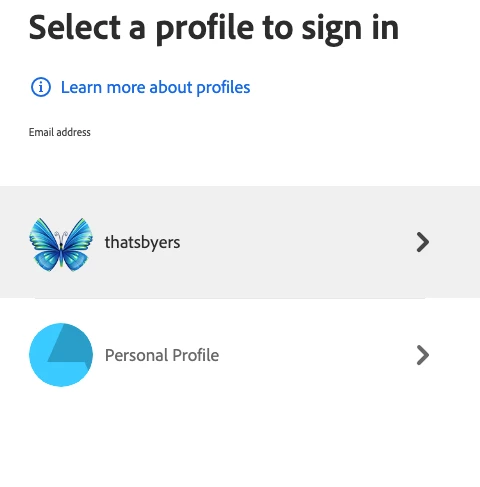
Recently there was a change in adobe organizational managing accounts as an admin -- something like that, and they created a new profile for me, with the same email address, and when i signed in one day it asked do you want thatsbyers or personal.  What is this?


Seems the older business profile turned into a personal profile that is connected to me because of the email address.


Now i get emails about the personal profile not having a current cc on file. when i sign into the personal profile i look for remove or delete and there is none.


How do I remove this personal profile and just have the business profile with the one email address that is linked to the business account?


Correct answer Abambo

For every account that is connected to a business ID, you have two layers:

  • A personal layer, where you can take “private” plans like a photography plan.
  • A business layer, where you get assigned a plan (or a task, like administrator) from the company you're working for.


In the personal layer, you can leave your organization. I haven't done that yet, so I can only speculate that this would trigger a removal of the business ID and you would lose access to all assigned plans by your company. The company can also choose to delete your business ID, which would have the same effect. If I'm correctly informed, you can be in more than one organization at a time. That would come handy for contractors working for multiple companies at the same time.


The standard, however, will be that you will have a company assigned e-mail address and on that address you will have your Adobe ID with the two layers. For the business ID, the data (library, Creative Cloud, Document Cloud) is controlled by your company.


The two layers are created automatically, and you can't delete one or the other, without loosing access to that layer. As the personal layer is the root layer, you can't leave that one as long as a business ID is attached.


Before this reorganization, it was impossible to have a personal plan and a business assigned plan on the same ID, which at that point was a major problem to some people. I always had my personal plan on my personal ID, however, so that was never an issue for me.


Whatever @howlaman's troubles are, I have no idea why this happens, if they don't have an Enterprise or Teams licence for one or the other Adobe product. It is worth mentioning that there is more than Creative Cloud, you also have Enterprise Cloud and the Technical Suite and the Substance plans and may be still other plans, that I have no idea about. @howlaman's IT should be aware of anything they have. It may well be, that they added you by error to the company's system. 

4 replies

Abambo
Community Expert
AbamboCommunity ExpertCorrect answer
Community Expert
December 29, 2022

For every account that is connected to a business ID, you have two layers:

  • A personal layer, where you can take “private” plans like a photography plan.
  • A business layer, where you get assigned a plan (or a task, like administrator) from the company you're working for.


In the personal layer, you can leave your organization. I haven't done that yet, so I can only speculate that this would trigger a removal of the business ID and you would lose access to all assigned plans by your company. The company can also choose to delete your business ID, which would have the same effect. If I'm correctly informed, you can be in more than one organization at a time. That would come handy for contractors working for multiple companies at the same time.


The standard, however, will be that you will have a company assigned e-mail address and on that address you will have your Adobe ID with the two layers. For the business ID, the data (library, Creative Cloud, Document Cloud) is controlled by your company.


The two layers are created automatically, and you can't delete one or the other, without loosing access to that layer. As the personal layer is the root layer, you can't leave that one as long as a business ID is attached.


Before this reorganization, it was impossible to have a personal plan and a business assigned plan on the same ID, which at that point was a major problem to some people. I always had my personal plan on my personal ID, however, so that was never an issue for me.


Whatever @howlaman's troubles are, I have no idea why this happens, if they don't have an Enterprise or Teams licence for one or the other Adobe product. It is worth mentioning that there is more than Creative Cloud, you also have Enterprise Cloud and the Technical Suite and the Substance plans and may be still other plans, that I have no idea about. @howlaman's IT should be aware of anything they have. It may well be, that they added you by error to the company's system. 

ABAMBO | Hard- and Software Engineer | Photographer
Known Participant
December 29, 2022

I think the issue I'm having is the opposite of what you're describing. All my info is under my personal despite being provided by my business. I don't want to delete my personal profile.


This problem always starts with receiving an email from an Adobe contact that reads the following:


Good Morning, (company name),


This is Muhammad, Adobe Customer Success Manager for (COMPANY), and part of the Adobe Sign Business team.


Please direct this to your IT Department.


This communication is pertaining to your Admin control over your business licenses. We have found that there are Individual users using your company domain that are not part of your business ecosystem. We recommend consolidation of these licenses to attain centralization of data, licenses and cost. Adobe ensures seamless consolidation for migrated licenses and data assets.


Please find the list of these licenses below and advise if we should proceed with the consolidation process of these licenses into your business account:


It then lists what appears to be every email in our company with Adobe subscriptions, including our IT and anyone who might be an admin for a department. So basically, Adobe is claiming we have a business account in some format, but also claiming no one in our company is under it. The split profile for me appears some time after this email, without our IT agreeing to it, and the business profile for my account is always empty with no subscriptions, licences, or anything (since our IT never agreed to it or set it up) despite my subscription being for work. When I try to ask about it, I get sent in the circles I mentioned above regarding Adobe Teams and Enterprise. If there is a better contact or location to receive help on this, I would greatly appreciate advice. It really seems like no one in Adobe knows what is happening even though the changes are being made by Adobe's system.


It should be noted that this email we receive is CC'd to every person in our company with an Adobe subscription, not specifically to our IT or anyone who might be an oerall admin for a department. It actually seems rather invasive, as it lists everyone's emails and their product subscription level in there.


Abambo
Community Expert
Community Expert
December 29, 2022
ABAMBO | Hard- and Software Engineer | Photographer
Known Participant
August 15, 2022

I'm not certain if you ever received help for this - if not, I suggest getting into a live chat with an agent under Adobe's Teams department to figure out the proper steps. I had this same issue today where, since my individual account was made by my workplace using my workplace address, Adobe has decided to create a "work" and "personal" profile for me, despite all my info still being in the personal and my workplace having no Adobe Teams system in place. I was in help chat for some time and it was eventually concluded that the empty profile was not supposed to be there and should be deleted. We will see if that happens. But now we need to check if all people with accounts under our work emails have been affected. It seems like something Adobe has rolled out on its own, to the confusion of its customers.

Known Participant
August 29, 2022

Just an update that it is now nearly 2 weeks later. Although the support agent I spoke with in chat said they would remove the business profile from my account, as it was a mistake, it is still there when I log in. Not sure if anyone else is still encountering this issue at this stage, but it seems it's still unresolved.

Legend
July 19, 2022

Hi there,


Adobe creates profiles for you if your authenticating email address is used for multiple Adobe plans. So, to ensure that you're never prompted with the Profile chooser, you'll need to have a distinct email address for each organization for which you have paid entitlement.


Or you can use the automatic profile selection feature:

When you sign in, Adobe filters the list of profiles to the most appropriate ones. In case there's only one applicable profile for the app or service you’re trying to sign in to that profile is chosen automatically.

However, if you have a Personal Profile and one or more Business Profiles, use the Automatic profile selection setting to exclude your Personal Profile during sign-in. So, if you only have one Business Profile, you won't be prompted to select a profile at sign-in.

This setting is turned on, by default, for users with a mix of Personal and Business Profiles. For other users, it's turned off, by default.

To turn automatic profile selection on or off, do the following:

  • Go to Account and security > Sign-in and security.

  • Turn off the Select my profile automatically option.


Hope this helps.

Charles

Byers Video
Known Participant
July 19, 2022

Thank you, Charles. But the personal profile, I NEVER CREATED, still exists. and I keep getting notification emails to pay my bill. As I said before was the original profile for our adobe cc, then the boss redid the business, or adobe did (with a new business model, all vague to me), and a duplicate or new profile was created. which is for the business and the old one turned into a personal.


Is it something that the owner of the account would be able to delete since it was under the business umbrella, in the beginning?

Byers Video
Known Participant
July 13, 2022

and this is entirely odd as well, since this post is generated from a completely different email address not connected to any account with adobe other than these forums.  I know which one is which when i am logged in. the business one has a butterfly and the personal profile has my name with a red crossed-out circle over it.

So now i am even more confused. Let me see if i can log out of this and log in with my real credentials.


NM this is the correct one. have to change my profile image and name.

Byers Video
Known Participant
July 13, 2022

interesting. when i go to change anything on my profile, there is a button that reads "Edit on Adobe Account."


I click it and it goes to the personal profile account with all the red notifications. UPDATE YOUR PAYMENT...


I am logged into the business acount on a different browser and i came to the forums and saw my post and clicked profile and then edit on adobe account and it took me to the personal profile.


OH, THIS JUST GETS EVEN BETTER.


I am trapped on a loop in a profile that will not go away.

Byers Video
Known Participant
July 13, 2022

I am afraid to disconnect the personal profile from the organization for fear it will effect the business profile I need to keep.