
Using Creative Cloud Packager to install Photoshop only from the Creative Suite CS6
Hi,
I'm trying to use the latest version of Creative Cloud Packager in order to Package Photoshop CS6. So I got the installation sources from the Creative Suite Design Premium CS6 in order to isolate Photoshop.
Basically my settings seems to be right, the creation of the package has been completed successfully but I have some issues with the new package that has been created.
1- After installing the new Photoshop package even if I used an Enterprise License the application once is launched it always displays the 30 days trial and then you need to enter the serial number again.
For now the screenshots are available in French because we're trying to create bilingual applications starting with this language.
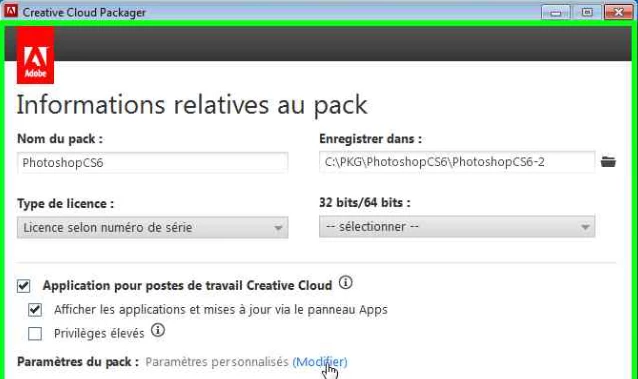
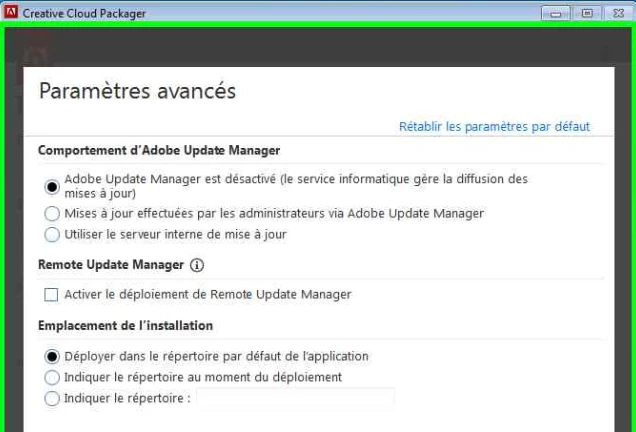
2- The shortcuts are not copied inside "Adobe" folder on "Start Menu\All Programs\" so the applications that come along with Photoshop are directly on the root of the Start Menu, and there's no option to redirect those icons. If you have any way like an XML setting in order to adjust that or that need to be modified in your Creative Cloud Packager settings. Notice that I want to use the default installation folder inside : C:\Program Files (x86)\Adobe\
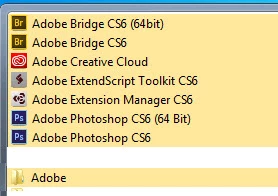
Please advise if you have already solved this issue or do I need to add any MST to the MSI that has been created but even on the MSI I don't find any Icons inside Start Menu\Programs Menu\
Thanks & Kind regards.
Joel
 AdChoices