
Acrobat Customization Wizard DC Error (Mac)
Hello! Hopefully someone may be able to assist me with this error I'm getting......
I am attempting to customize an Acrobat DC .pkg for MAC that was built using the Creative Cloud Packager tool (enterprise).
I have successfully built several Windows packages including one for Acrobat DC and I was also able to customize it using the Wizard tool.
I am using the following documentation:
Mac Wizard Overview — Customization Wizard DC for Mac
The .pkg that was built for Mac is able to successfully install on a system if it run directly, therefore it is unlikely that there are any issues with the package itself. It is version 2015.009.20069.
I have also tried rebuilding it just to be sure.
I downloaded the DC Customization Wizard from the following link:
https://www.adobe.com/support/downloads/detail.jsp?ftpID=5893
Whenever I attempt to open the installer file I receive the following error:
"An error occurred while creating the output package. See the logs for details."
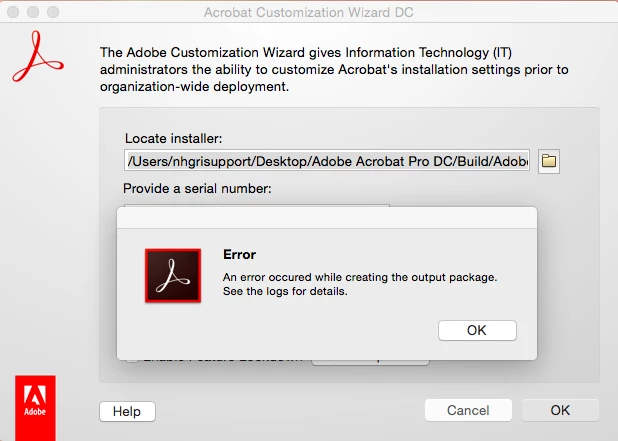
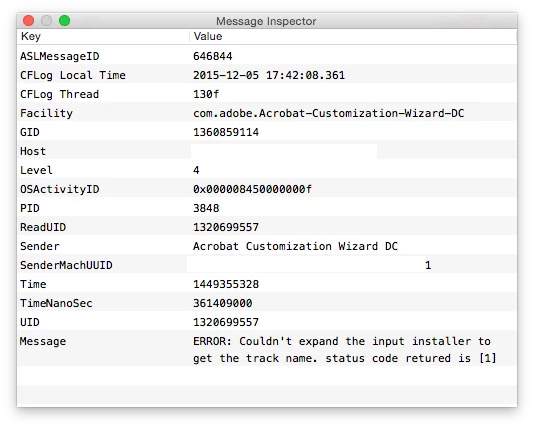
When I look at the console it shows the following:
12/5/15 5:50:08.293 PM Acrobat Customization Wizard DC[4033]: ERROR: Couldn't expand the input installer to get the track name. status code retured is [1]
I have attempted to install the Wizard in various locations including /Applications/ and other folders that have read/write permissions. I have attempted with multiple combinations on the initial Wizard screen.
Please see the attached screenshots.
Is there something that I'm missing or should be doing differently?
Edit:
If it makes any difference, I checked the license type for my install and it is showing as and activated LeID of:
V7{}CreativeCloudEnt-1.0-Mac-GM-MUL
Using this documentation:
Identifying Existing Installs — Enterprise Administration Guide
Thank you!
 AdChoices