Exit
  • Global community
    • Language:
      • Deutsch
      • English
      • Español
      • Français
      • Português
  • 日本語コミュニティ
  • 한국 커뮤니티
0

Adobe creating multiple folders in program files

Community Beginner ,
Mar 15, 2021 Mar 15, 2021

Hi!
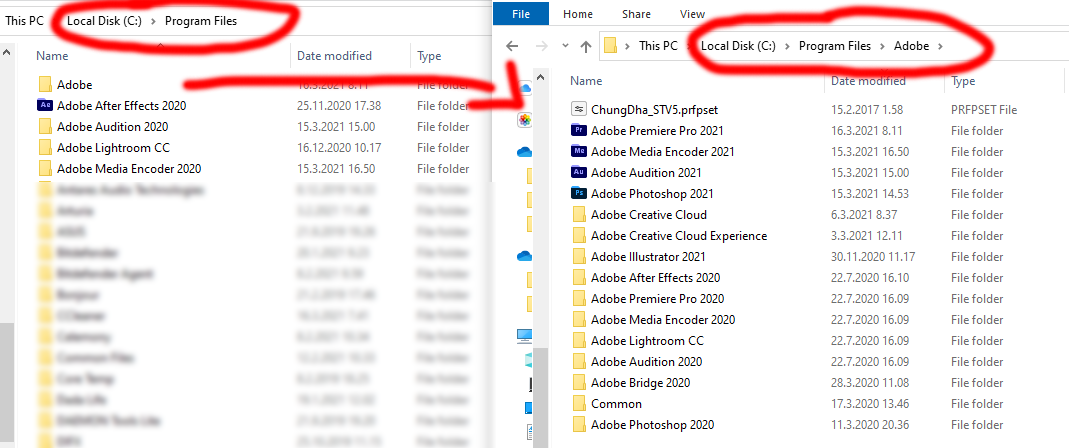
I noticed that I have multiple instances of my Adobe CC apps on my program files-folder. 

I tried removing some of the folders in Program Files, but then for example Adobe Premiere didn't find the luts I usually use. I have no idea how this has happened, and I don't know if it's normal or not. 

I have reinstalled everything once, but I don't want to delete these folders manually as they contain many of my presets/LUTs.
Thanks!

435
Translate
Report
Community guidelines
Be kind and respectful, give credit to the original source of content, and search for duplicates before posting. Learn more
community guidelines
Community Expert ,
Mar 16, 2021 Mar 16, 2021
LATEST

the default install location for the all the 64 bit programs should be in c:program files\adobe:


kglad_1-1615903596187.png


if that's what you want, for the programs install in other locations change (click file>preferences>apps>) the default install location to the other locations and uninstall those programs.


whatever presets etc that you want to keep, you'll need to move manualy.


p.s.

kglad_0-1615903502999.png


Translate
Report
Community guidelines
Be kind and respectful, give credit to the original source of content, and search for duplicates before posting. Learn more
community guidelines