

Adobe Installer Blocked by Firewall - Recurring Issues
Over the last 6 months or so I've had to add 13 firewall rules to accommodate changes in to the servers that your products are downloaded from. The FQDN at the bottom of the list never worked.
This happens every time I need to install Adobe products on a client's computer. Something new is blocked, and I have to track down your new IP address and add a firewall exception for it, often more than one. See screenshot below, today I added the rule titled Adobe Acrobat 8. (has nothing to do with version numbers, just the number of rules I've had to add in order to accommodate you.)
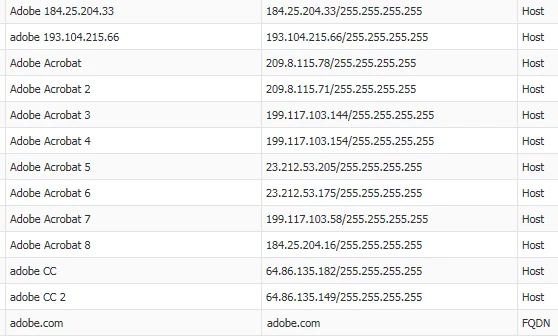
Can you provide a FQDN (Fully Qualified Domain Name) for your installation servers so that I don't have to add on average two new Adobe rules every single month?
Thanks.
Justin A Smith
IT Consultant
 AdChoices