
Known Participant
January 23, 2017
Answered

Auto trigger the updates

  • January 23, 2017
  • 6 replies
  • 5708 views

Hi team,

I have a requirement from my team to auto update the adobe packages. Below is my situation.

1) Users will not have admin access on machines

2) No manual updates allowed outside SCCM

3) User should not get the update prompts.

Is there any option that i can make SCCM (System center configuration manager) ) to trigger the  updates to download.

or

Store locally the updates package them using System center configuration manager .

Regards,

Santhosh B S
    This topic has been closed for replies.
    Correct answer alisterblack

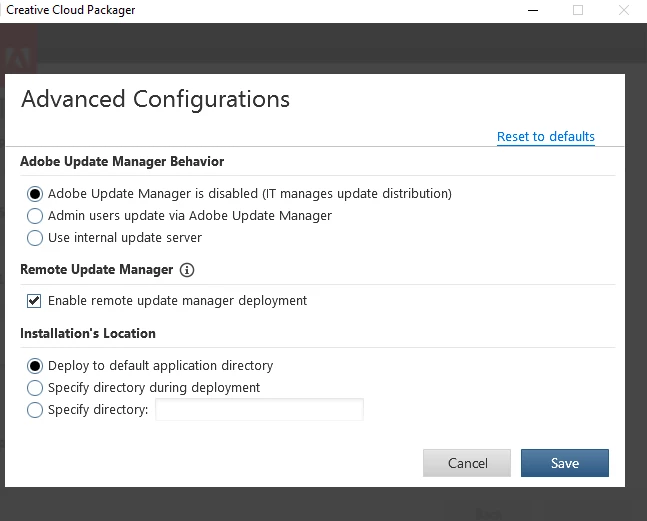
    The CCP options should look like this.

    6 replies

    alisterblack
    Community Manager
    Community Manager
    January 31, 2017


    I tested this by signing out of the Creative Cloud Desktop App and then running Remote Update Manager. It did not require me to sign in and installed correctly.

    Known Participant
    February 1, 2017

    Hi Alister,

    Thanks for the update. I am using windows 10 and i need silent switch to run the RUM.

    like remoteupdatemanager.exe /quiet or /qn /q

    Please help with the silent switch to download the updates. I dont have any proxy environment.

    Regards,

    Santhosh B S

    alisterblack
    Community Manager
    Community Manager
    February 2, 2017

    The way to do this is to script RUM to run in the background or to run overnight. For example by scheduling a Task in Windows. Schedule a Task

    alisterblack
    Community Manager
    Community Manager
    January 27, 2017

    Yes, if you launch Creative Cloud Desktop App it will ask for a sign in. Users will need to be signed in anyway if you are using a named user method.

    Remote Update Manager log file

      The Remote Update Manager log file provides detailed information about the events that occur during deployment of exception payloads with Remote Update Manager.
    The log file is named RemoteUpdateManager.log and is located as follows:

    • In Windows, the log file is in the %temp% location.
    • In Mac OS, the log file is in the folder ~/Library/Logs/.

    Use Adobe Remote Update Manager

    Known Participant
    January 30, 2017

    Consider a user who has creative cloud installed doesn't have Adobe Credentials. Still we (SCCM team) can invoke the RUM to update the adobe installed products ?

    alisterblack
    Community Manager
    Community Manager
    January 30, 2017

    You can use RUM with a serialized deployment.

    alisterblack
    Community Manager
    Community Manager
    January 24, 2017

    I also just tested on Windows 10 with the same result.

    Known Participant
    January 24, 2017

    Tried on Win 10 machine. Am i missing any option while creating a package? I am retrying creation of package and keep you posted.

    alisterblack
    Community Manager
    alisterblackCommunity ManagerCorrect answer
    Community Manager
    January 24, 2017

    The CCP options should look like this.

    alisterblack
    Community Manager
    Community Manager
    January 24, 2017

    What operating system are you installing on to?

    I tried this with a Windows 7 VM and RUM was in this location.

    alisterblack
    Community Manager
    Community Manager
    January 24, 2017

    You should also find this thread useful: Remote Update Manager and SCCM

    Known Participant
    January 24, 2017

    I followed the link "Use Adobe Remote Update Manager "

    i prepared the package and installed manually on one of my test machine and i don't see the OOBE_Enterprise folder.

    C:\Program Files (x86)\Common Files\Adobe\OOBE_Enterprise\RemoteUpdateManager

    Please guide if i am missing anything.

    Regards.

    Santhosh B S

    alisterblack
    Community Manager
    Community Manager
    January 24, 2017

    There are multiple options for updates. See the following document for an overview. Enterprise Help | Applying updates