
Participant
July 19, 2012
Answered

Deploy Acrobat Reader 10.1.3 via MSI Group Policy

  • July 19, 2012
  • 1 reply
  • 36115 views

The purpose of this thread is to identify EASIEST way to create/obtain an MSI file of the LATEST VERSION of Acrobat Reader (currently 10.1.3 as of 7/19/2012) to be deployed via GPO.  I am not concerned with customizations of Reader settings as I have accomplished this already using Group Policy.

It sounds so easy, but I have found it to be quite frustrating and extremely time consuming to figure this out.

Here's what I have so far:

To download the full installer from Adobe, you must first apply on Adobe's website to distribute Reader:

http://www.adobe.com/products/reader/rdr_distribution1.html

Once you submit the request, a short time later you'll get an e-mail with a link to download the full exe file of reader 10.1.3. 

Here's a link that explains how to extract an MSI from this exe:

http://blogs.adobe.com/dmcmahon/2010/06/16/how-to-extract-an-msi-file-from-the-exe-

for-adobe-reader/

Even with following those steps, I do not end up with an MSI file which will install 10.1.3.

To try another route:

There is also an Adobe FTP site.  If you navigate down into the Reader 10.1.0 folder there is an MSI file.  Good - but it's the old version.
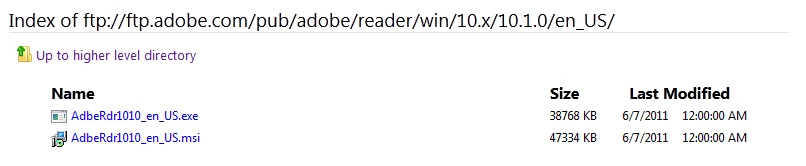
You would think that if you navigate into the 10.1.3 folder there would be an MSI there as well.

Unfortunately there is not.  However, there is an MSP file found in the misc folder:

I have tried several methods that are supposed to combine the MSP file with the MSI file - they have not worked.

I have also tried several methods of modifying MSI files, and using the Adobe Cusomization wizard downloadable here:  http://www.adobe.com/support/downloads/detail.jsp?ftpID=4950

I am unable to end up with a deployable MSI file for Reader 10.1.3.

It's amazing that it's so complicated to deploy the latest version of Adobe Reader to my users.

Does anyone have a comprehensive answer to this simple problem?  I do not want a link to a document with 20 pages explaining the theory of MSP files.  I am looking for a concise, step by step method to obtain an MSI for 10.1.3 quickly and easily.

Thanks!

This topic has been closed for replies.
Correct answer Steve Cordero

First there isn't a single MSI file that will install Adobe Reader 10.1.3 available. There are two ways in which you can create an installer package that will install Adobe Reader 10.1.3. 

1.  Bootstrapper

-  Bootstrapper uses the Setup.ini file to create a chained installation process and is run from Setup.exe with a limited amount of installation switches available. 

The process is documented in the Enterprise Administration Guide:  http://kb2.adobe.com/cps/837/cpsid_83709/attachments/Acrobat_Enterprise_Administration.pdf#page=77

Here is a reference video on the process:  http://www.youtube.com/watch?v=9zYTUyOIcNk

2.  AIP (Administrative Installation Point)

- AIP uses the Windows Installer to create a decompressed updated full MSI based installer.  The process is documented in the Enterprise Administration Guide:  http://kb2.adobe.com/cps/837/cpsid_83709/attachments/Acrobat_Enterprise_Administration.pdf#page=70

Here is a reference video on the process: http://www.youtube.com/watch?v=05XOKX0150w&feature=relmfu

* Please note, that each installation method has it's advantages and disadvantages. Those aspects of each installation type need to be seriously considered for your specific environment and what will and will not work for the IT group and user groups within your enterprise before you decide upon one of them.

Regards,

Steve

1 reply

Allta Media
Community Expert
Community Expert
July 20, 2012

Let us know if this technical article helps Update, patch | Acrobat, Reader 10.x | Windows, Mac OS.

AMSBBHAuthor
Participant
July 23, 2012

This does not help.  If I wanted to spend a few days studying how Adobe creates their software patches then this would be useful.  At which point I might end up with a workable solution - but maybe not.  I do not have the time nor desire to understand the nuances of Adobe's complicated patching process.  I suspect Adobe thinks that IT admins have the time/desire to do this - which is certainly not the case for me.  All I want is a quick and easy way to deploy the latest  version to new and existing machines.  Adobe - just give me the MSI files to put in my GPO...

As I stated earlier, I need a clear and concise method to obtain/create an MSI file to keep all my windows machines on the latest version of Reader 10.1.3.

Steve CorderoCorrect answer
Adobe Employee
July 24, 2012

First there isn't a single MSI file that will install Adobe Reader 10.1.3 available. There are two ways in which you can create an installer package that will install Adobe Reader 10.1.3. 

1.  Bootstrapper

-  Bootstrapper uses the Setup.ini file to create a chained installation process and is run from Setup.exe with a limited amount of installation switches available. 

The process is documented in the Enterprise Administration Guide:  http://kb2.adobe.com/cps/837/cpsid_83709/attachments/Acrobat_Enterprise_Administration.pdf#page=77

Here is a reference video on the process:  http://www.youtube.com/watch?v=9zYTUyOIcNk

2.  AIP (Administrative Installation Point)

- AIP uses the Windows Installer to create a decompressed updated full MSI based installer.  The process is documented in the Enterprise Administration Guide:  http://kb2.adobe.com/cps/837/cpsid_83709/attachments/Acrobat_Enterprise_Administration.pdf#page=70

Here is a reference video on the process: http://www.youtube.com/watch?v=05XOKX0150w&feature=relmfu

* Please note, that each installation method has it's advantages and disadvantages. Those aspects of each installation type need to be seriously considered for your specific environment and what will and will not work for the IT group and user groups within your enterprise before you decide upon one of them.

Regards,

Steve