
boorl1977
Participant
November 22, 2018
Answered

How do I disable the Creative Cloud sign-in pop-up Window
  • November 22, 2018
  • 1 reply
  • 17529 views

Hi

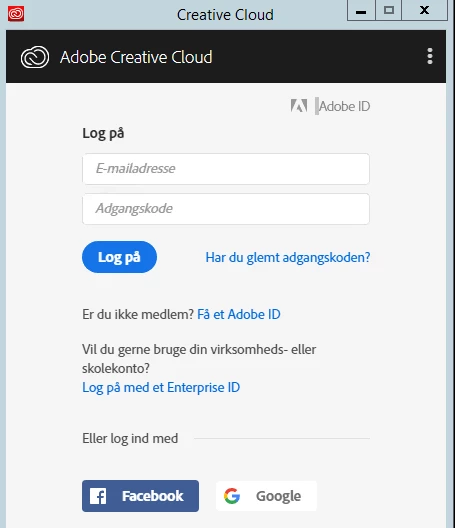
I have installed Creative Cloud on a Citrix server, I have som users who use Creative Clud and some who don't.

If you sign in, Creative cloud is just minimized and don't pop up at logon.

but user who don't have a creative clod account and don't need on, are prompted for login every time they logon to the Citrix server.

How do I stop Creative cloud sign-in window from popping up at logon?

This topic has been closed for replies.
Correct answer boorl1977

I found a solution :-)

Delete this reg key through GPO

Action Delete

PropertiesHive HKEY_LOCAL_MACHINE

Key path SOFTWARE\Wow6432Node\Microsoft\Windows\CurrentVersion\Run

Value name Adobe Creative Cloud

Set this under user GPO  - Item-level targeting used Security Group if member

Action Update

PropertiesHive HKEY_CURRENT_USER

Key path SOFTWARE\Microsoft\Windows\CurrentVersion\Run

Value name Adobe Creative Cloud

Value type REG_SZ

Value data "C:\Program Files (x86)\Adobe\Adobe Creative Cloud\ACC\Creative Cloud.exe" --showwindow=false

To Clean up if removed from security group - Item-level targeting used Security Group if not member

Action Delete

PropertiesHive HKEY_CURRENT_USER

Key path SOFTWARE\Microsoft\Windows\CurrentVersion\Run

Value name Adobe Creative Cloud

1 reply

November 22, 2018

Hi

Click on the three dots and select preferences and deselect Launch at login

boorl1977
boorl1977Author
Participant
November 22, 2018

Hi

Thanks for the answer :-)

I do not have that opportunity when I'm not logged in.

I need to stop it from popping op for alle users when they login.

Is it possible to just start minimized, as it is for user who are logon.

boorl1977
boorl1977AuthorCorrect answer
Participant
November 22, 2018

I found a solution :-)

Delete this reg key through GPO

Action Delete

PropertiesHive HKEY_LOCAL_MACHINE

Key path SOFTWARE\Wow6432Node\Microsoft\Windows\CurrentVersion\Run

Value name Adobe Creative Cloud

Set this under user GPO  - Item-level targeting used Security Group if member

Action Update

PropertiesHive HKEY_CURRENT_USER

Key path SOFTWARE\Microsoft\Windows\CurrentVersion\Run

Value name Adobe Creative Cloud

Value type REG_SZ

Value data "C:\Program Files (x86)\Adobe\Adobe Creative Cloud\ACC\Creative Cloud.exe" --showwindow=false

To Clean up if removed from security group - Item-level targeting used Security Group if not member

Action Delete

PropertiesHive HKEY_CURRENT_USER

Key path SOFTWARE\Microsoft\Windows\CurrentVersion\Run

Value name Adobe Creative Cloud