
Answered
Removing assigned license?
good day! May I know how to remove the assigned license? It prompted me to contact support and it cannot totally removed the assign panel.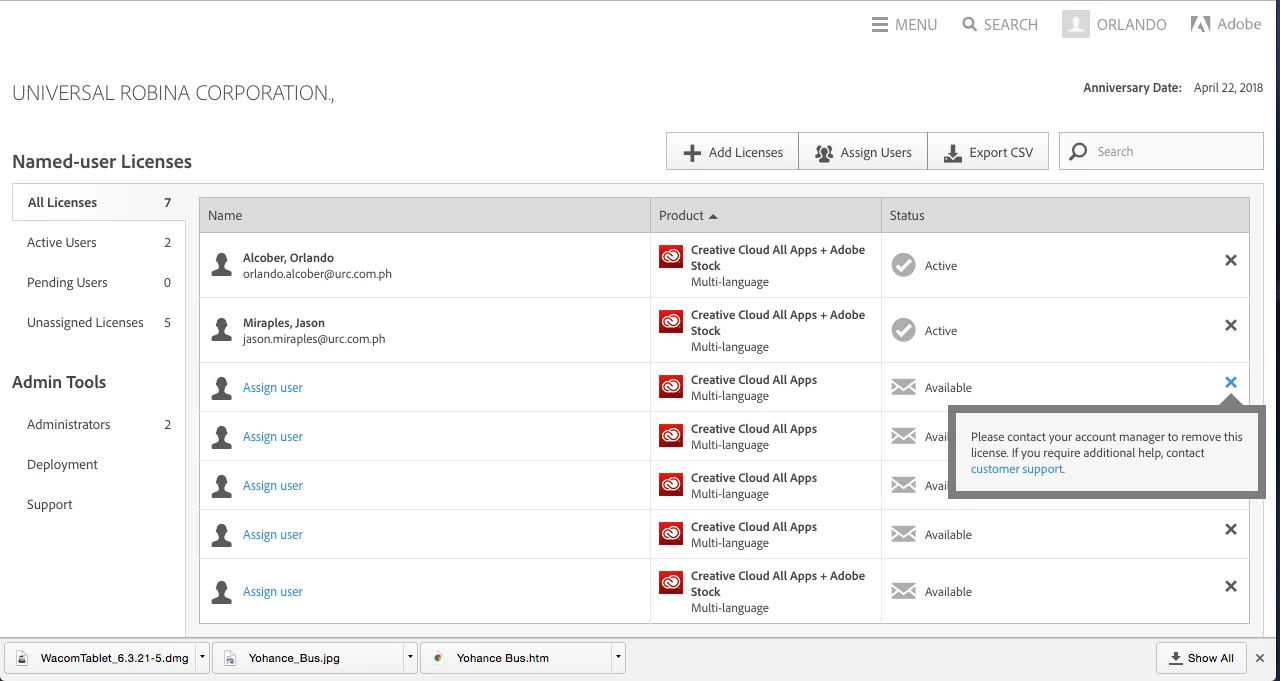

good day! May I know how to remove the assigned license? It prompted me to contact support and it cannot totally removed the assign panel.
Hi,
Please see the following information from Manage your Creative Cloud for teams membership
A license is committed for one year or prorated to the anniversary. Therefore, you must maintain the committed number of licenses until your anniversary date. If you have purchased your Creative Cloud for teams membership directly from Adobe.com, you can remove licenses; however, a cancellation fee will be charged. Contact Customer Support for details.
Note:
If you have purchased your Creative Cloud for teams membership via a reseller, you can’t return or cancel your membership, or remove a license, after 14 days.
Already have an account? Login
Enter your E-mail address. We'll send you an e-mail with instructions to reset your password.
 AdChoices