




Another way to install Add-ons (updated)
Hi everyone,
Just wanted to let you know that we just provided another way to install Add-ons, this is primarily if you encounter an install problem when using the Creative Cloud desktop app, then we now have an alternative way to install. We have also made it more discoverable. You can now find it in 2 places:
1. In My Add-ons (Click on "Install issues?" and if the Add-on is compatible with CS6 and you want to use it specifically for CS6 now you can! Just click the blue text "Install for CS6" which will take you to a direct download for use with Adobe Extension Manager CS6.
2. In the Where to find it section after you have acquired a product. Look at the "Install another way" section for details.
We also have a new troubleshooting check list.
It's not as slick as using the Creative Cloud Desktop app but it should work.
Clicking Download Add-on for that Add-on downloads a zxp file. You need to have Adobe Extension Manager installed to then unpack the zxp.
Please read the Where to find it section of that Add-ons for next steps once the Add-on has been installed via Extension Manager and please ensure you are using the compatible version of Extension Manager for that Add-on, so for instance if it's for CC or CC 2014 apps you need Extension Manager 7.2 or later. If it's for CS6 you would need Extension Manager CS6, there are links on the page to download Extension Manager.

Here's download links for Extension Manager
Download Adobe Extension Manager
If you already have Extension Manager CC you can also get a small update to Extension Manager CC 7.2 which works with CC and CC 2014 release here.
We hope you like this new alternative installation method. See below for a screenshot.
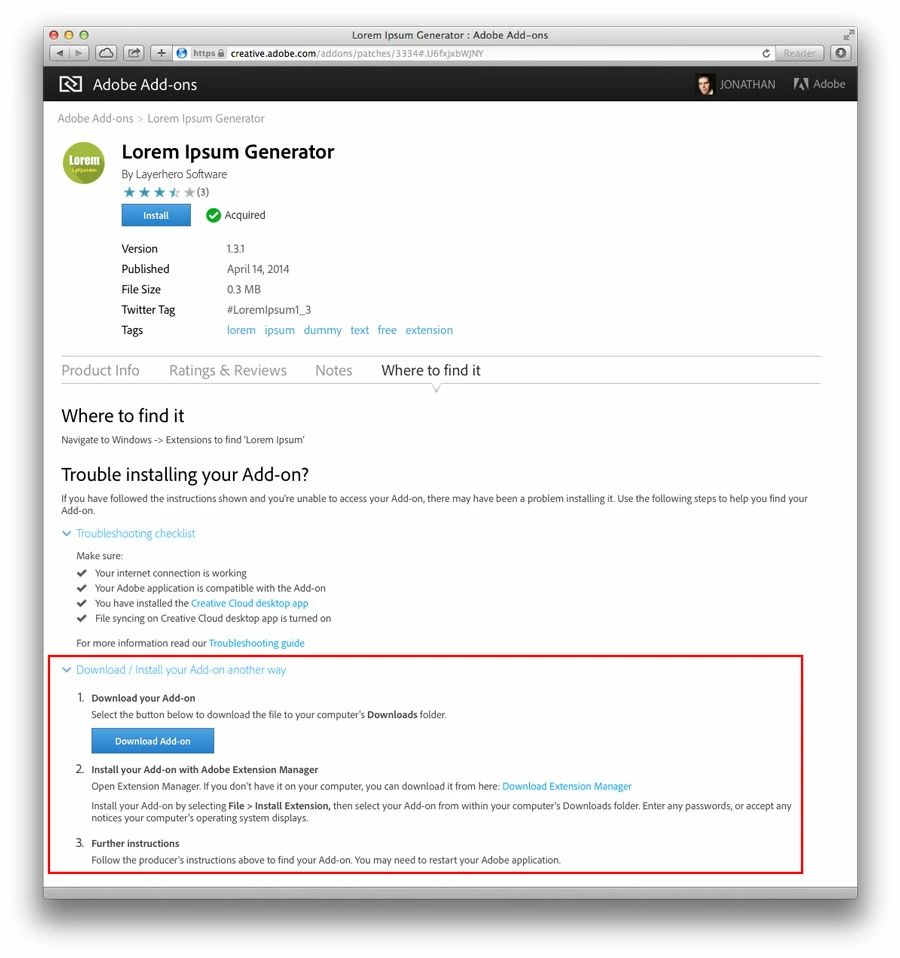
Update (July 29): You can now get access to install via Extension Manager in My Add-ons.
If you are having trouble
If the Add-on
 AdChoices