



erinferinferinf
Adobe Employee
Adobe Employee
December 2, 2020
Answered

Impossible to download extensions "400 Bad Request" error

  • December 2, 2020
  • 13 replies
  • 6330 views

If you're having this problem, where even free downloads from the Exchange don't seem to load, please let us know here.
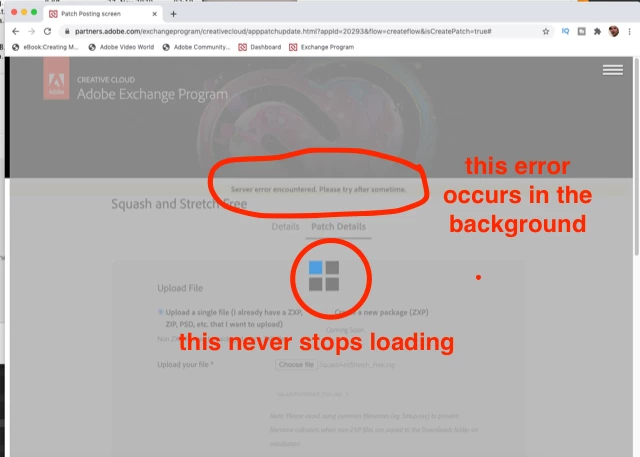
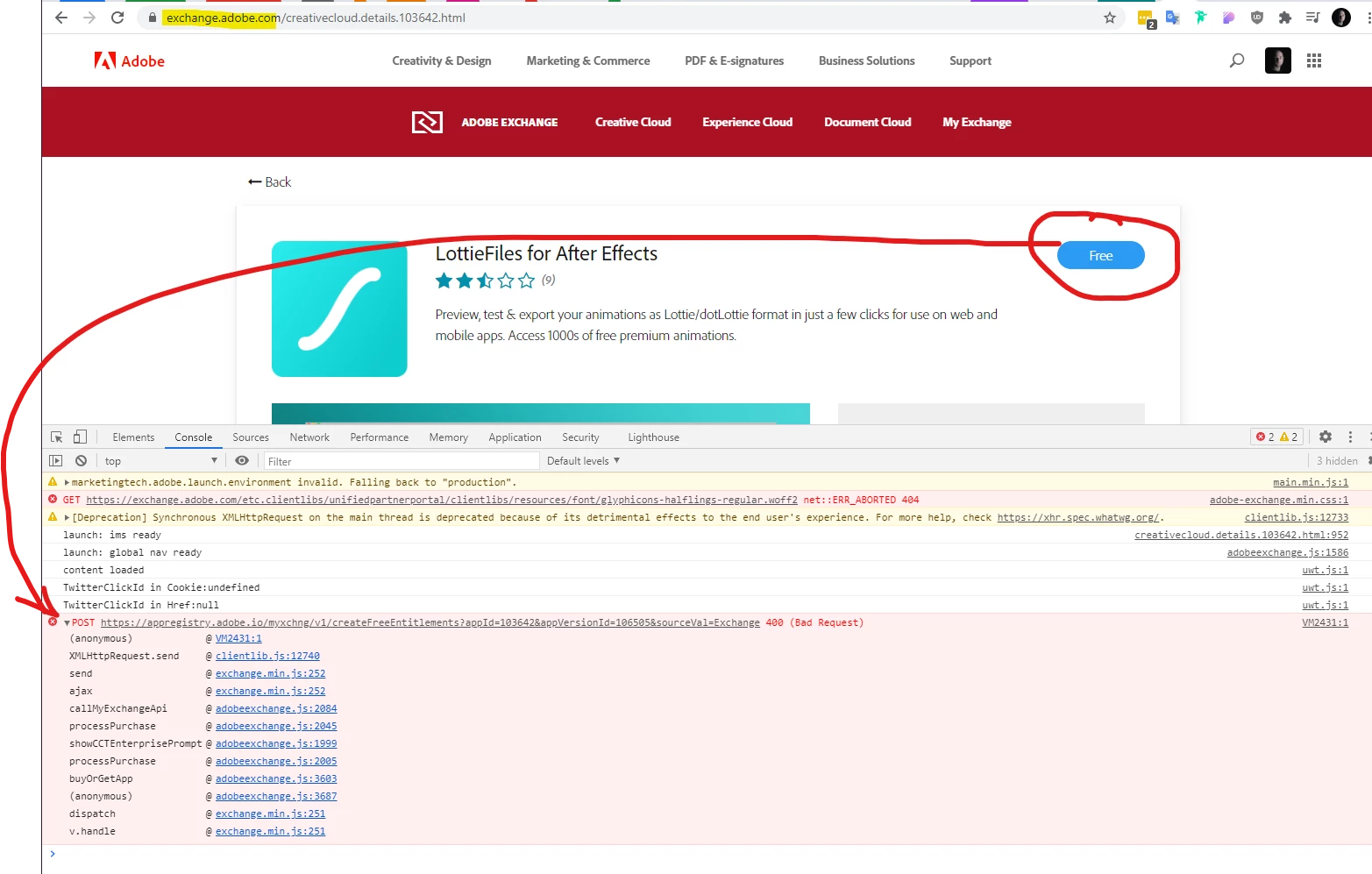


Edited, as these steps haven't helped: The current fix is to try deleting all adobe.com cookies from your browser. Check out this page, in the subsection "Delete cookies from a site" for Chrome.


You may also try using different browsers or "incognito" mode. 


If these steps don't help, try logging out of the Creative Cloud desktop app. You may also try updating, and/or uninstalling and reinstalling the Creative Cloud Desktop app.


Let me know in this thread and via this survey if none of these steps help. It's helpful to know which extensions you tried and what browser you're using.

This topic has been closed for replies.
Correct answer erinferinferinf

@Leandro Markframe 


If I'm reading the JIRA ticket correctly, the fix should roll out on or around February 17th.


In the meantime, one workaround is to find and remove any special characters from anywhere in your profile (including the billing address), as in turning "ü" to "u" or similar. This works for some users.


Other users (above) imply that it's an account billing issue, and that free accounts allow you download plugins.


Neither workaround is great, but again, I'm expecting to see a fix as early as next week. 


Hello again!


The engineering team has rolled out a fix. You can - and should - try to acquire plugins again, with all kinds of characters in your name or billing address, and reply on the thread to let us know if it isn't working.


The engineers are concerned special characters may not have been the only cause of the problem, so they'd like users to test it out.


13 replies

Participating Frequently
December 4, 2020

First of all, thank you for looking into this.

I'll try this soon. Unfortunately I dont expect it to work, because i dont think it can be a cookie issue.
I've tried this with 3 different browsers, 2 of which were freshly installed and could not have had any adobe cookies yet.

erinferinferinf
Adobe Employee
Adobe Employee
December 7, 2020

Hi @sebastianschuster,


I was able to download Bodymovin just now, but I had to click on a new End User License Agreement first:


After clicking "Accept" I get prompted with a blue banner to install using the Cretive Cloud Desktop app.


I'm pretty sure you're unable to install because the EULA dialog isn't displaying properly. Maybe it's a pop-up blocking thing?

 I'll ask the web team and see if there's a workaround.


Here's the blue-banner Creative Cloud Desktop app prompt:


Inspiring
December 14, 2020

and what do we do now?


IMO, I don't expect this to be fixed soon. Luckily, I don't depend on any of these extensions. @julia santos : if you really need to go through HTML5 animations, I suggest you look at Tumult Hype (maybe you already known this app). Although not as featured as After Effects, it does a really good job at producing impressive animations with clean and standard code and most importantly, small file size.


https://medium.com/@tumult/creating-an-animated-logo-in-tumult-hype-comparing-the-after-effects-bodymovin-lottie-workflow-b7808848f4ff

Roooodboy
Participant
December 4, 2020

It still doesn't working. I've tried everything, don't know what to do...

erinferinferinf
Adobe Employee
Adobe Employee
December 4, 2020

If this is a cookies issue, it's the same as this (internal to Adobe) bug: XCHG-1837 The fix is scheduled for a sprint that ends on Dec 22nd. I've asked for an update as this continues to cause problems.


If you delete cookies and still can't download from the Exchange, please let me know.

Inspiring
December 4, 2020

Done that (deleting all cookies). Unfortunately, same result. Clicking on the FREE button doees nothing. On all Mac browsers I have.