


Participant
July 26, 2018
Answered

Remote Debugger Not Starting

  • July 26, 2018
  • 1 reply
  • 1756 views

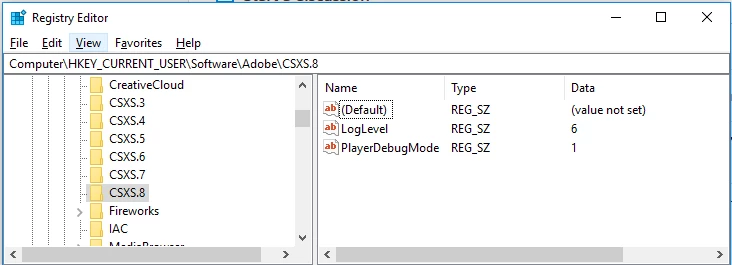
I am playing around with CEP extension creation, and I'm having trouble getting the debug options to work.  I have the correct entries in the registry (and even put them for previous CXSX versions just to be safe).  The extension loads (finally), but I can't open the remote debugger, and by all accounts it can't find my .debug file.
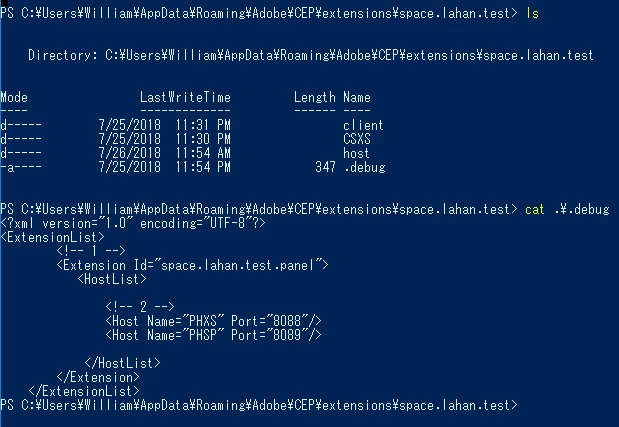
Here is the contents of my .debug file:

<?xml version="1.0" encoding="UTF-8"?>    
<ExtensionList>
        <!-- 1 -->
        <Extension Id="space.lahan.test.panel">
           <HostList>

               <!-- 2 -->
               <Host Name="PHXS" Port="8088"/>
               <Host Name="PHSP" Port="8089"/>

            </HostList>
        </Extension>
    </ExtensionList>

And here's the contents of manifest.xml

<?xml version='1.0' encoding='UTF-8'?>
<ExtensionManifest ExtensionBundleId="space.lahan.test" ExtensionBundleVersion="1.0.0" Version="6.0" xmlns:xsi="http://www.w3.org/2001/XMLSchema-instance">
  <ExtensionList>
    <Extension Id="space.lahan.test.panel" Version="1.0.0" />
  </ExtensionList>
  <ExecutionEnvironment>
    <HostList>
            <Host Name="PHSP" Version="16.0"/>
            <Host Name="PHXS" Version="16.0"/>
    </HostList>
    <LocaleList>
      <Locale Code="All" />
    </LocaleList>
    <RequiredRuntimeList>
      <RequiredRuntime Name="CSXS" Version="6.0" />
    </RequiredRuntimeList>
  </ExecutionEnvironment>
  <DispatchInfoList>
    <Extension Id="space.lahan.test.panel">
      <DispatchInfo>
        <Resources>
          <MainPath>./client/index.html</MainPath>
          <ScriptPath>./host/index.jsx</ScriptPath>
          <CEFCommandLine />
        </Resources>
        <Lifecycle>
          <AutoVisible>true</AutoVisible>
        </Lifecycle>
        <UI>
          <Type>Panel</Type>
          <Menu>My First Panel</Menu>
          <Geometry>
            <Size>
              <Height>500</Height>
              <Width>350</Width>
            </Size>
          </Geometry>
          <Icons />
        </UI>
      </DispatchInfo>
    </Extension>
  </DispatchInfoList>
</ExtensionManifest>

Finally, here's the start of my log file:

2018-07-25 23:54:28:170 : INFO  GetProcessDpiAwareness succeeded with the value 2
2018-07-25 23:54:28:170 : INFO  SetProcessDpiAwareness succeeded with the value 2
2018-07-25 23:54:28:172 : ERROR Error occurs while getting debug port. No such node (HostList)
[0725/235428.203:VERBOSE1:pref_proxy_config_tracker_impl.cc(151)] 00000201613AB010: set chrome proxy config service to 00000201613AA520
[0725/235428.203:VERBOSE1:pref_proxy_config_tracker_impl.cc(278)] 00000201613AB010: Done pushing proxy to UpdateProxyConfig
[0725/235428.204:VERBOSE1:multi_log_ct_verifier.cc(75)] Adding CT log: Google 'Pilot' log

Here is the directory structure and .debug file:
I would appreciate help.

This topic has been closed for replies.
Correct answer williamr97361347

Finally solved this today.  It was apparently confused by the comments in the file <!-- 1 --> .  I had copied these from a tutorial I was trying, and didn't think that a comment could possibly impact the way the XML was read.  I guess Adobe must be using some kind of non-standard XML parser, which is fine, but it was just confusing.

For the benefit of people in the future:

2018-07-25 23:54:28:172 : ERROR Error occurs while getting debug port. No such node (HostList)

Translates to "The .debug file was found and parsed, but the necessary node HostList was not in the expected position."  For instance, if there is another node (including a comment) preceding the expected HostList XML node.

2018-07-27 14:57:56:366 : WARN  No debug port file found.

Translates to "The .debug file was not found" (fairly obvious, but I was wondering if the previous line meant that it couldn't find the file).

There is a line that is quite confusing in the CEP-5 instructions:

"Create and put a “.debug” file to the extension root directory such as Test_Extension.debug."  Obviously, this should be Test_Extension/.debug.  This line was corrected in the CEP-6 instructions.  I had used the correct filename, but looking at the old instructions made me doubt myself somewhat, and I think it might help avoid confusion to correct the CEP-5 instructions as well. 

1 reply

williamr97361347AuthorCorrect answer
Participant
July 27, 2018

Finally solved this today.  It was apparently confused by the comments in the file <!-- 1 --> .  I had copied these from a tutorial I was trying, and didn't think that a comment could possibly impact the way the XML was read.  I guess Adobe must be using some kind of non-standard XML parser, which is fine, but it was just confusing.

For the benefit of people in the future:

2018-07-25 23:54:28:172 : ERROR Error occurs while getting debug port. No such node (HostList)

Translates to "The .debug file was found and parsed, but the necessary node HostList was not in the expected position."  For instance, if there is another node (including a comment) preceding the expected HostList XML node.

2018-07-27 14:57:56:366 : WARN  No debug port file found.

Translates to "The .debug file was not found" (fairly obvious, but I was wondering if the previous line meant that it couldn't find the file).

There is a line that is quite confusing in the CEP-5 instructions:

"Create and put a “.debug” file to the extension root directory such as Test_Extension.debug."  Obviously, this should be Test_Extension/.debug.  This line was corrected in the CEP-6 instructions.  I had used the correct filename, but looking at the old instructions made me doubt myself somewhat, and I think it might help avoid confusion to correct the CEP-5 instructions as well.