


Participant
June 14, 2024
Question

Fireworks not working after installing on new computer with window 11 through creative cloud

  • June 14, 2024
  • 2 replies
  • 1467 views

I recently got a new PC which had a copy of window 11 on it. I installed Adobe Creative Cloud  used it to install Firework CS6. Whenever I try to boot it up I get a error message pop up.
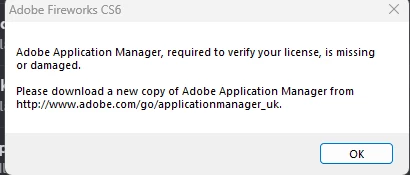


I've tried the link it seems to go nowhere, I tried a bunch of things using the clean up tool. I tried reinstalling.  Nothing seems to work for me. 


I thought maybe this is a sign I should just learn to use photoshop but it seem overkill for what I need and I have a few projects that I need finishing off and photoshop does not recognise the layers from them. 


If anyone can help that would be amazing

    This topic has been closed for replies.

    2 replies

    Known Participant
    July 7, 2024

    After researching a lot, I finally found a solution, I had to download and install ApplicationManager through this link,

    https://download.adobe.com/pub/adobe//creativesuite/cc/win/ApplicationManager10.0_all.exe


    For some reason Adobe removed this from the installation of CS6 programs recently, I hope they resolve this and don't remove this wonderful program from Adobe Cloud because for me even today, Fireworks is an incredibly lightweight program for making quick arts and working with vectors, something that Photoshop doesn't do it and Illustrator is too heavy.

    Participating Frequently
    July 15, 2024

    Well done, did the trick for me; iot's been so long I forgot how to use Fireworks LOL

    Known Participant
    August 27, 2024

    This didn't work for me as of 8/22 - But I can Trial Period workaround for now I guess.
    I get caught in a loop of verify with qrcode/email - go through that process successfully, but when it's done, it shoots me to a "enter license code" prompt. to which you then go back to the beginning of verification with qr code/email like it never happened.  😞


    Ok, I have a solution that might work, it happened to me today and I processed it and it worked,

    1- put Adobe Manager to run as administrator C:\Program Files (x86)\Common Files\Adobe\OOBE\PDApp\core\PDapp.exe

    2- Search on YouTube for "How to open Photoshop Cs6 with an expired trial" and do the procedure,

    Apparently it's a problem with the serial, if you do this Fireworks will work again activated with your Creative Cloud subscription

    Participating Frequently
    July 2, 2024

    Same issue here.. omg.. this has to stop.. please just release FW to people for free if @adobe cannot get this right.. the makeshift work around before you removed from online download solution .. now you removed that to provide a broken solution!