


Participant
May 1, 2019
Answered

Says license has expired but all other apps work

  • May 1, 2019
  • 1 reply
  • 5143 views

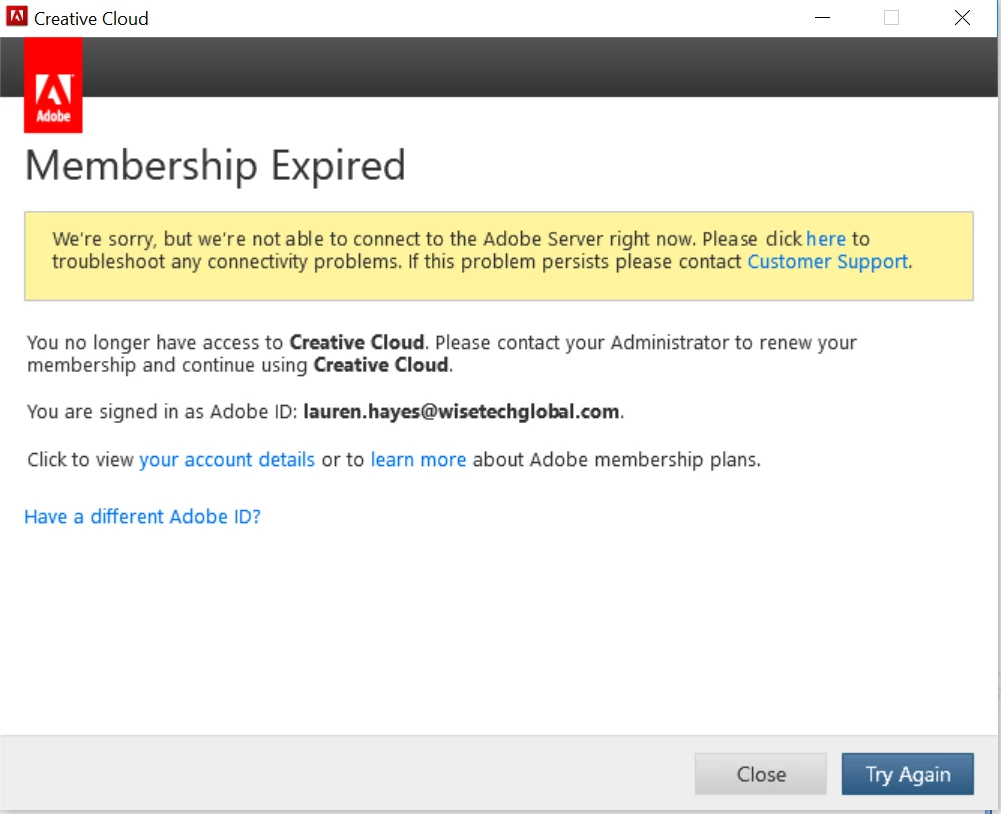
Hi. I have an Adobe account through my employer. I'm able to open Photoshop, Illustrator, XD all fine, but when I try and open Fireworks it says my license has expired. I know it's no longer supported but I've been able to use it fine up until last week. Do you know any reason for this?

The customer support link that appears takes me to a page about my serial number being wrong (https://www.adobe.com/au/genuine/landing-csadnr.html?sdid=599F8QN9&trackingid=CRH529XX&mv=other) but isn't this the same serial number for all the aps?
    This topic has been closed for replies.
    Correct answer Paul-M


    OK so I'm  asuming you have a full/active CC subscription?

    Have you had a version of Fireworks CS6 installed prior to installing Creative Cloud Desktop via the subscription model?

    A few things you could try (if you haven't already):

    1) Try signing out and then back of the Creative Cloud App > then trying launching Fireworks

    2) In the Creative Cloud app see if there's an update for Adobe Fireworks, if there is apply the update and try to launch Fireworks again, any luck?

    3) Turn your system clock back to 2006 >  see if you can now launch Fireworks > if you can go to help => deactivate > you should be prompted to sign out > sign out > close Fireworks > set your clock back to the correct year > re-launch Fireworks > you should be prompted to sign in > sign in > has this fixed the issue?

    You could also try looking at these articles:

    http://helpx.adobe.com/creative-cloud/kb/sign-in-out-creative-cloud-desktop-app.html

    https://helpx.adobe.com/manage-account/kb/stop-creative-cloud-trial-mode-after-purchase.html

    https://helpx.adobe.com/creative-cloud/kb/cc-reverts-to-trial.html

    1 reply

    Legend
    May 1, 2019

    Are you on Windows or Mac?

    In the first instance I would uninstall Fireworks you could try using the  Creative Cloud Cleaner Tool

    Make sure you do a reboot

    Then, reinstall Fireworks using the Adobe Creative Cloud app, if you dont see Fireworks you'll need to go into preferences and select 'show older apps'

    If you still have the same issue after this I would reach out to Adobe Support

    Paul-M - Community Expert
    Participant
    May 1, 2019

    Windows.

    I followed your step but still getting the same issue.  I contacted support first and they told me to write on here because Fireworks isn't supported anymore.

    Paul-MCorrect answer
    Legend
    May 6, 2019


    OK so I'm  asuming you have a full/active CC subscription?

    Have you had a version of Fireworks CS6 installed prior to installing Creative Cloud Desktop via the subscription model?

    A few things you could try (if you haven't already):

    1) Try signing out and then back of the Creative Cloud App > then trying launching Fireworks

    2) In the Creative Cloud app see if there's an update for Adobe Fireworks, if there is apply the update and try to launch Fireworks again, any luck?

    3) Turn your system clock back to 2006 >  see if you can now launch Fireworks > if you can go to help => deactivate > you should be prompted to sign out > sign out > close Fireworks > set your clock back to the correct year > re-launch Fireworks > you should be prompted to sign in > sign in > has this fixed the issue?

    You could also try looking at these articles:

    http://helpx.adobe.com/creative-cloud/kb/sign-in-out-creative-cloud-desktop-app.html

    https://helpx.adobe.com/manage-account/kb/stop-creative-cloud-trial-mode-after-purchase.html

    https://helpx.adobe.com/creative-cloud/kb/cc-reverts-to-trial.html

    Paul-M - Community Expert