


Participating Frequently
April 28, 2017
Answered

adobe blocked by browser

  • April 28, 2017
  • 1 reply
  • 9397 views

Adobe Flash Player is blocked by your browser. Please check your settings or follow these instructions to enable it.  I have checked my settings and its enabled in my broswer, I tried both ways allow sites to run and detect and run and put the exception in, and they are correct. I have tried uninstalling and reinstalling both flash and google twice,  nothing has helped.  flash is working in other browsers but not in google.  I had a pwr outage and my system was in the middle of windows updates when the outage occured and now I cannot get flash to work.  I have also deactivated my anti-virus sofware  and that didnt help

I am running Windows 7 Ultimate. never had an issue until after the pwr outage. I tried a system restore but that didnt work.
This topic has been closed for replies.
Correct answer _maria_


Please try the following:

  • Close all instances of Chrome
  • Launch Windows Explorer
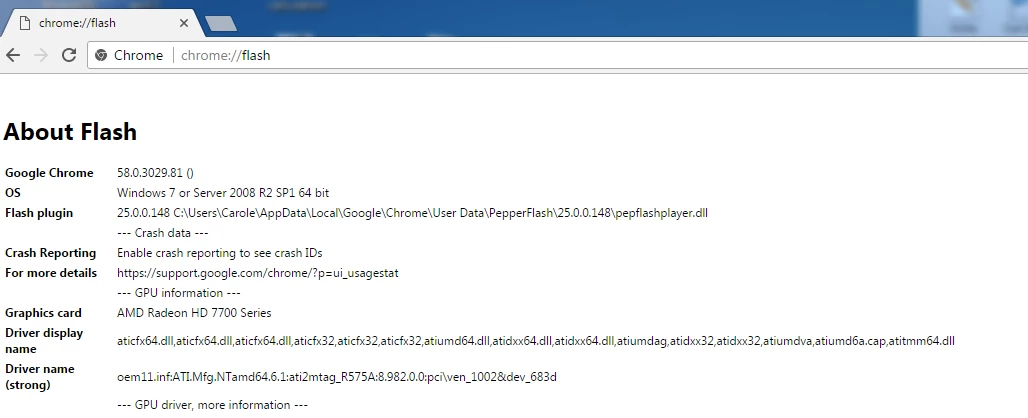
  • Navigate to  C:\Users\Carole\AppData\Local\Google\Chrome\User Data\PepperFlash\
  • Rename the 25.0.0.148 directory to something else (e.g. 25.0.0.148-old)
  • Launch Chrome and navigate to a site with Flash content (e.g. www.adobe.com/products/flash/about
  • Chrome should automatically download Flash Player and display Flash content.

Did the above work?

1 reply

ridhij4208356012135538
Adobe Employee
Adobe Employee
April 28, 2017

Hi,

As you are using Google chrome browser, Flash Player comes installed with chrome and all updates are pushed by Google as part of Chrome updates. You will not be able to install/uninstall Flash Player for chrome. As you are stating that you have already done settings to allow Flash Player to run, could you check if you can run Flash Content on other pages like Adobe - Flash Player or Flash Player Help .

In case you do not observe issues on these pages, let us know.

Thanks!

RascalRatAuthor
Participating Frequently
April 28, 2017

No flash is not working with chrome, page doesn't work with chrome, its

working with explorer though

I get message, couldn't load plugin when I try to use chrome.

Here are my settings