


raymondz70177734
Participating Frequently
January 1, 2018
Answered

Adobe Flash no longer work on Chrome

  • January 1, 2018
  • 3 replies
  • 63721 views

Hello,

  As of a couple weeks ago, I can still use Chrome to access all flash content without any problem. However, it suddenly stops working, and I cannot pinpoint any particular problem that caused this. Other browser that currently still support flash, such as Microsoft Edge, can still access flash content without problem. I have exhausted all available options as shown on the Chrome help page, Use or fix Flash audio & video - Computer - Google Chrome Help , with no progress in fixing the issue. Moreover, chrome://plugins used to be accessible shortly after finding out I cannot access flash content, but now it's an inaccessible site.

I did a clean re-installation of Chrome as well as Adobe Flash, but the problem remain: All websites that contains flash content simply tells me "Right-click to run Adobe Flash Player", but there are no response even after I tell the website to run Adobe Flash Player. Looking for more insight into this problem. Thanks!
This topic has been closed for replies.
Correct answer _maria_

Clicking on the mentioned button produce the same screen as the above screenshot.

By going to chrome://site-engagement, the website has the base value 9.98. Setting it to 100 does not fix flash.


Hi raymondz70177734

Can you try the following:

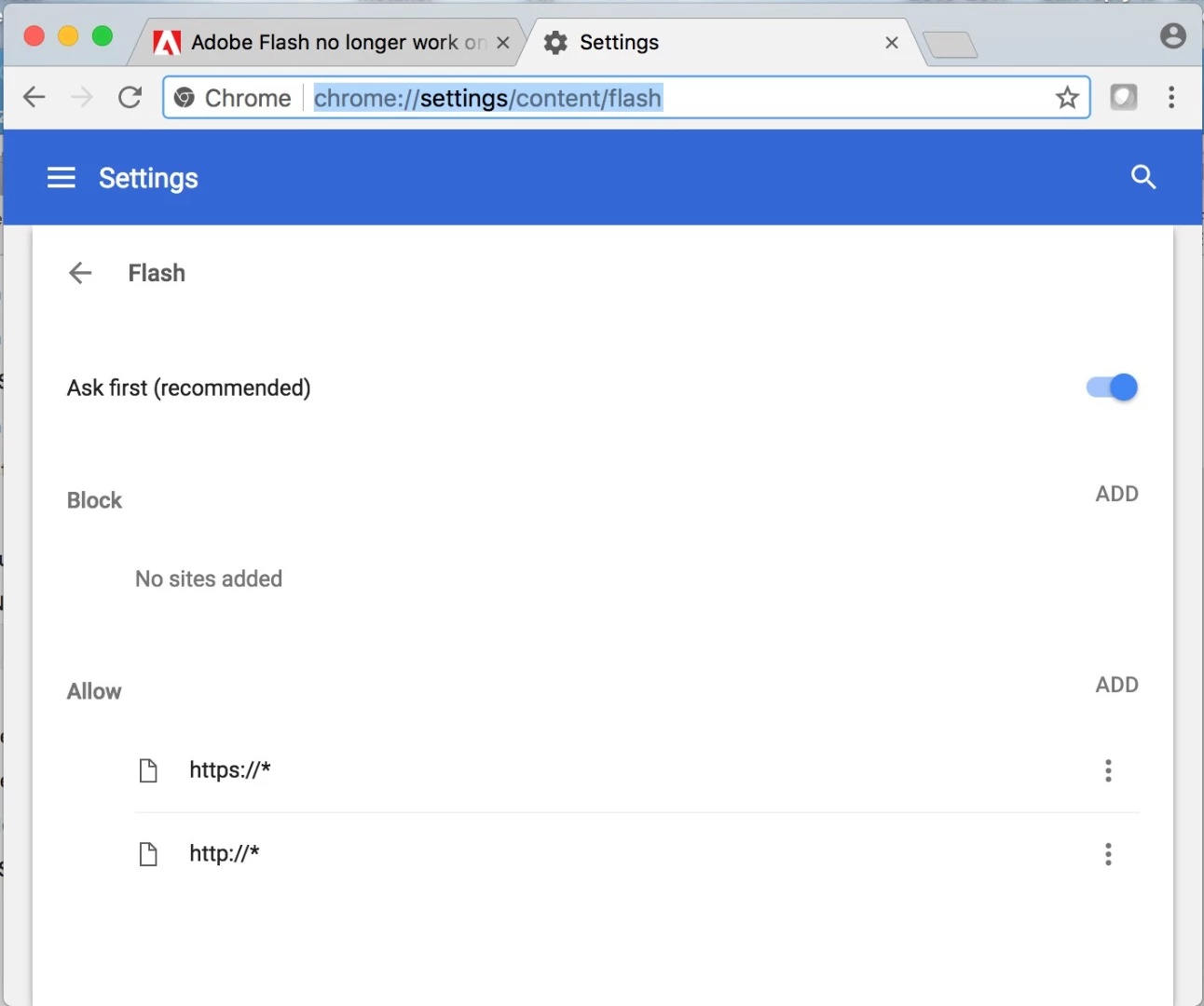
  • Go to chrome://settings/content/flash
  • In the list of 'allow' sites, add http://* and https://* - make sure both are set to 'allow'
  • Restart the browser

Have you tried completely uninstalling and re-installing Chrome?

I've spoken to a few folks here and every suggestion on this thread covers every option we're aware of.  If nothing works, my next recommendation is to contact Google directly.  You can point them to this thread for a history of every thing you've attempted to do.

--

Maria

3 replies

January 6, 2018

hi, i have the same problem here since 3 days now , i tried every thing  form A-Z but still the same issue ,

New Participant
December 10, 2019

Flash is broken and has been for a few weeks in Linux.  I've given up trying to get any reply from adobe.  The only work aorund I have found is find the location of the .so (plugin file) and replace it with a previous version extracted from the download.

_maria_
Community Manager
Community Manager
January 2, 2018

Please provide the following information:

  • operating system, including version
  • direct link to the content you are attempting to view
  • launch Chrome and navigate to to chrome://flash
    • provide a screenshot of the first 3 fields, e.g.:

To post a screenshot, see https://forums.adobe.com/docs/DOC-7043#jive_content_id_How_do_I_attach_a_screenshot

<edited: added comment to add direct link to Flash content that is not displaying>

raymondz70177734
Participating Frequently
January 3, 2018

OS: Window 10 Home, Version 1709, OS Build 16299.125

Direct link: While unfortunately I cannot link you directly to the website that I use flash the most frequently (Macmillan Learning , requires login and resource purchase), here is an alternative website that I access on a semi frequent basis: (N v2.0 Full Online Version)

From Chrome:

https://i.imgur.com/ZOhjU9q.png?1

_maria_
Community Manager
_maria_Community ManagerCorrect answer
Community Manager
January 5, 2018

Clicking on the mentioned button produce the same screen as the above screenshot.

By going to chrome://site-engagement, the website has the base value 9.98. Setting it to 100 does not fix flash.


Hi raymondz70177734

Can you try the following:

  • Go to chrome://settings/content/flash
  • In the list of 'allow' sites, add http://* and https://* - make sure both are set to 'allow'
  • Restart the browser

Have you tried completely uninstalling and re-installing Chrome?

I've spoken to a few folks here and every suggestion on this thread covers every option we're aware of.  If nothing works, my next recommendation is to contact Google directly.  You can point them to this thread for a history of every thing you've attempted to do.

--

Maria

Grandpa Gimpy
New Participant
January 1, 2018

Hopefully an answer will be showing up soon.. Adobe Flash Player has been nothing but trouble; it works, then it doesn't, it works, then it doesn't, and on and on it goes with the 'experts' to fix it once and for all no longer wanting to deal with Adobe...

Net neutrality is now a thing of the past and now my FiOS connection to the Internet operates about as good as the old dial up modems did...  If the Adobe Flash Player is such a troublesome program, why is it still around and being used...?

New Participant
March 19, 2021

Well!


You got your wish!

;-;