


New Participant
May 31, 2017
Question

Adobe Player install fail: insufficient permissions
  • May 31, 2017
  • 1 reply
  • 1700 views

Windows 10 Home

Firefox, v53.0.3 (32-bit)

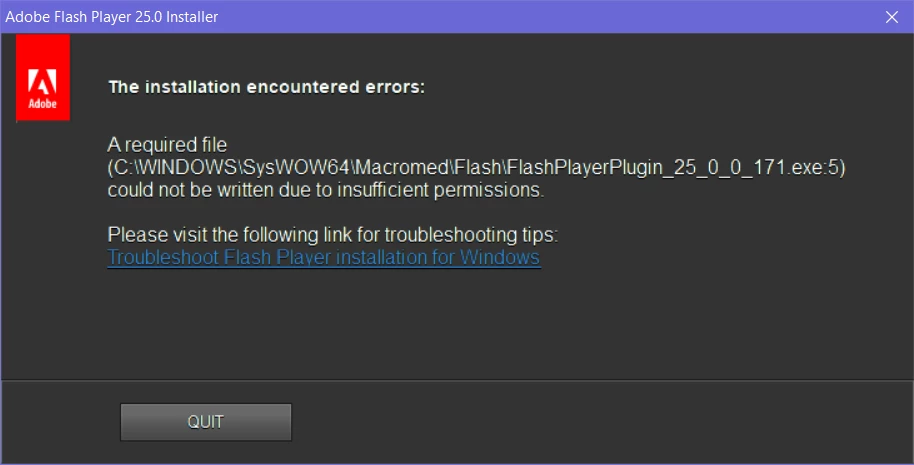
I am logged in as administrator. Trying to install Adobe Flash latest version. No flash on system now. I don't understand why. I've tried to install several times using different downloads. All have failed- see screenshot above.

Have rebooted computer. Have turned off Security software (Malwarebytes, which is an adjunct). Refuse to turn off Kapersky, which has never caused problems with any download.

This has never happened before. Why is it happening now?

This topic has been closed for replies.

1 reply

_maria_
Community Manager
Community Manager
May 31, 2017

Please provide the following information so that we may investigate further:

  • What version of Flash Player, if any is currently installed on the system?
  • Provide the install log files as follows:
    • Go to C:\Windows\System32\Macromed\Flash
    • Make a copy of the FlashInstall.log file and rename the copied file to FlashInstall32.log
    • Take a screenshot of the contents of the C:\Windows\System32\Macromed\Flash directory
    • Go to C:\Windows\SysWOW64\Macromed\Flash
    • Make a copy of the FlashInstall.log file and rename the copied file to FlashInstall64.log
    • Take a screenshot of the contents of the C:\Windows\SysWOW64\Macromed\Flash directory
    • Upload both log files and both screenshots to cloud.acrobat.com/send using the instructions at https://forums.adobe.com/docs/DOC-7161
    • Post the link to the uploaded files in your reply

Refuse to turn off Kapersky, which has never caused problems with any download.

Unfortunately, Kaspersky has been known to cause some issues, not always, but it has.

NeshobeAuthor
New Participant
May 31, 2017

Shared Files - Acrobat.com

As far as I can tell, there is no working version of Adobe Flash on my computer at this time. Could the install have removed an existing version and then not have been able to install?

Good grief, what do people do who do not have some experience with this sort of thing? This would be painful. And frustrating. Sure hope it leads to a resolution.

_maria_
Community Manager
Community Manager
June 1, 2017

Hi,

Based on the log file, it appears Flash Player NPAPI plugin for Firefox was successfully installed on May 9th, via Background Update (silent auto-update mechanism, requiring no user interaction.  Then on May 31st, there were a series of failed attempts to re-install the same version.

Please follow the instructions at How do I do a clean install of Flash Player - Windows?  to perform a complete uninstall of Flash Player, and then re-install it.  At step 6, please be sure to NOT delete the FlashInstall.log files.

--

Maria