


Inspiring
March 31, 2017
Question

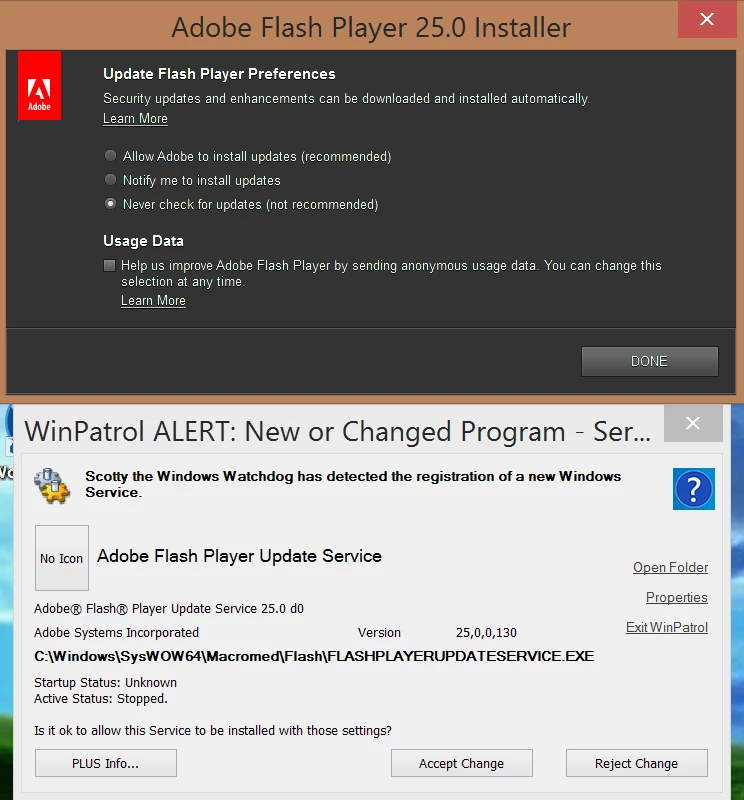
Adobe Update Flash Player Prefererences selection is meaningless, caught it inserting itself is meaningless, caught it inserting itself to start with Windows regardless of choice

  • March 31, 2017
  • 1 reply
  • 346 views

Adobe Flash should be updated for our own security, that's not the point here.

But you know how Adobe gives you a "choice" if you want it inserting itself to start with Windows (or not), and you are under a clear impression that you have a choice?

Well if you look at my screen shot, that choice is bogus.

It tried to insert itself regardless of user choice... before I even clicked on DONE.

I like to manually install updates and not have Adobe sending data in/out of the system - regardless of what it is and why it does it, as a personal individual choice...

But it inserts itself to ping Adobe servers regardless of your choice, look:
This topic has been closed for replies.

1 reply

_maria_
Community Manager
Community Manager
March 31, 2017

Your assertions are false.

The Background Update Service does install, as it's a required payload of Flash Player, however, it only pings Adobe servers for an update IF the user elects to opt into background updates.  Otherwise it does nothing.

c627627Author
Inspiring
April 1, 2017

Thank you for posting, could you clarify one thing please: You used the word 'install' but the question is about it inserting itself to RUN at every Windows boot, not simply 'install' - there are many executables that are "installed" on the system, to run when they are needed, but they do not RUN at *every boot.*

So the question is why is it running at every boot if user specifically chose the option to *never* check for updates?

_maria_
Community Manager
Community Manager
April 3, 2017

The task checks the config file to check the users update preferences.  If the user has opted out of Background Updates it does nothing beyond the check.