


Camera just up and stopped working with flash player. SUUUUPER annoying. Any ideas?
Hi:
Windows XP SP3 32bit, latest updates applied
Firefox 3.6.6 (Mozilla/5.0 (Windows; U; Windows NT 5.1; en-US; rv:1.9.2.6) Gecko/20100625 Firefox/3.6.6 ( .NET CLR 3.5.30729; .NET4.0E))
IE 8.0.6001.18702
Flash Player 10,1,53,64
HP EliteBook 8530w with built-in HP camera (brand spankin' new).
So Flash Player today decided it doesn't want to work with my webcam. I have pulled my hair out trying to figure out what the problem is. The camera works fine with other video camera software, such as Adobe Flash Live Encoder 3.1, for example, or the various Microsoft cam tools. But Flash Player just won't see it. When I visit a website that uses the camera through flash, all I get is a black box. I never get the privacy screen that asks me if I would like to allow the site temporary access to my camera.If i go into my settings, and go to the camera tab, it shows my camera device in the dropdown box. But you know how if you double-click the little box under the dropdown, it should activate your camera and display a little video inside that box? That doesn't work for me. All I get is this:
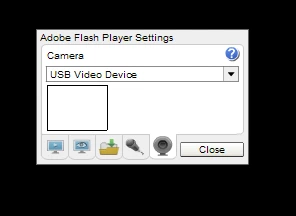
It doesn't matter if I use FF or IE. I've re-installed Flash Player, both the FF version and the Ax version. To no avail. I've logged into my computer as a different user, because hell maybe it's some weird dumb thing in the Flash Player cache or something. Nope.
Now here's the super, super, super annoying part: I just recently moved to this laptop and one of the things I was looking forward to was a computer where my webcam would FINALLY work with flash player again. Yes, that's right: my old computer had this exact same problem. And in both cases, at one point the camera worked with Flash player no problem, and then at some point, it just stopped working.
This makes me think, of course, that the problem is some nefarious piece of software I've installed, but I can't think of what that is. I know the camera was working with my new computer as early as last week. Recently I've installed a bunch of software, including Adobe Media Live Encoder 3.1, Flash Professional CS5, and the Adobe Connect add-in. I've uninstalled everything except CS5, because, hey, who wants to re-install that if they don't have to? I'll do that as a last result, but the guy sitting next to me has the entire CS5 suite installed and camera works fine for him with Flash Player (same exact hardware too), so I don't think it's that. Other than that, I dunno. I've got VS2008 and 2010 installed. GoToMeeting. Office. That's about it.
So. Any ideas? Any thoughts on how I could even start to debug the issue? Logging or something? Any help is much appreciated.
 AdChoices