


Mcgarnigle
New Participant
February 5, 2015
Answered

Can't update Flash Player in I.E. 11

  • February 5, 2015
  • 1 reply
  • 1417 views

I have Windows 8.1 and I.E. 11.0.9600.17498. I went to the Adobe Flash Player help page, and it says I have 16.0.0 and Windows 8. But I have 8.1.
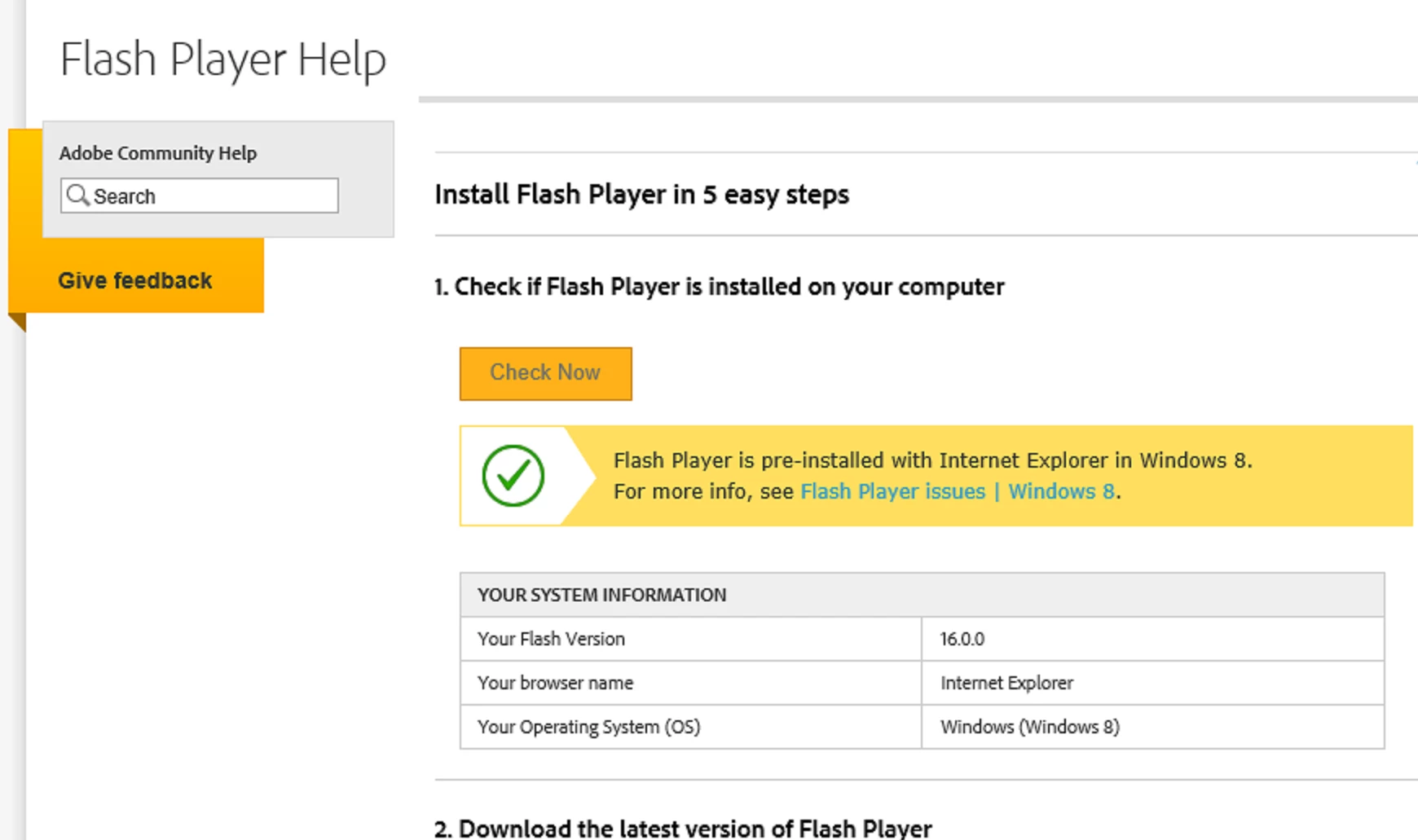
I went to the Find My Version Page, and got this:

I had the Flash Player update set to notify me when updates available, but I realized I haven't received any notice in ages. I went and changed it to update automatically. The trouble shooting page seems to suggest that if I have the latest Internet Explorer version, I will get the latest Flash Player. I tried to update I.E. there for Windows 8.1, 64 bit machine, but when trying to install, I got this:

I have Mozilla Firefox installed for backup. I checked it. It had the same outdated Flash version, but I was able to update it. I prefer to use I.E., just because I'm so used to it after all these years. Any suggestions?

    This topic has been closed for replies.
    Correct answer jeromiec83223024

    Flash Player is a built in component of Internet Explorer on Windows 8 and higher.  Everything comes through Windows Update.

    Flash Player in Google Chrome is a built-in component of Chrome.  Everything comes through Chrome.

    Flash Player for Firefox and other NPAPI browsers is distributed via Adobe and can be downloaded at http://get.adobe.com/flashplayer.  The settings that you're modifying in the control panel pertain to this specific Flash Player target.

    Because Microsoft has their own distribution requirements (testing, etc) that need to be addressed before they can ship, we may occasionally beat them by a couple days when delivering an out-of-cycle security release.  Typically the difference is pretty negligible, and the synchronization issues are just practical limitations and a desire to get the fix out to as many people as quickly as possible when we discover something bad in the wild.  We get a little bit of a head start on Microsoft because it's our product, but they do a phenomenal job of getting the releases out in a timely manner.

    1 reply

    Mcgarnigle
    New Participant
    February 6, 2015

    Doesn't look like any one is going to reply, but I thought I should mention that I just got a notification of a Windows Update. I went to check it out, it was a security update for Flash Player on Internet Explorer 11. Installed it. Went to the Flash Player check version web page. I'm now up to date! Not sure why, or if I will continue to receive version updates in the future.

    jeromiec83223024
    Community Manager
    jeromiec83223024Community ManagerCorrect answer
    Community Manager
    February 10, 2015

    Flash Player is a built in component of Internet Explorer on Windows 8 and higher.  Everything comes through Windows Update.

    Flash Player in Google Chrome is a built-in component of Chrome.  Everything comes through Chrome.

    Flash Player for Firefox and other NPAPI browsers is distributed via Adobe and can be downloaded at http://get.adobe.com/flashplayer.  The settings that you're modifying in the control panel pertain to this specific Flash Player target.

    Because Microsoft has their own distribution requirements (testing, etc) that need to be addressed before they can ship, we may occasionally beat them by a couple days when delivering an out-of-cycle security release.  Typically the difference is pretty negligible, and the synchronization issues are just practical limitations and a desire to get the fix out to as many people as quickly as possible when we discover something bad in the wild.  We get a little bit of a head start on Microsoft because it's our product, but they do a phenomenal job of getting the releases out in a timely manner.

    Mcgarnigle
    New Participant
    February 11, 2015

    Very informative. Thank you very much!