


cannot get rid of "Adobe Flash Player SETTINGS" pop-up? - unable to write local shared object on Firefox
this is a weird one......(at least, for me!)
I go to play 8-ball pool online in the Firefox brower at www.miniclip.com. My specs are:
Mac OS 10.10.5 Yosimite
Firefox for Mac v. 64
Adobe Flash Player 31.0 NPAPI
((I also have Chrome v. 71.0 which runs Adobe Flash Player PPAPI))
I played pool happily on the site for many years, but a few months back, I began to get this window every time I tried to boot the game:
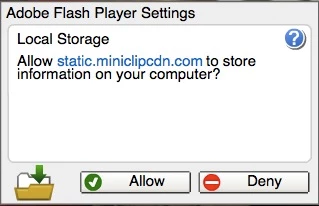
Of course, this window freezes out the screen and prevents me from doing anything other than restarting teh page, but then it happens again - - endless loop. and no amount of re-setting, re-installing, etc. will get rid of it?!
For no reason I know, it went away about 2 months ago, but now it's back and is locking me out of the site.
BTW, this only happens on Firefox - - I can go to the site on Safari or Chrome without problems....
[moderator: edited title]
 AdChoices