


MarcoDelCorto
Participant
September 12, 2017
Answered

Check if Flash Player is installed fails

  • September 12, 2017
  • 3 replies
  • 6068 views

We have:

PC Windows 7 32bit, Firefox 55.0.3 (32 bit), Flash Version: 27.0.0.130

on flash player help page (https://helpx.adobe.com/flash-player.html) we got message (see attachments):
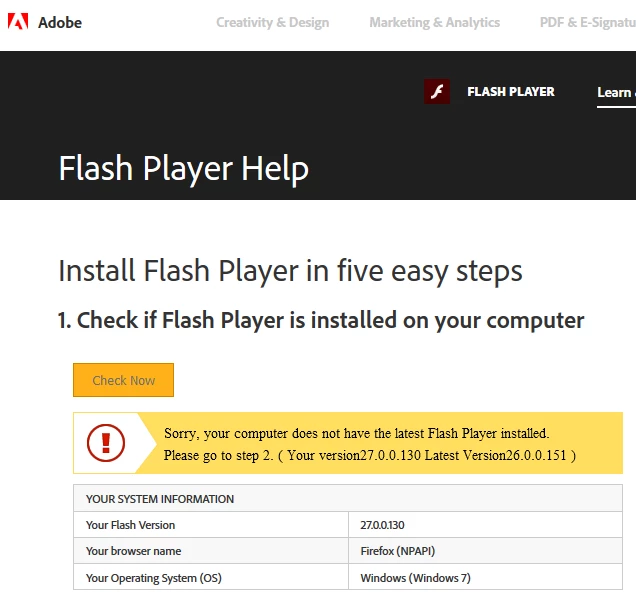
Alert message says:

"Sorry, your computer does not have the latest Flash Player installed.

Please go to step 2. ( Your version27.0.0.130 Latest Version26.0.0.151 )"

But "Your version27.0.0.130" is greater than "Latest Version26.0.0.151".

In addition, the version of the flash player fails to play the video of some sites, so we tried to uninstall and reinstall Flash Player, but the problem remains, and on the Adobe site the above message has been obtained.

Can you give us help?

Thank you

This topic has been closed for replies.
Correct answer _maria_

The problem that we would like to highlight on the forum is that on flash player help page (https://helpx.adobe.com/flash-player.html) we got following message (see previous attachments)

"Sorry, your computer does not have the latest Flash Player installed.

Please go to step 2. ( Your version27.0.0.130 Latest Version26.0.0.151 )"

But, and this is our question,

    "Your version27.0.0.130"

    is greater than

    "Latest Version26.0.0.151",

i.e. our version (27.0.0.130) should be already updated, but the message says the contraire

You attempted to access the page during the deployment of the new version, hence the widget still displayed that the latest version was 26.0.0.151,. instead of 27.0.0.130.  The deployment tasks are now complete and all content and files should now be updated.  If you're still seeing the message "Sorry, your computer does not have the latest Flash Player installed..." please clear your browser cache and cookies and refresh the page.  The browser will then fetch the new content to display.

3 replies

chrisb78264839
Participating Frequently
December 19, 2017

i cleared cookies and cache. i downloaded  flash players newest version,  did what you said and it still says i dont have flash player version installed. so why does it keep saying i dont have the version

_maria_
Community Manager
Community Manager
December 19, 2017
did what you said

what did you do, exactly?

To troubleshoot Flash in Chrome, see Use or fix Flash audio & video - Computer - Google Chrome Help

chrisb78264839
Participating Frequently
December 22, 2017

i cleared cookies and cache. i downloaded  flash players newest version ! ! !

i tried the flash player help  nothing helped "To troubleshoot Flash in Chrome, see Use or fix Flash audio & video - Computer - Google Chrome Help"

when i got to flash player test there is a grayed out puzzle piece which should be a image of some thing i think, i right click on puzzle piece adobe flash player is grayed out. flash player is enabled and i have latest version installed. yet the adobe flash player test says i don't or its not enabled.

i tried everything "help support adobe flash player"  said to do, so why does it keep saying i don't have flash player installed or enabled,  i am loosing stuff on my games because i cant play them cause game keeps telling me to install flash player.

i have a 1 SS  with 2 images you can look at

ty

chris

ridhij4208356012135538
Adobe Employee
Adobe Employee
September 12, 2017

Hi,

This should be fixed now.

Thanks!

MarcoDelCorto
Participant
September 12, 2017

Thanks for the timely response.

we did upgrade Flash Player a few minutes ago and the procedure is finished correctly (like the other times a few hours ago).

We probably did not explain our problems well:

the version of the flash player fails to play the video of some sites, so we tried to uninstall and reinstall Flash Player, but the problem remains. The problem that we would like to highlight on the forum is that on flash player help page (https://helpx.adobe.com/flash-player.html) we got following message (see previous attachments)

"Sorry, your computer does not have the latest Flash Player installed.

Please go to step 2. ( Your version27.0.0.130 Latest Version26.0.0.151 )"

But, and this is our question,

    "Your version27.0.0.130"

    is greater than

    "Latest Version26.0.0.151",

i.e. our version (27.0.0.130) should be already updated, but the message says the contraire

thanks a lot

_maria_
Community Manager
_maria_Community ManagerCorrect answer
Community Manager
September 12, 2017

The problem that we would like to highlight on the forum is that on flash player help page (https://helpx.adobe.com/flash-player.html) we got following message (see previous attachments)

"Sorry, your computer does not have the latest Flash Player installed.

Please go to step 2. ( Your version27.0.0.130 Latest Version26.0.0.151 )"

But, and this is our question,

    "Your version27.0.0.130"

    is greater than

    "Latest Version26.0.0.151",

i.e. our version (27.0.0.130) should be already updated, but the message says the contraire

You attempted to access the page during the deployment of the new version, hence the widget still displayed that the latest version was 26.0.0.151,. instead of 27.0.0.130.  The deployment tasks are now complete and all content and files should now be updated.  If you're still seeing the message "Sorry, your computer does not have the latest Flash Player installed..." please clear your browser cache and cookies and refresh the page.  The browser will then fetch the new content to display.

ridhij4208356012135538
Adobe Employee
Adobe Employee
September 12, 2017

Hi,

We are under the process of pushing 27.0.0.130 build live. While few pages are updated, rest would be updated after some time.

You can check the same after sometime.

Thanks!