

September 1, 2016
Question

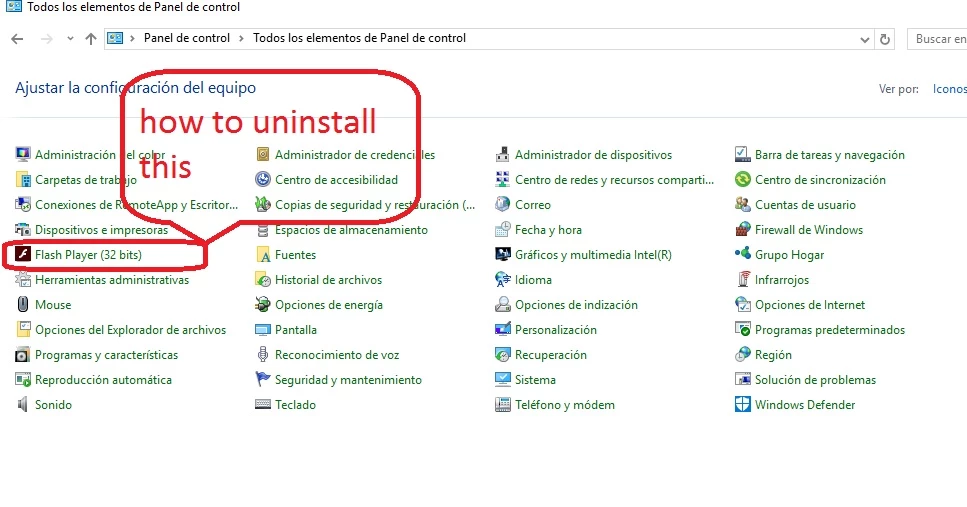
completely uninstall Configuration Manager flash player 32 bits ( windows 10 64 bits)
  • September 1, 2016
  • 3 replies
  • 9622 views

completely uninstall Configuration Manager flash player 32 bits

I do not speak English, but I appreciate the help

I speak Spanish thanks

    This topic has been closed for replies.

    3 replies

    New Participant
    February 7, 2018

    1.- By default W10 64b in the control panel, does not bring the icon of Flash Player, but it does have Flash Player ActiveX installed for IE / Edge even if you do not see it.
    2.- When you install the PPAPI (Chrome) or NPAPI (Firefox) version for the first time, "Flash Player 32b" appears in the control panel.
    3.- If you want to uninstall, it goes to control panel, programs and features and are uninstalled. The ActiveX is internal and can never be uninstalled. What happens is that the direct access remains in the control panel forever.
    4.- To remove this shortcut, we rename:
    C: \ WINDOWS \ SysWOW64 \ FlashPlayerCPLApp.cpl
      C: \ WINDOWS \ SysWOW64 \ FlashPlayerCPLApp.cpl.ori
    and restart

    ----------------------------------------------------------------------------------------------------------------------

    1.- Por defecto W10 64b en el panel de control, no trae el icono de Flash Player, pero sí tiene Flash Player ActiveX instalado para IE/Edge aunque no lo veas.

    2.- Cuando instalas por primera vez la versión PPAPI(Chrome) o NPAPI (Firefox) aparece "Flash Player 32b" en el panel de control.

    3.- Si se quieren desinstalar, se va a panel de control, programas y características y se desinstalan. El ActiveX es interno y nunca podrá desinstalarse. Lo que ocurre es que queda el acceso directo en el panel de control para siempre.

    4.- Para quitar este acceso directo, renombramos:

    C:\WINDOWS\SysWOW64\FlashPlayerCPLApp.cpl

    C:\WINDOWS\SysWOW64\FlashPlayerCPLApp.cpl.ori

    y reiniciamos.

    _maria_
    Community Manager
    Community Manager
    September 2, 2016

    Hi alejandrol11795028 ,

    Since you're on Windows 10 and Microsoft embeds Flash Player in IE/Edge you cannot completely uninstall Flash Player, nor the Flash Player Settings Manager (what you refer to as Configuration Manager).  The only way to do this is to use a third party app to unlock the files and delete them.  If you do this you won't be able to re-install Flash Player for IE/Edge short of re-installing Windows on your system.

    --

    Maria

    September 2, 2016

    Thanks for the help

    use the tool to uninstall flashplayer (opera and mozilla)

    Do not use IE or edge

    and I want to remove that manager settings flash player on my computer, if I can help uninstall is I appreciate it

    _maria_
    Community Manager
    Community Manager
    September 2, 2016

    As I posted previously, this is there because Microsoft embeds Flash Player in IE/Edge browsers.  You can't uninstall it unless you unlock the files and manually delete it. This is not advised as you will put your computer in a broken state.

    Community Manager
    September 2, 2016