New Participant
July 3, 2017
Answered

Download content from an embedded video?

  • July 3, 2017
  • 1 reply
  • 3562 views

I'm trying to troubleshoot for someone else who says they can download a flash video, but want this feature disabled.

When I access the same file with the embedded video, I do not have the option to download it. Can someone let me know where the settings are to disable this download feature?

This video is embedded in a SCORM package that was originally created in PowerPoint.

Both myself and the other person are using the same versions of Chrome (59.0.3071.115 (Official Build) (64-bit)) and Flash (26.0.0.131)

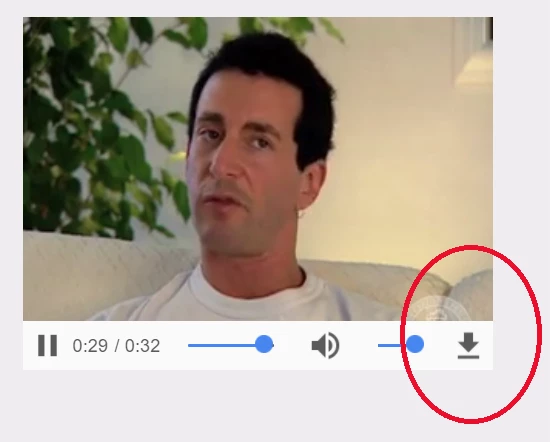
This is what they see:

This is what I see:

Any help is greatly appreciated! Thanks in advance

    This topic has been closed for replies.
    Correct answer jeromiec83223024

    Looks like they are still using Windows 7. I am using Windows 10. What effect would this have?


    Bear with me for a minute as we walk through this.

    Flash Player isn't a video player, per-se.  You should think of it more like Java.  We're a language runtime that processes code written by other people.  You can write a video player on top of it, but we're not a video player.  In that same vein, we don't present playback UI. That's provided by the author of the thing that's playing the video, which sits on top of us.


    In contrast, web browsers that support HTML5 video (which is basically anything that's reasonably current) have a pretty consistent UI, defined by each browser vendor, with some components that scale to the size of the element on the page and with some developer-configurable attributes.  They all have a particular, consistent look, like you'd expect when watching lots of videos in the same video player.

    With that in mind, the thing that jumps out at me is that the video player UI is different between those screenshots.  My bet is that the with the download button is HTML5, and the other one is Flash.  The courseware is looking to see if Flash is present, and if it is, then it serves up the Flash video player.  If you don't *have* Flash Player, it's probably falling back to serving HTML5 content (or possibly, vice versa).  If you right-click on that video and it says About Flash Player at the bottom of the context menu, it's Flash.  If not, it's HTML5.

    Where I'm going, is that your friend is probably getting the HTML5 variant and you're getting the Flash one, or the other way around.  If you want the download button, you need to figure out how to get the courseware to serve you that corresponding player.

    If your friend's player is indeed the HTML5 one, you could try disabling or uninstalling Flash Player to see if the courseware system serves you the content you're looking for, or if that doesn't work, maybe try the same browser that they're using.  It's hard to know what drives that content's decision about which player to use, without directly inspecting it.

    Anyway, the punchline is that the courseware is determining which video player you're getting.  You can probably get some insight from them on how to get it to give you the video player you want if you're still stuck.


    1 reply

    _maria_
    Community Manager
    Community Manager
    July 10, 2017

    This feature would be implemented by the content developer.  You would need to contact the content developer to disable the download option in their content.

    charboyleAuthor
    New Participant
    July 10, 2017

    Hi m_vargas, thanks so much for your reply. What I still don't understand is why two people can be looking at the exact same content, and one would see the feature while the other would not. How does that work?

    jeromiec83223024
    Community Manager
    jeromiec83223024Community ManagerCorrect answer
    Community Manager
    July 13, 2017

    Looks like they are still using Windows 7. I am using Windows 10. What effect would this have?


    Bear with me for a minute as we walk through this.

    Flash Player isn't a video player, per-se.  You should think of it more like Java.  We're a language runtime that processes code written by other people.  You can write a video player on top of it, but we're not a video player.  In that same vein, we don't present playback UI. That's provided by the author of the thing that's playing the video, which sits on top of us.


    In contrast, web browsers that support HTML5 video (which is basically anything that's reasonably current) have a pretty consistent UI, defined by each browser vendor, with some components that scale to the size of the element on the page and with some developer-configurable attributes.  They all have a particular, consistent look, like you'd expect when watching lots of videos in the same video player.

    With that in mind, the thing that jumps out at me is that the video player UI is different between those screenshots.  My bet is that the with the download button is HTML5, and the other one is Flash.  The courseware is looking to see if Flash is present, and if it is, then it serves up the Flash video player.  If you don't *have* Flash Player, it's probably falling back to serving HTML5 content (or possibly, vice versa).  If you right-click on that video and it says About Flash Player at the bottom of the context menu, it's Flash.  If not, it's HTML5.

    Where I'm going, is that your friend is probably getting the HTML5 variant and you're getting the Flash one, or the other way around.  If you want the download button, you need to figure out how to get the courseware to serve you that corresponding player.

    If your friend's player is indeed the HTML5 one, you could try disabling or uninstalling Flash Player to see if the courseware system serves you the content you're looking for, or if that doesn't work, maybe try the same browser that they're using.  It's hard to know what drives that content's decision about which player to use, without directly inspecting it.

    Anyway, the punchline is that the courseware is determining which video player you're getting.  You can probably get some insight from them on how to get it to give you the video player you want if you're still stuck.