New Participant
July 11, 2015
Answered

Firefox v35 v38 don't see flash player 18 npapi installed?

  • July 11, 2015
  • 1 reply
  • 2957 views

Hi folks,

I've been running Firefox v35 for several months, on Windows 7 64 bit Ultimate fully updated. But a week or so ago I noticed that embedded videos wouldn't play, such as at bbc.co.uk/news.  "Flash Player is not installed", Firefox would tell me.

Repeated attempts to download the install (flash player 18 npapi) seem to install correctly, as far as Windows is concerned (it shows up in Control Panel).  But try as I might, Firefox v35 won't see that it is installed.  Shockwave does not show up on the plugins page; it does not show up when I go to the Adobe test site to try to run the test.

I just upgraded to firefox v38, with reboots, with uninstall and reinstall of flash player, but... still no flash playing.

Help?

Thanks,

Mike
This topic has been closed for replies.
Correct answer willsmike

Hi Piyush,

Thanks for your prompt response.

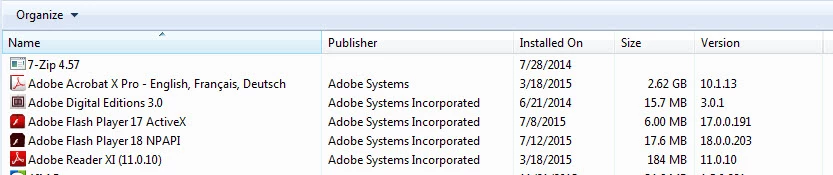
As you can see, the Active X version is installed (which seems to work fine in IE 8) as well as the NPAPI version.


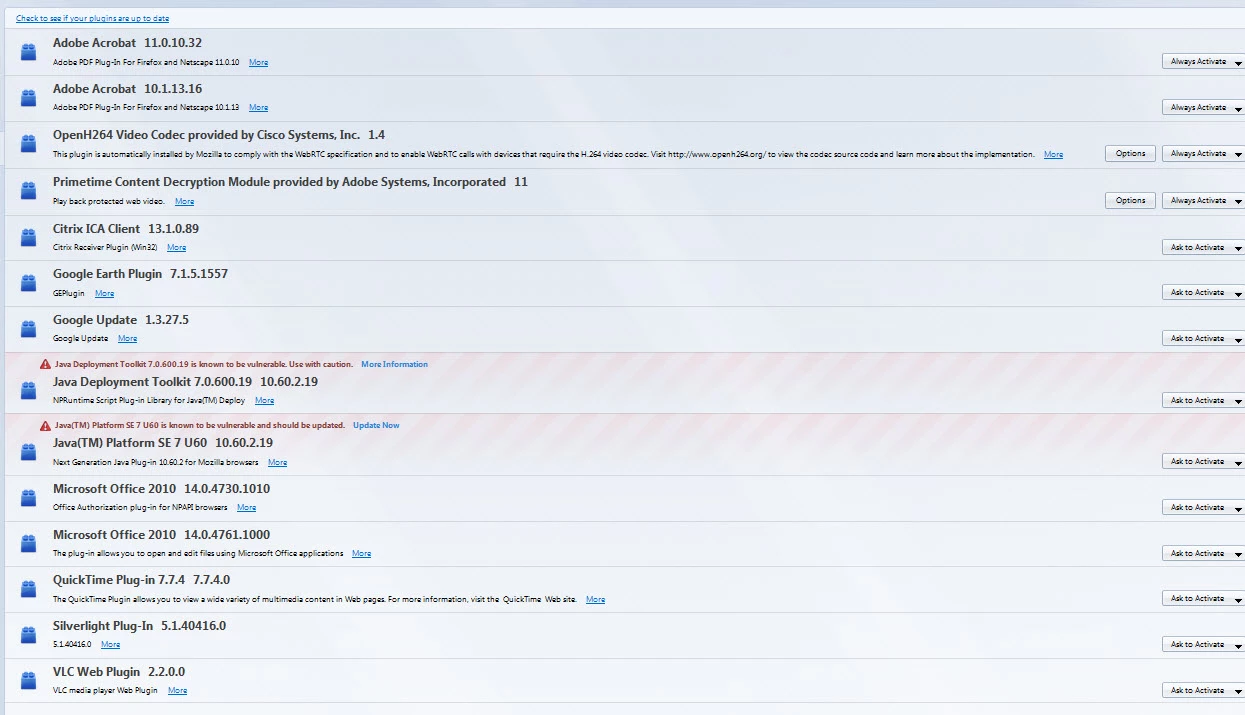
There is NO Shockwave flash player plugin listed in the Firefox Addons area. If there was, I would have enabled it by now.

I have tried a complete Uninstall of Firefox, deleting every Mozilla folder in sight after numerous reboots, and have still no flash player.

I ran your manual uninstaller, and it uninstalled both the Active X and NPAPI flash player.  Now the installer...  and on completion, it shows only the v18 NPAPI.

Firefoxing...  and now the Shockwave Flash player is there.  And it plays videos!

And... so do Chrome and IE 8 still.

Many thanks,

Cheers,

Mike

1 reply

piyush2508
Adobe Employee
Adobe Employee
July 11, 2015

Hi willsmike‌,

Can you please post a screenshot (How to post a screenshot in the forum) of the following:

  1. Control Panel-->Program List --> Flash Player entry
  2. using Firefox, Goto --> Flash Player Help Page, Click on check now and and post screenshot of the result
  3. Flash Player Enable Status --> Enable for Firefox

After you have the screenshots, can you please try uninstall Flash Player using our offline uninstaller - http://download.macromedia.com/get/flashplayer/current/support/uninstall_flash_player.exe and then reinstall flash player using our offline installer - http://fpdownload.macromedia.com/pub/flashplayer/latest/help/install_flash_player.exe

and let know if this helps.

--

Piyush

willsmikeAuthorCorrect answer
New Participant
July 12, 2015

Hi Piyush,

Thanks for your prompt response.

As you can see, the Active X version is installed (which seems to work fine in IE 8) as well as the NPAPI version.


There is NO Shockwave flash player plugin listed in the Firefox Addons area. If there was, I would have enabled it by now.

I have tried a complete Uninstall of Firefox, deleting every Mozilla folder in sight after numerous reboots, and have still no flash player.

I ran your manual uninstaller, and it uninstalled both the Active X and NPAPI flash player.  Now the installer...  and on completion, it shows only the v18 NPAPI.

Firefoxing...  and now the Shockwave Flash player is there.  And it plays videos!

And... so do Chrome and IE 8 still.

Many thanks,

Cheers,

Mike