


chrisi87781579
Participating Frequently
July 10, 2017
Question

Flash 26.0.0.131 not recognized by some web interfaces.

  • July 10, 2017
  • 1 reply
  • 1226 views

We have deployed a pilot of Flash 26.0.0.131 to about 50 machines in our enterprise environment and are seeing some problems:

Avaya Aura Messaging Center will not allow connections over the web.  The error is:

Also our McAfee Enterprise Security Manager will not allow web connections.  The error is:
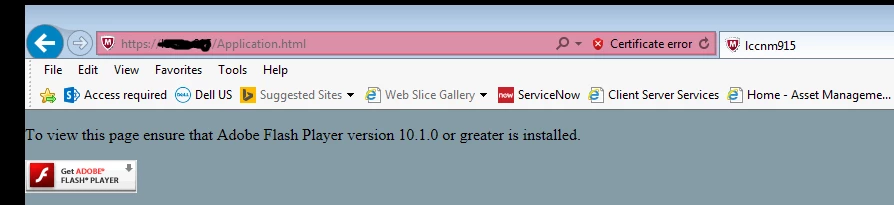
Both I.E. 11 and Google Chrome produce the same errors, and both are running Flash 26.0.0.131.

    This topic has been closed for replies.

    1 reply

    _maria_
    Community Manager
    Community Manager
    July 10, 2017

    You're screenshots appear to be of Microsoft Edge browser.  Microsoft changed how Edge handles Flash Player in the latest Windows 10 Creator's Update, setting Flash Player as click-to-play by default.  On the second screenshot, if you click 'get Adobe Flash Player' button a pop-up message should display enabling you to allow Flash Player on this site. The new functionality in Edge works on a per-site basis only.  There is no 'always allow for all sites' option.  For assistance see Troubleshooting Flash Player on Microsoft Edge .  For Avaya Aura Messaging client, I recommend contacting Avaya for assistance with their product.

    For Chrome, see Adobe Flash isn't working - Google Chrome Help  for assistance.


    Note that as of Windows 8, Microsoft embeds Flash Player in IE, and Edge in Windows 10, and all Flash Player for IE/Edge updates are released by Microsoft via Windows Updates.

    chrisi87781579
    Participating Frequently
    July 10, 2017

    Please note the last line of my original post.  We are getting this error in I.E. 11 and Google Chrome 59.0 as well as Edge. Something has changed in this version of Flash and now multiple websites are unable to tell what version of Flash is installed and therefore won't allow access to Flash content.  In our case it is management consoles that are affected, so this is a big problem for us.

    chrisi87781579
    Participating Frequently
    July 26, 2017

    Without the ability to reproduce and debug the issue, there's not a lot we can do about it.   If your organization has an enterprise support agreement with Adobe, your named support representative can help facilitate the appropriate data collection and debugging in your closed environment.  That would hands-down be the best avenue for approaching this.

    The reason that we're saying click-to-play is involved is that from what you're showing us, it looks like Flash Player isn't even getting invoked.  You're getting the alternate HTML content that would be shown when the browser can't actually invoke the object/embed tag that uses the Flash plug-in.  You can confirm by right clicking on that content.  If it doesn't say About Flash Player, we're not running...

    Setting aside the click-to-play theory for a minute (I guarantee that it *will* become a source of pain for you in the near future), I'm thinking that your deployment of 26.0.0.131 is resulting in a broken Flash Player.

    If you download and install the regular, generally available Flash Player from https://get.adobe.com/flashplayer and install it, do you have the same problem?  My guess is that it's going to work fine, which will point us back to some kind of install-time problem.  That might still be on us, but at least we'll be looking in the right place.  If that's the case, your installation logs would be informative.


    This is now happening with version 26.0.0.137 as well.  I get the message below in Chrome, Internet Explorer 11 and Firefox when I try to access our voicemail web url:

    I tried clicking the Install Now link, which downloaded "flashplayer26ax_ch_install.exe."  After installing, the problem was resolved, but that isn't a viable option for our enterprise environment of 2000 desktops where users do not have rights to install software.  I must be able to deploy Flash ActiveX and Flash NPAPI as two separate, silent, unattended installs, which is why we downloaded and deployed the MSI version of your software.

    We originally downloaded installation MSI files from www.adobe.com/products/flashplayer/distribution5.htm and deployed them (without any modification) via SCCM using these install commands:

    msiexec /i install_flash_player_26_active_x.msi /qn /norestart

    msiexec /i install_flash_player_26_plugin.msi /qn /norestart

    We aren't doing anything to change your MSI or the way that it installs, so at this point everything points to the MSI files as the problem.

    I also noticed that the web-based installs did not remove the previous MSI-based installs, leaving me with two instances of ActiveX 26.0.0.137 and two of NPAPI 26.0.0.137. Checking my registry, I find my MSI-based install has an uninstall key of {D7830E9A-5E0C-4BD5-8724-0F89757EBF07}, while the web-based install produced an uninstall key named "Adobe Flash Player ActiveX".  The web-based install is entirely separate and distinct from the MSI-based install.  This is a hot mess from a systems management standpoint.

    So, what do I need to do to fix my MSI-based Flash installs?  What log files do you need?