


chrisi87781579
Participating Frequently
July 10, 2017
Question

Flash 26.0.0.131 not recognized by some web interfaces.

  • July 10, 2017
  • 1 reply
  • 1226 views

We have deployed a pilot of Flash 26.0.0.131 to about 50 machines in our enterprise environment and are seeing some problems:

Avaya Aura Messaging Center will not allow connections over the web.  The error is:

Also our McAfee Enterprise Security Manager will not allow web connections.  The error is:
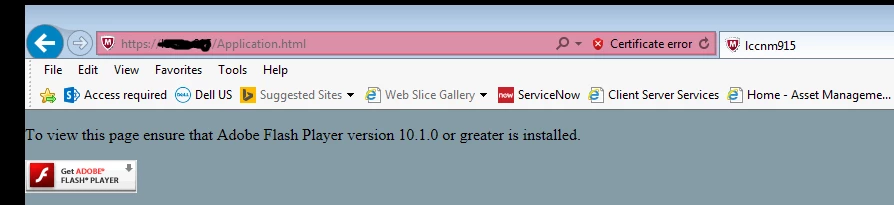
Both I.E. 11 and Google Chrome produce the same errors, and both are running Flash 26.0.0.131.

    This topic has been closed for replies.

    1 reply

    _maria_
    Community Manager
    Community Manager
    July 10, 2017

    You're screenshots appear to be of Microsoft Edge browser.  Microsoft changed how Edge handles Flash Player in the latest Windows 10 Creator's Update, setting Flash Player as click-to-play by default.  On the second screenshot, if you click 'get Adobe Flash Player' button a pop-up message should display enabling you to allow Flash Player on this site. The new functionality in Edge works on a per-site basis only.  There is no 'always allow for all sites' option.  For assistance see Troubleshooting Flash Player on Microsoft Edge .  For Avaya Aura Messaging client, I recommend contacting Avaya for assistance with their product.

    For Chrome, see Adobe Flash isn't working - Google Chrome Help  for assistance.


    Note that as of Windows 8, Microsoft embeds Flash Player in IE, and Edge in Windows 10, and all Flash Player for IE/Edge updates are released by Microsoft via Windows Updates.

    chrisi87781579
    Participating Frequently
    July 10, 2017

    Please note the last line of my original post.  We are getting this error in I.E. 11 and Google Chrome 59.0 as well as Edge. Something has changed in this version of Flash and now multiple websites are unable to tell what version of Flash is installed and therefore won't allow access to Flash content.  In our case it is management consoles that are affected, so this is a big problem for us.

    _maria_
    Community Manager
    Community Manager
    July 26, 2017

    Hi chrisi87781579

    You mention your apps/sites work with 25.0.0.148, but not 26.0.0.131.  Did you upgrade directly from 25.0.0.148 > 26.0.0.131?  Did you try 25.0.0.171 and 26.0.0.126?

    --

    Maria